My Honest Take on the Acer Nitro V 15 (RTX 4050)
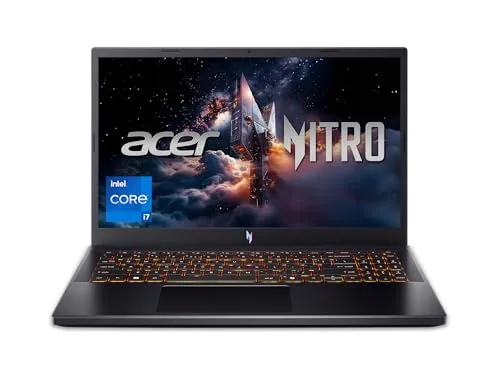
As someone who loves a good deal but also demands decent performance, I was intrigued by the Acer Nitro V 15. The specs looked promising on paper for its price point – an Intel Core i7-13620H processor paired with an NVIDIA GeForce RTX 4050, 16GB of DDR5 RAM, and a 144Hz display. I picked one up a few months ago, hoping it could be my daily driver for both work and some after-hours gaming. If you're curious about the exact model I tested, you can check today's price.
First Impressions & Build Quality
Unboxing the Nitro V 15, it's pretty clear where Acer cut corners to hit that aggressive price point. The chassis is mostly plastic, which isn't a surprise for a budget gaming laptop. It feels sturdy enough, but you won't mistake it for a premium machine. The design is understated for a gaming laptop, which I actually prefer – no obnoxious RGB strips everywhere, just a subtle "Nitro" logo. It's not overly heavy at around 5 lbs, making it manageable to carry around in a backpack.
The keyboard feels decent for typing and gaming. The key travel is adequate, and I didn't experience any significant flex. It's backlit, which is a must-have for me for those late-night sessions. The trackpad, on the other hand, is just okay. It's responsive enough for general navigation, but for gaming, you'll definitely want an external mouse. I noticed it could be a bit finicky with multi-finger gestures sometimes.
Performance: Gaming & Productivity
This is where the Nitro V 15 really shines for its category. The i7-13620H is a beast for everyday tasks and even heavy-duty applications. I regularly had multiple browser tabs open, Spotify streaming, and a coding IDE running without a hitch. Video editing (1080p, some 4K) was surprisingly smooth thanks to that powerful CPU and 16GB of fast DDR5 RAM.
Gaming Performance
Now, onto the main event: gaming. The RTX 4050 is an entry-level GPU for this generation, but it's a very capable one, especially at 1080p. Here's what I found:
- Cyberpunk 2077: With settings on a mix of medium to high and DLSS Quality enabled, I was getting a respectable 45-55 FPS. Turning settings down a bit pushed it into the 60s. It’s definitely playable and looks good on the 144Hz screen.
- Call of Duty: Warzone: On optimized settings (mostly medium, some high), I consistently hit 80-100 FPS. This made for a very smooth and competitive experience.
- Baldur's Gate 3: High settings, no DLSS needed, and I was cruising at 60+ FPS in most areas. Act 3 in the city saw some dips, but nothing that broke the immersion.
- Valorant/CS2: These competitive titles absolutely fly on this machine. Easily over 120-144 FPS on high settings, making full use of the display's refresh rate.
Thermals were decent. The laptop does get warm under heavy load, especially near the exhaust vents, but I never experienced any major thermal throttling. The fans, however, get LOUD when you're gaming. It sounds like a jet taking off, so a good gaming headset is essential. This is pretty standard for a thin-and-light gaming laptop, but it’s something to be aware of.
Display & Audio
The 15.6-inch Full HD (1920x1080) 144Hz display is a highlight for gaming. The high refresh rate makes everything feel incredibly smooth, from scrolling web pages to fast-paced shooters. Colors are decent, and it's bright enough for indoor use. I wouldn't recommend it for professional creative work that demands perfect color accuracy, but for gaming and media consumption, it's perfectly fine.
Audio is, well, laptop audio. The speakers are clear enough for YouTube videos or casual listening, but they lack bass and overall richness. Again, grab a headset for any serious gaming or music. The webcam is a standard 720p unit – good enough for video calls but don't expect crisp, professional-grade video.
Battery Life & Connectivity
Battery life is the Achilles' heel of most gaming laptops, and the Nitro V 15 is no exception. I got about 3-4 hours of light productivity (browsing, documents) on a single charge. Gaming unplugged? Forget about it, you'll be lucky to get an hour, and performance will be significantly throttled. This is a machine that wants to be plugged in.
Port selection is good: multiple USB-A ports, a USB-C port (which supports DisplayPort and power delivery, though I mostly used the included charger), HDMI, and Ethernet. Wi-Fi 6 provided solid, stable connections.
Pros:
- Excellent Price-to-Performance: For what you pay, the i7-13620H and RTX 4050 deliver serious bang for your buck.
- Strong CPU Performance: Handles demanding applications and multitasking with ease.
- 144Hz Display: Smooth gaming and general use experience.
- Decent Thermals (for its class): Keeps components relatively cool under load.
- Understated Design: Looks more professional than many flashy gaming laptops.
Cons:
- Plastic Build Quality: Feels a bit cheap compared to more premium options.
- Loud Fans: Can get quite noisy during gaming sessions.
- Subpar Battery Life: Needs to be plugged in for any serious work or play.
- Only 512GB SSD: Gamers will fill this up quickly. I found myself uninstalling games to make space after a few weeks.
- Mediocre Speakers & Trackpad: Expect to use external peripherals.
Who Should Buy This:
If you're a budget-conscious gamer or a student who needs a powerful laptop for both schoolwork (especially STEM fields that benefit from a strong CPU) and playing the latest games at 1080p medium-to-high settings, this is a fantastic option. It's great for someone who primarily uses their laptop plugged in and wants solid performance without breaking the bank. Overall, for the money, it's a solid performer, and you can grab it on Amazon if you're looking for an entry to mid-range gaming machine.
Who Should Skip It:
If you demand premium build quality, long battery life for on-the-go use, a silent operation, or top-tier GPU performance for 1440p gaming or maximum ray tracing, this isn't the laptop for you. Creative professionals needing highly color-accurate displays should also look elsewhere.
Final Thoughts
The Acer Nitro V 15 is a solid, no-frills gaming laptop that delivers exactly what it promises for its price point. It's a workhorse for both productivity and 1080p gaming, provided you can live with its budget-friendly compromises like the plastic build and loud fans. I'm happy with my purchase, as it meets my needs without emptying my wallet. If you're on the fence, I recommend reading other reviews and maybe even seeing if you can find it on display somewhere. Or just see what others paid and decide for yourself.