iDPRT Portable Printer: My Honest Take on This Inkless Wonder
As someone who’s always on the lookout for gadgets that make life easier, especially when I’m out and about, the idea of a truly portable printer always intrigued me. I've tried those tiny photo printers, but a full-sized document printer? That felt like a game-changer. So, when I got my hands on the iDPRT Portable Printer, I was genuinely excited to put it through its paces.
My initial thought was, "Can this really handle A4 documents on the go?" Most portable thermal printers I’d seen were limited to narrow labels or receipt-sized paper. But this one promised full A4 width, which immediately elevated my expectations. I needed something reliable for travel itineraries, quick invoices, or even just printing out a recipe in the kitchen without firing up the big desktop printer. So, I grabbed one on Amazon to give it a whirl.
First Impressions & Setup
The printer arrived in a surprisingly compact box. Inside, I found the sleek, minimalist printer itself, a USB-C charging cable, and a small starter roll of thermal paper. It felt solid in my hand, not flimsy like some cheaper gadgets. The design is understated and professional, which I appreciate.
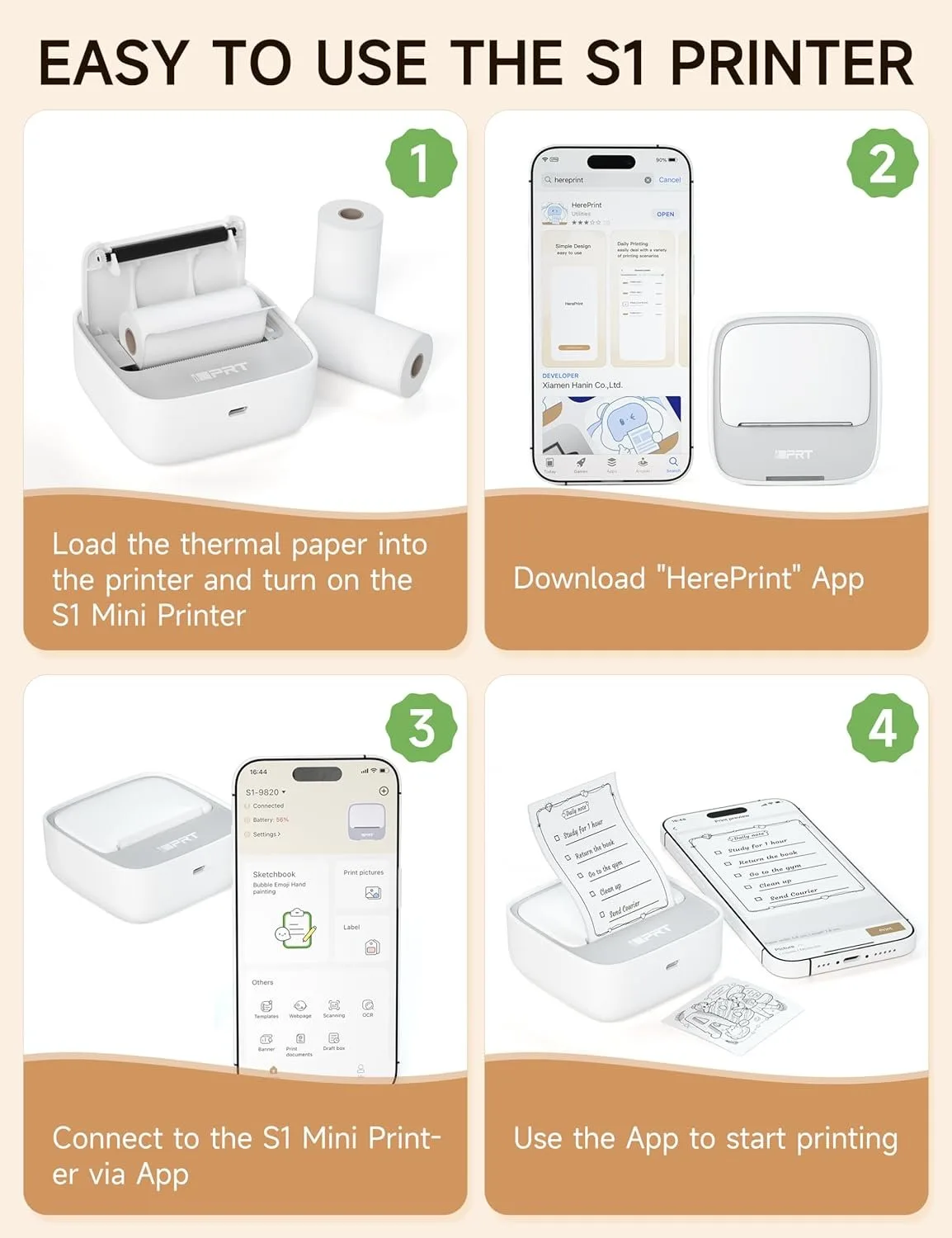
Getting started was pretty straightforward. I downloaded the "iDPRT Print" app from my phone's app store, turned on the printer, and within seconds, it paired via Bluetooth. No convoluted menus or confusing prompts – just a quick, seamless connection. I was impressed by how quickly I went from unboxing to ready-to-print.
Design, Portability, and Build Quality
This is where the iDPRT really shines for me. It’s incredibly lightweight and slim, easily slipping into my laptop bag or even a larger purse without adding noticeable bulk. I’ve carried it to coffee shops, taken it on a short business trip, and even just moved it from my home office to the living room without a second thought. The build quality feels durable enough for regular travel, though I wouldn’t toss it around carelessly. It’s got a nice matte finish that doesn’t pick up fingerprints easily, which is a small but welcome detail.
Print Quality & Speed
Okay, let's talk about the actual printing. This is a thermal printer, so right off the bat, you need to manage your expectations: no color, just crisp black and white. For text documents, shipping labels, meeting notes, or even simple black-and-white graphics, it performs remarkably well. The text comes out clear and legible, comparable to what you'd expect from a standard receipt printer, but on A4 paper. I tried printing a few PDF documents and some web pages, and the results were perfectly adequate for reading and reference.
Images are a different story. While you can print pictures, don’t expect photo lab quality. They come out in a sort of halftone, almost newspaper-like style. They’re recognizable, but definitely not for sharing cherished memories. For quick visual references or simple diagrams, they're fine. I found adjusting the darkness setting in the app helped improve contrast for images. The speed is decent too; a full A4 page takes just a few seconds, which is great when you're in a hurry.
The iDPRT Print App Experience
The companion app is functional, if not groundbreaking. It allows you to print documents, web pages, pictures, and even offers some basic templates for lists, notes, and business cards. I particularly liked the QR code generator – super handy for quickly sharing info. Navigating the app is intuitive enough, and I didn't experience any major crashes or frustrating bugs. My only minor gripe is that sometimes it takes a moment to re-establish the Bluetooth connection if the printer has been idle, but it always connects eventually.
Battery Life & Charging
Battery life is solid. I managed to print around 20-30 pages on a single charge before needing to plug it in. Charging is done via USB-C, which is fantastic because it means one less cable to carry around; I can use my phone charger. It charges up fairly quickly, too, so downtime is minimal.
Pros & Cons: My Honest Breakdown
Pros:
- Truly Portable: Lightweight and slim, it’s genuinely easy to carry anywhere.
- Inkless Operation: No more worrying about dried-out cartridges or expensive refills. Just thermal paper.
- A4 Width Printing: This is a massive advantage. Printing full-sized documents on the go is incredibly convenient.
- Clear Text Quality: For documents, notes, and labels, the text is sharp and easy to read.
- Fast Printing: Quick output means less waiting around.
- Easy Setup & Connectivity: Bluetooth pairing is a breeze, and the app is user-friendly.
- USB-C Charging: Modern and convenient, using common cables.
- Versatile App: Useful templates, QR code generator, and various printing options.
Cons:
- No Color Printing: Obvious for a thermal printer, but worth reiterating for those unfamiliar.
- Thermal Paper Limitations: The paper can be more expensive than standard paper in bulk, and prints can fade over a very long time if not stored properly.
- Basic Image Quality: Not suitable for high-quality photos or detailed graphics.
- App Connectivity Lags: Occasionally takes a few extra seconds to connect after being idle.
Who Should Buy This?
This printer is an absolute lifesaver for specific use cases:
- Mobile Professionals: Salespeople, consultants, or anyone needing to print invoices, contracts, or reports on the fly.
- Students: Great for quick printouts of notes, assignments, or study guides without needing a university lab.
- Travelers: Print boarding passes, itineraries, or reservation confirmations directly from your phone.
- Small Business Owners: Perfect for printing shipping labels, receipts, or quick documents at markets or pop-up shops.
- Organizers/Journalers: Want to print out lists, templates, or simple graphics for your planner or journal instantly? This is it.
If you're looking for a convenient, inkless way to print black-and-white A4 documents anywhere, then you should definitely see what others paid for it on Amazon.
Who Should Skip It?
This printer isn't for everyone:
- Anyone Needing Color Prints: If vibrant graphics or true-to-life photos are a must, look elsewhere.
- High-Quality Photo Enthusiasts: Thermal prints just won't cut it for detailed images.
- Archival Document Needs: For documents that need to last decades without any fading, traditional ink or laser is better.
- Heavy Volume Printers: While convenient, the cost of thermal paper can add up if you're printing hundreds of pages weekly.
Final Verdict
After several weeks of using the iDPRT Portable Printer, I can confidently say it’s a valuable tool for my mobile workflow. It’s not meant to replace your main desktop printer, but it excels at what it promises: convenient, inkless, A4-width black-and-white printing on the go. The portability and ease of use are its strongest assets, and the ability to print full-size documents really sets it apart from other mini printers. If you understand its thermal limitations and have a need for quick, functional printouts wherever you are, then this little gadget is definitely worth considering. If you're curious about grabbing one for yourself, you can check today's price.