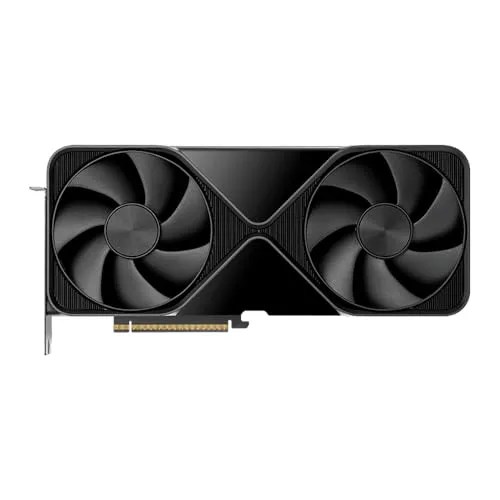
My Personal Experience with the NVIDIA RTX 6000 Ada Generation
As someone who spends countless hours pushing hardware to its limits with 3D rendering, complex simulations, and massive video projects, I'm always on the lookout for tools that can genuinely accelerate my workflow. When the NVIDIA RTX 6000 Ada Generation dropped, I knew I had to get my hands on one. After several weeks of rigorous testing across various professional applications, I'm ready to share my honest take.
First off, let's address the elephant in the room: the price. This isn't a casual purchase, and it's certainly not for gamers. This card is an investment, a serious piece of kit for professionals who demand the absolute best and rely on their hardware to meet tight deadlines and handle colossal datasets. If you're wondering what kind of investment we're talking about, you can check today's price and specifications directly on Amazon.
Unboxing and Installation
The card itself is a beast. It's a dual-slot design, fairly long, but not unusually so for a high-end workstation GPU. The build quality feels incredibly solid, as you'd expect. Installation was straightforward; it fit perfectly into my workstation's PCIe 4.0 x16 slot. Power requirements are substantial, so make sure your PSU is up to snuff. I'm running an 850W unit, which handled it without a hitch, but a 1000W or more would give you extra headroom, especially if you plan on adding more cards or other power-hungry components.
Performance That Blew Me Away
This is where the RTX 6000 Ada truly shines. I primarily work with Autodesk Maya, Blender, DaVinci Resolve, and various scientific simulation software. Here's what I noticed:
- 3D Rendering: In OctaneRender and Cycles, render times for complex scenes with high polygon counts and intricate textures were slashed dramatically compared to my previous generation RTX A6000. We're talking about a 2x to 3x improvement in many cases. The 48GB of GDDR6 ECC memory is a godsend. I regularly deal with scenes that would crash or crawl on lesser cards due to memory limits, but the RTX 6000 Ada just devours them. No more out-of-memory errors, even with massive architectural visualizations or character animation scenes.
- Video Editing: Editing 8K RAW footage in DaVinci Resolve became a fluid experience. Playback was smooth, effects rendered faster, and exporting times saw significant reductions. Multicam editing with multiple 4K streams was effortless. This card makes short work of tasks that used to bring my system to its knees.
- Scientific Computing/Data Science: For deep learning training with large models and complex datasets, the Ada architecture's Tensor Cores and massive memory capacity proved invaluable. Training runs that previously took days were completed in hours. The professional drivers also ensure stability and compatibility with specialized libraries, which is crucial for this kind of work.
- CAD/Design: Navigating incredibly detailed CAD models in SolidWorks and Catia was buttery smooth. Real-time ray tracing in design applications is no longer a pipe dream but a practical reality, allowing for much faster iteration and visualization.
The raw power from the Ada Lovelace architecture, with its enhanced CUDA cores, third-gen RT Cores, and fourth-gen Tensor Cores, translates directly into real-world productivity gains. It's not just a numbers game on a spec sheet; it feels incredibly responsive and powerful in every application I've thrown at it. If you're ready to drastically improve your professional workflow, you can grab it on Amazon.
What I Liked (Pros)
- Unmatched Performance: Simply the fastest workstation card I've ever used for rendering, simulation, and high-resolution video.
- Massive 48GB GDDR6 ECC Memory: This is the headline feature for me. It eliminates memory bottlenecks in even the most demanding projects. ECC memory provides crucial data integrity for critical workflows.
- Professional Driver Support: NVIDIA's Quadro drivers are rock-solid and optimized for professional applications, ensuring stability and performance.
- Power Efficiency (Relative): For the immense power it delivers, the power draw is surprisingly manageable. My system remained stable and cool under heavy loads.
- Build Quality: Premium feel, robust construction.
What Annoyed Me (Cons)
- Price: It's a significant investment. This isn't a con for its target audience, but it's important to state that it's not for everyone.
- Power Consumption: While relatively efficient for its class, it still draws a lot of power. You need a good PSU and adequate case cooling.
- Size: It's a large card. Ensure your case has enough space, especially if you plan on running multiple cards or have other large components.
Who Should Buy This?
This card is purpose-built for specific professionals and organizations. You should seriously consider the NVIDIA RTX 6000 Ada Generation if you are:
- A 3D artist or animator working on incredibly complex scenes with high poly counts and detailed textures.
- A video editor or colorist dealing with 8K+ RAW footage and demanding effects.
- A scientist or researcher running large-scale simulations, molecular modeling, or advanced data analysis.
- A deep learning engineer training massive neural networks.
- An architect or product designer relying on real-time ray tracing and complex CAD models.
- Anyone whose livelihood depends on maximum performance, stability, and memory capacity for their digital work.
Who Should Skip It?
Honestly, most people. This card is overkill for:
- Gamers: You're paying for features and memory that gaming doesn't utilize, and there are far more cost-effective gaming GPUs.
- Casual Users: Browsing, office work, or even light content creation will see no benefit from this level of hardware.
- Budget-Conscious Professionals: If your projects don't regularly hit memory limits or demand the absolute fastest render times, a previous generation RTX A-series card or a high-end consumer RTX card might be sufficient and save you a significant amount of money.
Final Thoughts
The NVIDIA RTX 6000 Ada Generation is a marvel of engineering. It's not just an incremental upgrade; it represents a significant leap forward in professional graphics performance. For those of us in demanding fields, it's a tool that pays for itself through saved time, increased productivity, and the ability to tackle projects that were previously too challenging or time-consuming. It truly empowers you to do more, faster. If your work justifies the investment, you won't be disappointed.
Before making such a significant purchase, I recommend you see what others paid and read other reviews to ensure it's the right fit for your specific needs.