My Personal Experience with the OBSBOT Tiny 2
As someone who spends a significant amount of time on video calls and occasionally streams, I'm always on the lookout for gear that can make my setup smoother and more professional. The OBSBOT Tiny 2 caught my eye with its promise of intelligent tracking and 4K resolution. I decided to take the plunge and see if it lived up to the hype. After several weeks of putting it through its paces, I’ve got some strong opinions to share.
First Impressions and Setup
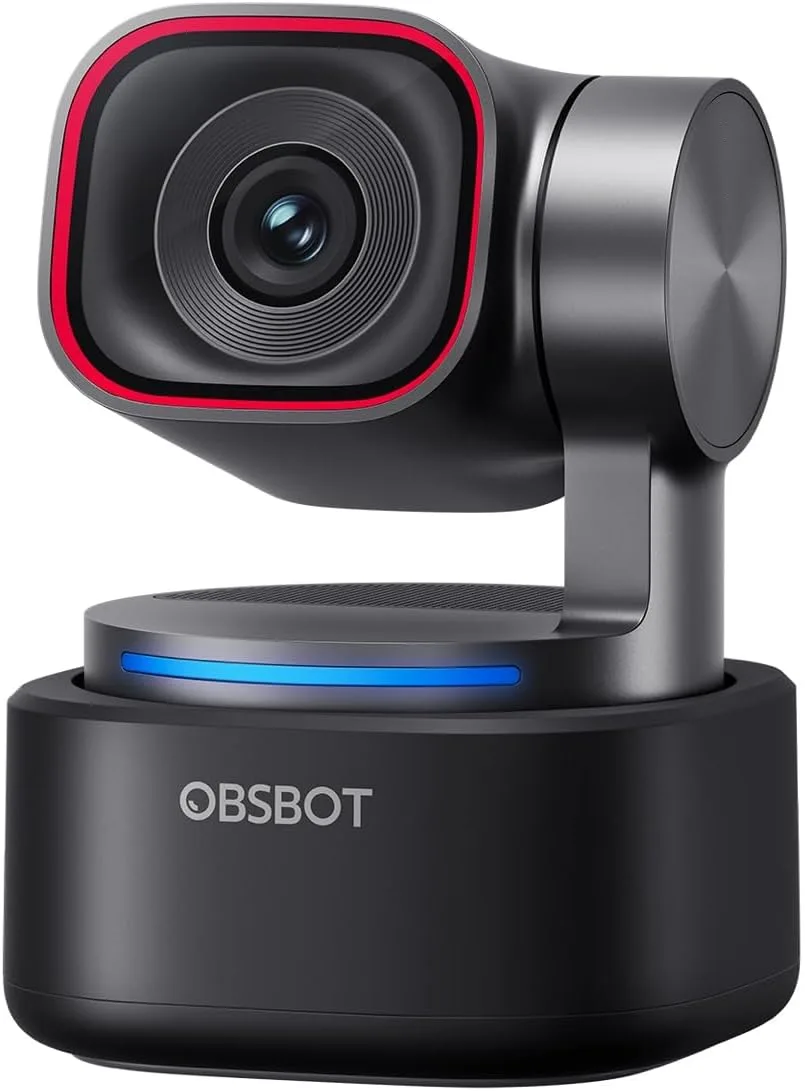
Unboxing the Tiny 2 was a pleasant experience. It feels solidly built, compact, and surprisingly heavy for its size, which usually indicates quality components. The magnetic base is a clever touch, making it incredibly easy to attach to a monitor or laptop screen. It also comes with a small tripod mount, which is great for more flexible positioning.
Setup was pretty straightforward. I plugged it into my computer via USB-C, and Windows recognized it almost instantly. There’s companion software you'll want to download to unlock all the features, which I found on OBSBOT's website. Installation was quick, and I was up and running in minutes. No complex drivers or frustrating troubleshooting, which is always a relief with new tech.
Video Quality: Sharp, Mostly
Let's talk about the main event: video quality. The 4K resolution is genuinely impressive in good lighting. My colleagues immediately noticed a difference in clarity compared to my old 1080p webcam. Colors are vibrant, and the image is crisp. When I recorded some test footage, I noticed fine details in my face and background that my previous webcam simply couldn't capture.
However, like most webcams, it does suffer a bit in less-than-ideal lighting conditions. While it’s certainly better than many others I've tried, you’ll still want a decent light source to truly make that 4K pop. In a dim room, it can get a little noisy, but it's still perfectly usable for standard calls. For those serious about streaming, you'll still need external lighting, but the camera performs admirably for its class.
The Star of the Show: Intelligent Tracking
This is where the OBSBOT Tiny 2 truly shines. The intelligent tracking is, for the most part, absolutely phenomenal. I'm someone who moves around a lot, even when sitting at my desk, and having the camera smoothly follow me without me having to think about it is a game-changer. During presentations or even just casual conversations, I no longer worry about drifting out of frame. It keeps me centered and focused, which looks far more professional.
I’ve tested it in various scenarios: standing up and walking a few steps left and right, leaning in, leaning back. The camera pan and tilt are smooth and silent. It’s not jerky or distracting at all. There were a couple of instances where it got a little confused if I moved very quickly or introduced a second person into the frame unexpectedly, but it quickly re-centered on me. You can also turn tracking on or off with simple hand gestures, which is surprisingly intuitive and convenient. If you want to experience this tracking for yourself, you can check today's price.
Audio Performance
The built-in microphones are decent, especially for casual video calls. They pick up my voice clearly, and I haven't had anyone complain about not being able to hear me. However, for anything more serious like professional streaming or podcasting, you’ll still want a dedicated external microphone. That’s pretty standard for webcams, so it wasn't a surprise or a deal-breaker for me.
Software & Features
The OBSBOT WebCam app is user-friendly and offers a good range of controls. You can adjust exposure, white balance, zoom levels, and even set up different tracking modes. I particularly liked the "privacy mode" where the camera physically tilts down when not in use, which offers peace of mind. The gesture control feature is also a nice touch – a simple hand gesture can start/stop tracking or zoom in/out. It took a few tries to get the gestures recognized consistently, but once I got the hang of it, it became second nature.
What I Liked (Pros):
- Excellent 4K Video Quality: Super crisp and clear in good lighting.
- Smooth & Reliable Tracking: Keeps you perfectly framed without any effort on your part. This is the standout feature.
- Solid Build Quality: Feels premium and durable.
- Easy Setup: Plug-and-play with intuitive software.
- Gesture Controls: A convenient way to manage tracking and zoom.
- Privacy Mode: Physical tilt-down is a great addition for privacy.
What Annoyed Me (Cons):
- Low Light Performance: While better than many, it still needs good lighting to truly shine.
- Occasional Tracking Hiccups: Very rare, but rapid, unpredictable movement can sometimes momentarily confuse it.
- Price Point: It's not a budget webcam, so you're paying a premium for these advanced features.
Who Should Buy This?
If you're a content creator, a streamer, a remote worker with frequent video calls, or anyone who moves around a lot during their presentations, the OBSBOT Tiny 2 is an excellent investment. Its intelligent tracking saves you from constantly adjusting your camera and ensures you always look professional and engaged. If you value high-quality video and the convenience of not having to worry about framing, you should seriously consider it. You can grab it on Amazon.
Who Should Skip It?
If you're on a tight budget and only need a basic webcam for occasional, static video calls, the advanced features and higher price point of the Tiny 2 might be overkill. Also, if you primarily work in very dimly lit environments without any additional lighting, you might not fully benefit from its 4K capabilities. For those who already have a high-end external microphone, the decent built-in mics won’t be a major selling point. If you just need a standard webcam, there are more affordable options out there. But if you’re looking for a serious upgrade, then it’s worth the consideration. Take a look at the product page to see what others paid.
Final Thoughts
Overall, I'm genuinely impressed with the OBSBOT Tiny 2. It lives up to its promises and has significantly improved my video conferencing and content creation experience. The intelligent tracking alone is worth the investment for me, making my calls feel much more professional and dynamic. It’s a premium product, and it certainly delivers a premium experience. If you’re serious about your webcam game, this one is definitely worth considering.