My Hands-On Review of the SCRIB3D P1 3D Printing Pen
I've always been fascinated by 3D printing, but the idea of getting a full-blown printer seemed a bit daunting and expensive. That's why the SCRIB3D P1 3D Printing Pen caught my eye. It looked like a fun, accessible way to dip my toes into the world of three-dimensional creation without breaking the bank. I picked one up a few weeks ago, hoping it would be a cool new hobby for me and maybe something to spark my nephew's interest in engineering. Here's what I really think after putting it through its paces.
Unboxing and First Impressions
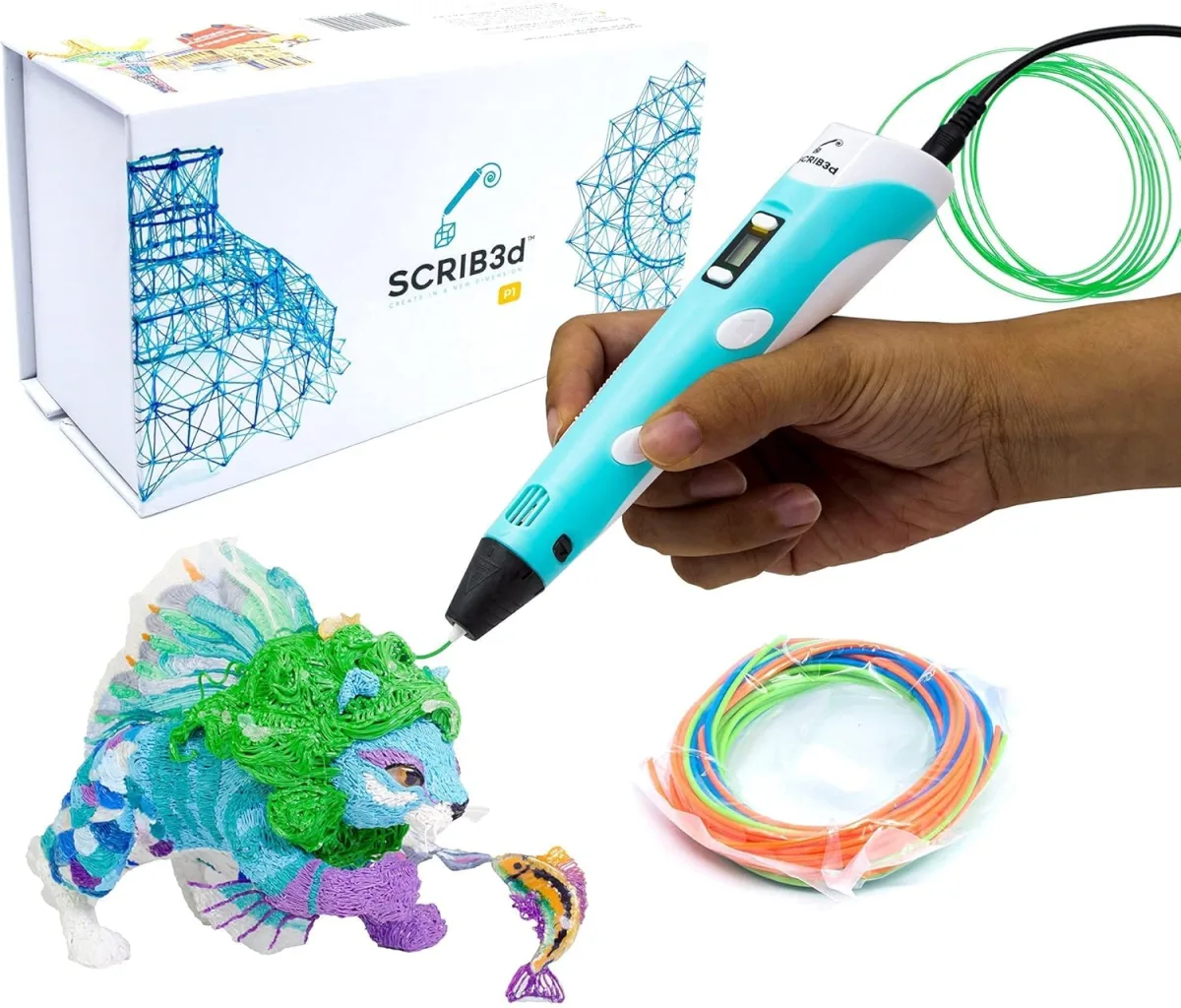
The package arrived quickly, and everything was neatly tucked inside. The box includes the SCRIB3D P1 pen itself, three small coils of PLA filament (black, white, and blue), a helpful stencil book, a project guide, and the necessary power adapter. It felt like a complete starter kit, which I appreciated. My first thought holding the pen was that it felt pretty lightweight, almost like a chunky marker. It has a small OLED display right on the side, which I immediately liked – seeing the temperature and filament type is a definite plus for control.
Getting Started: A Bit of a Learning Curve
Setting it up was straightforward enough. You plug it in, turn it on, and select your filament type (PLA or ABS). I went with PLA since that's what came with it. I noticed it took about a minute or so to heat up to the recommended temperature, which the display clearly showed. Loading the filament was pretty straightforward too: just feed it into the hole at the back, and the pen's internal motor grabs it and pulls it through. The initial purge of filament was a little messy, but that's expected.
Now, actually *drawing* in 3D? That's where the learning curve kicked in. It's not like drawing on paper. You're essentially extruding molten plastic, and it cools almost instantly. My first attempts looked more like tangled spaghetti than anything recognizable. This is where the included stencil book became absolutely invaluable. It has various designs, from simple shapes to more complex animals, with clear lines to trace. Starting with the stencils gave me a much better feel for how fast to move the pen, how much pressure to apply, and how to build up layers. After a few attempts, I was actually able to create a decent-looking Eiffel Tower (well, a mini, wobbly one, but still!).
Performance and Features
- Display: The OLED display is genuinely useful. Being able to see the exact temperature and confirm I'm on the right filament setting takes a lot of guesswork out of it.
- Temperature Control: You can adjust the temperature in small increments, which is great for fine-tuning how the plastic flows. I found that slightly lower temps sometimes gave me more control for delicate work.
- Filament Loading/Unloading: The auto-feed and auto-retract buttons work well. Unloading is just as easy as loading, making it simple to switch colors.
- Ergonomics: The pen is comfortable enough to hold for short sessions. For longer projects, my hand did start to cramp a little, as it's thicker than a regular pen. The buttons for extruding and retracting are well-placed.
- Noise: It's not silent. There's a slight whirring noise from the internal motor, but it's not loud or distracting.
- Included Filament: The starter colors are small, but they're perfect for getting a feel for the pen without committing to a big spool. I quickly used them up and ordered some more PLA.
- Stencils & Guide: As mentioned, these are fantastic for beginners. They really bridge the gap between imagination and execution.
What I Liked (Pros)
- Great for Beginners: The kit truly provides everything you need to start, and the stencil book is a fantastic learning tool.
- Display for Control: The OLED screen makes it easy to monitor and adjust settings.
- Versatile: Works with both PLA and ABS filament (though I only tested PLA).
- Relatively Quick Heat-Up: No long waits to get started on your next creation.
- Inspires Creativity: It's genuinely satisfying to see your ideas take physical form, even if they're a bit rough around the edges at first.
What Annoyed Me (Cons)
- Fiddly for Fine Details: Achieving really precise, clean lines or tiny details is incredibly difficult. This isn't a precision instrument.
- Can Clog: I had one instance where the nozzle seemed to clog slightly, leading to inconsistent flow. A quick unload/reload usually fixed it, but it interrupted the creative flow.
- Small Filament Coils: The included filament runs out very quickly if you get ambitious. You'll need to buy more soon.
- Hot Nozzle: Obvious, but worth reiterating – the tip gets *very* hot. Supervision for younger users is a must.
- Steep Learning Curve for Freehand: While stencils help, truly freehand 3D drawing takes a lot of practice and a steady hand.
Who Should Buy This?
This pen is absolutely fantastic for curious kids (maybe 8+ with supervision due to the hot tip) and adults who want a fun, low-commitment way to explore 3D design. If you're into crafts, model making, or just want a unique creative outlet, the SCRIB3D P1 is a solid choice. It's also great for minor 3D print repairs or adding details to existing models. If you're curious about the current price or want to check today's price, I'd say go for it!
Who Should Skip It?
If you're expecting professional-grade precision or hoping to create intricate, perfectly smooth objects, this isn't the tool for you. You'll likely get frustrated by the limitations of hand-drawing with molten plastic. Also, if you lack patience for a learning curve, you might find it more annoying than enjoyable. This isn't a "plug-and-play and create masterpieces" device.
Final Thoughts
Overall, I've had a really good time with the SCRIB3D P1. It's exactly what I hoped for: an engaging, creative gadget that introduces you to the basics of 3D construction in a hands-on way. It’s not perfect, and it certainly requires patience and practice, but the satisfaction of holding something you've "drawn" in mid-air is pretty cool. It's a great gift idea for creative minds or anyone looking for a unique craft. If you're ready for a fun challenge, you can grab it on Amazon and start your own 3D adventures. Before you make up your mind, it's always good to see what others paid and read more reviews.