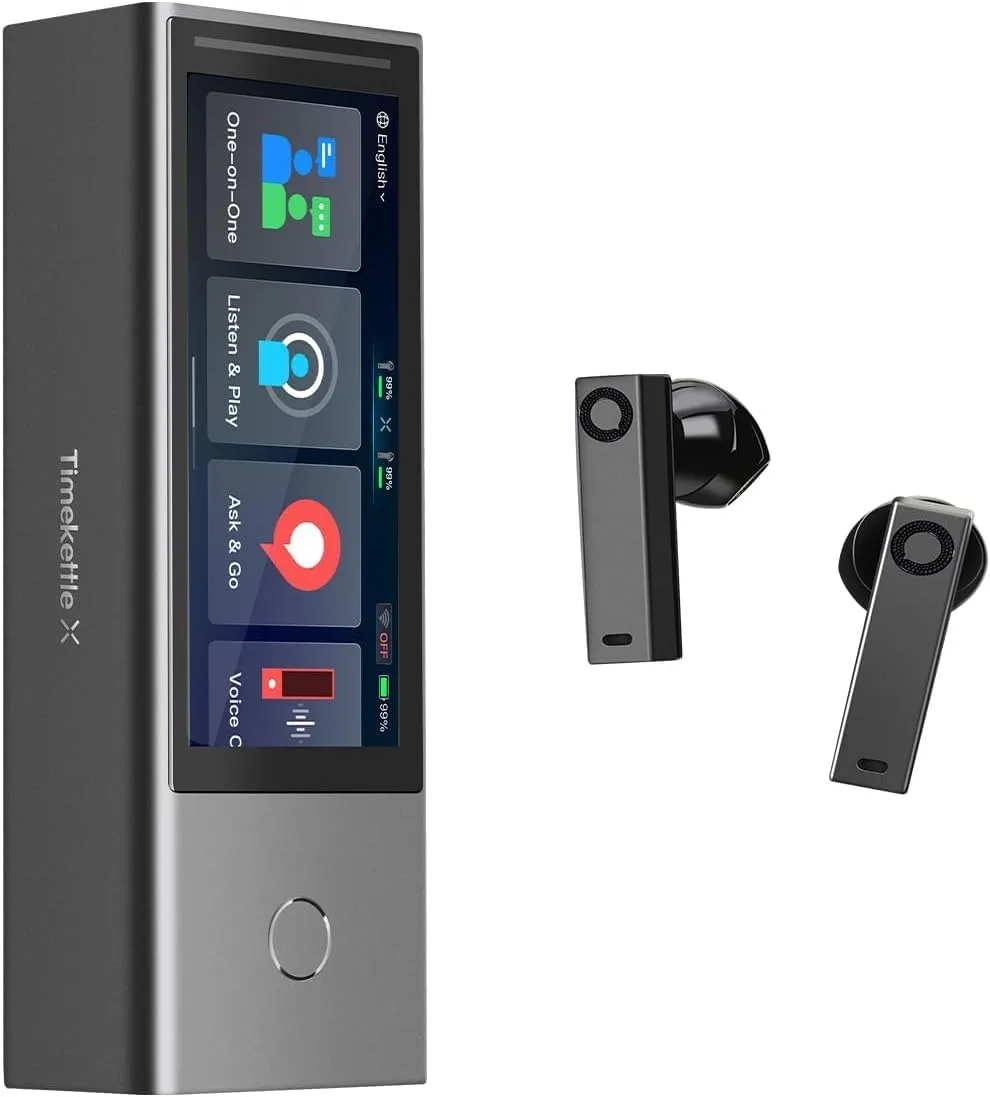
My Journey with the Timekettle X1 AI Interpreter Hub
As someone who frequently works with international teams and occasionally helps organize community events with diverse language speakers, I’m always on the lookout for tools that bridge communication gaps. Traditional interpreters are fantastic but can be costly and scheduling them for every small meeting just isn't feasible. So, when I stumbled upon the Timekettle X1 AI Interpreter Hub, promising two-way translation for up to 50 users, my interest was immediately piqued. I decided to grab it on Amazon, hoping it could be a scalable solution for my needs.
First Impressions and Setup
Out of the box, the X1 is a sleek, compact device. It feels substantial and well-built, not like some flimsy gadget. The screen is clear, and the interface seemed intuitive enough at first glance. Setting it up, however, was a bit more involved than I expected. You definitely need to download the Timekettle app on your smartphone, which acts as the control center and allows participants to connect. This wasn't a huge hurdle, but it's an extra step. Connecting the hub to Wi-Fi and then getting participants to join a session takes a bit of explanation, especially if people aren't tech-savvy. I recommend doing a dry run before a critical meeting.
The device itself acts as a central microphone and speaker, but for participants to hear translations privately, they need to connect their own smartphones (via the app) and use their own earbuds. This is a crucial point, as the product doesn't come with 50 pairs of headphones! It's a hub for managing up to 50 connections, not providing all the hardware for them. Once everyone was connected, though, the system started to shine.
Putting the X1 to the Test: Real-World Performance
I tested the X1 in a few different scenarios:
- Small Business Meeting (5 participants, 3 languages): This was my primary use case. We had English, Spanish, and Mandarin speakers. The X1 handled this remarkably well. The two-way translation was surprisingly fast. There was a slight delay, perhaps 1-2 seconds, but it felt much more natural than passing a single handheld translator around. People could speak almost conversationally.
- Virtual Presentation (10 participants, 2 languages): We tried using it for a remote setup where the hub was in one location, and participants joined virtually. The hub picked up the presenter's voice clearly, and the translations were streamed to the remote participants' phones. This worked, but required good internet connectivity on both ends to avoid lag.
- Community Workshop (15 participants, mixed languages): This was a bigger test. Getting everyone connected initially took some time, as expected. But once connected, the X1 managed the multiple language streams efficiently. I noticed that for less common phrases or very fast speech, accuracy could waver slightly, but for general conversation and presentations, it was solid.
What I Liked (The Pros)
- Impressive Accuracy: For general business and educational content, the translations were surprisingly accurate. It captured context better than many other translation apps I've tried.
- Speed of Translation: It's not perfectly instantaneous, but the near real-time translation makes conversations flow much more naturally. The 1-2 second lag is very manageable.
- Scalability: The ability to support up to 50 users is a huge advantage for larger group settings. While I only tested it with about 15, I can see how the architecture would support more.
- Ease of Use for Participants (Once Connected): Once someone is logged into the session via the app, it's very straightforward for them to select their language and listen.
- Centralized Control: As the host, I had good control over the session, managing languages and participants from the hub or my own phone.
- Decent Battery Life: For a device handling so much processing, the battery held up well for several hours of continuous use in my tests.
What Annoyed Me (The Cons)
- Initial Setup Complexity: Getting everyone connected, especially first-timers, can eat into meeting time. It's not just "plug and play" for an entire group.
- Reliance on Participant Smartphones/Earbuds: This is a big one. Every participant needs their own smartphone and earbuds for private listening. This isn't always practical or desirable.
- Connectivity Demands: For large groups, especially in a hybrid setting, a stable, robust Wi-Fi connection is absolutely critical. Any drops can disrupt the flow for everyone.
- Accent & Dialect Sensitivity: While good, it sometimes struggled with very strong accents or rapid-fire regional dialects, leading to minor inaccuracies. This is common for any machine translation, but worth noting.
- Cost: Let's be real, this isn't a cheap device. You can see what others paid and decide if the investment makes sense for your specific needs.
Surprises
One pleasant surprise was the directional microphone array on the hub itself. It did a fantastic job of isolating the active speaker's voice, even in a moderately noisy room, which I think contributed significantly to the translation accuracy. I also appreciated the ability to record sessions and get transcripts, which is a great added value for meeting minutes or educational review.
Who Should Buy This?
- International Businesses: If you regularly hold meetings with multilingual teams and want to reduce reliance on human interpreters, this is a strong contender.
- K-12 Education & Universities: Schools with diverse student populations could use this for parent-teacher conferences, school board meetings, or even in classrooms with language learners.
- Event Organizers: For small to medium-sized multilingual events, workshops, or presentations where providing simultaneous interpretation is usually cost-prohibitive.
- Organizations with Frequent Multilingual Communication: Any group that needs to facilitate clear, quick communication across language barriers for groups.
Who Should Skip It?
- Individual Travelers: This is overkill for personal travel. A simple handheld translator or a smartphone app would be far more practical and cost-effective.
- Occasional, One-on-One Users: If you only need to translate for one other person infrequently, there are much cheaper and simpler solutions available.
- Those Without Reliable Internet: A strong, stable Wi-Fi connection is crucial for optimal performance, especially with many users.
- Budget-Conscious Individuals: This is an investment. If your multilingual communication needs are minimal or sporadic, the cost might be hard to justify.
Final Verdict
The Timekettle X1 AI Interpreter Hub is a powerful and ambitious device. It's not perfect, and it certainly has a learning curve for group deployment, but it largely delivers on its promise of facilitating real-time, two-way translation for groups. The accuracy and speed are impressive for what it is, and the ability to scale up to 50 users is a significant advantage for specific use cases.
For businesses, educators, or event organizers who frequently grapple with language barriers in group settings, the X1 offers a compelling, albeit premium, solution. It won't fully replace a professional human interpreter for highly nuanced or critical diplomatic conversations, but for the vast majority of business, educational, and community interactions, it's a fantastic tool that genuinely helps bridge gaps and foster understanding. If this sounds like what you need to streamline your multilingual communications, check today's price and consider if it's the right fit for your organization.