My Real-World Experience with the All-New Echo Auto (2nd Gen)
I’ve been an Alexa user at home for years, so when I saw the new Echo Auto (2nd Gen) come out, I was pretty stoked about the idea of taking that convenience on the road. My car is a bit older and doesn’t have built-in smart features, so a dedicated Alexa device for my vehicle sounded like the perfect upgrade. I picked one up hoping for seamless music control, easy navigation requests, and maybe even a few smart home commands before I got home. After several weeks of using it daily on my commute and weekend trips, I've got a solid grasp of what it does well and where it falls short.
First Impressions and Setup
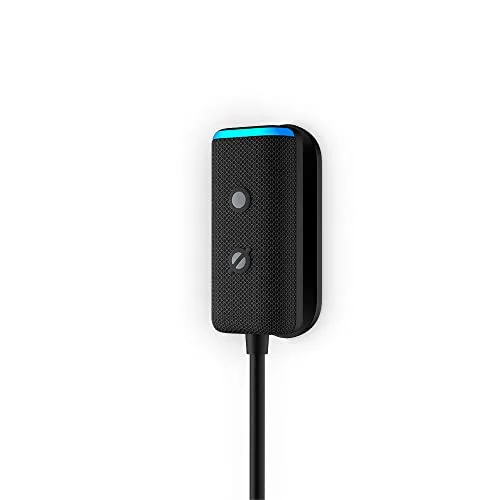
Out of the box, the Echo Auto (2nd Gen) is surprisingly small and sleek. It’s a tiny little rectangle, much less obtrusive than the first generation. It comes with a sticky mount that lets you attach it almost anywhere on your dash, and a couple of cables: a USB-C to USB-A cable for power and a 3.5mm auxiliary cable. My car has an AUX input, so I was able to connect it directly for audio, which was a plus. If you don't have an AUX input, it connects via Bluetooth to your car's audio system, assuming your car supports Bluetooth audio.
Setting it up was mostly straightforward, but required a bit of patience. You plug it into power, open the Alexa app on your phone, and follow the steps to pair it. The biggest hurdle for me was finding a good spot on the dash that didn’t block my view or look messy with cables, but also allowed the microphones to pick up my voice clearly. I found a sweet spot near the corner of my windshield, and after a few tries, I got it connected to my phone's hotspot and my car's audio. The initial pairing took about 10 minutes, mostly fiddling with cable management.
Performance: What It Gets Right (and Wrong)
The core promise of Echo Auto is hands-free Alexa in your car, and it mostly delivers on that. The 5-microphone array is genuinely impressive. Even with road noise, open windows, and music playing at a moderate volume, Alexa usually hears me. I was pleasantly surprised by how often it picked up my voice on the first try, even when I felt like I was mumbling. This is a huge improvement over trying to shout at my phone tucked away in a cup holder.
Music control is probably where I use it most. "Alexa, play my driving playlist on Spotify" or "Alexa, play some classic rock" works flawlessly. It integrates with your connected streaming services, and I rarely had issues with it finding the right song or station. For quick song skips or volume adjustments, it's really convenient.
Navigation requests are also pretty decent. "Alexa, navigate to the nearest gas station" or "Alexa, get directions to home" usually brings up Google Maps or Waze on my phone, which is exactly what I wanted. It's nice not having to physically interact with my phone while driving. I noticed it sometimes takes a few extra seconds to process the request and hand it off to the phone app, but it gets there.
However, it’s not all sunshine and rainbows. Here are some of the things that annoyed me:
- Connection Glitches: Occasionally, the Echo Auto would just decide it didn't want to connect to my phone or the car's Bluetooth. Sometimes a simple unplug and replug fixed it, other times I had to restart my phone. It's not frequent enough to be a deal-breaker, but it's definitely frustrating when it happens, especially if you're in a hurry.
- Reliance on Your Phone: Remember, this isn’t a standalone device. It needs your phone for data and processing. If your phone's battery dies, or if you're in an area with poor cell service, the Echo Auto becomes a fancy paperweight. This isn't a flaw of the device itself, but an important consideration.
- Smart Home Commands Are Hit or Miss: While theoretically you can say "Alexa, turn on the porch light when I'm almost home," I found this feature to be unreliable. Sometimes it would work, other times it would say it couldn't connect or didn't understand. I mostly gave up on this specific use case.
- Call Quality: Taking calls through Echo Auto felt a bit awkward. While Alexa can initiate calls, the audio quality on both ends wasn't always the best. My callers sometimes said I sounded distant, and I occasionally had trouble hearing them clearly, even though my phone's regular Bluetooth calls are fine.
Pros and Cons
Pros:
- Excellent Voice Recognition: The 5-mic array handles road noise surprisingly well.
- Compact Design: Small and unobtrusive on the dash.
- Easy Music Control: Seamless integration with streaming services.
- Hands-Free Navigation: Quickly launch directions on your phone's map app.
- Affordable: A cost-effective way to add smart assistant features to an older car. You can check today's price and see for yourself.
Cons:
- Occasional Connectivity Issues: Can sometimes drop connection to phone/car.
- Relies Heavily on Your Phone: Not a standalone device, needs phone data and battery.
- Inconsistent Smart Home Control: Not always reliable for commands outside the car.
- Subpar Call Quality: Not the best for hands-free phone calls.
- Cable Clutter: Still needs power and potentially an AUX cable, which can be messy.
Who Should Buy This?
If you:
- Have an older car without built-in smart assistant features.
- Are already deep into the Alexa ecosystem at home and want that familiarity on the road.
- Primarily want hands-free music control and quick navigation requests.
- Are comfortable with the fact that it relies on your phone for data and processing.
- Want an affordable way to upgrade your car's tech without replacing the head unit.
Then the Echo Auto (2nd Gen) could be a great addition to your vehicle. It genuinely makes basic car functions like playing music and getting directions safer and more convenient. If you're ready to add some smarts to your commute, you can grab it on Amazon.
Who Should Skip It?
You might want to pass if:
- Your car already has Apple CarPlay, Android Auto, or excellent built-in voice controls.
- You don't want another gadget that relies on your phone's data plan and battery.
- You value pristine call quality above all else for hands-free communication.
- You're looking for a device that acts as a standalone smart assistant without phone dependency.
- You hate dealing with cables and want a completely wireless solution (it's small, but still needs power).
My Final Verdict
The All-New Echo Auto (2nd Gen) isn't perfect, but it does a solid job of bringing Alexa's core functionality into your car. The improved microphone array is the real star here, making voice commands surprisingly effective even in noisy environments. For music, podcasts, and basic navigation, it’s a handy co-pilot. While it has its quirks with connectivity and smart home commands, for the price, it's a worthwhile upgrade for older vehicles or anyone looking to extend their Alexa ecosystem. If you understand its limitations and what it's designed to do, you'll probably be pretty happy with it. If you're still on the fence, I recommend you pick one up here and give it a shot.