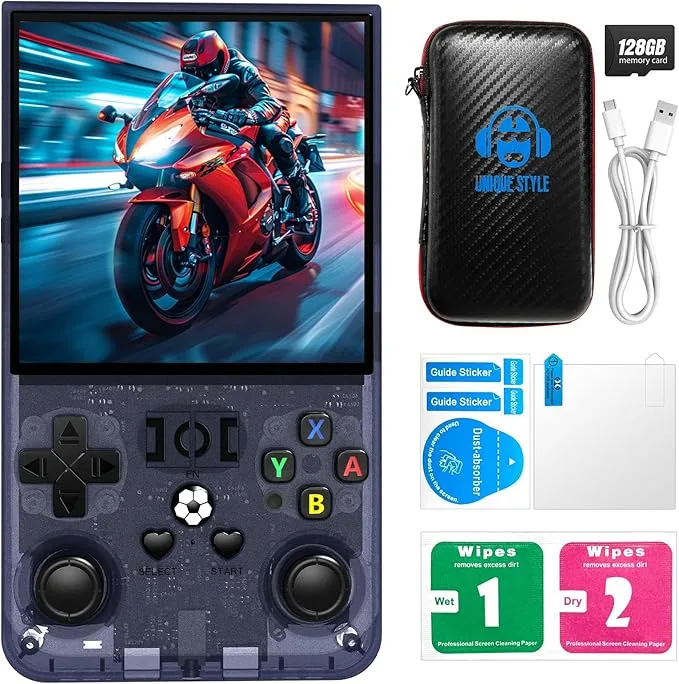
When the R36MAX Retro Handheld Game Console arrived at my door, I was genuinely excited. The packaging was surprisingly compact, a small, unassuming box that hinted at the retro joy inside. Unboxing it, the first thing I noticed was the console itself nestled securely within its included portable case – a thoughtful touch that immediately suggested this device was meant for travel. Pulling the transparent gray unit from its case, I was struck by its weight; it felt lighter than I’d anticipated, tipping the scales at just under 200 grams, giving it a reassuringly solid, but not heavy, feel in my hands. The transparent plastic housing, a nod to classic handhelds of yesteryear, felt smooth and surprisingly sturdy. Powering it on, the splash screen for the Linux-based system (which I later identified as a variant of AmberELEC) greeted me, and a faint, almost nostalgic plastic smell, like a new toy from decades ago, wafted up. That initial moment, seeing the crisp 4.0-inch IPS display light up, was when I knew this wasn't just another cheap knock-off; it had potential, but the real test, of course, was in the playing.
- This is best for casual retro gamers who primarily enjoy 8-bit to 16-bit classics and don't mind a bit of tinkering to optimize their experience.
- The standout feature is undoubtedly the vibrant 4.0-inch 720x720 IPS display, which makes many older games look incredibly sharp.
- The single biggest limitation or frustration is the hit-or-miss performance on more demanding systems like N64, Dreamcast, and PSP, despite being advertised to support them.
- Value assessment: It's worth the price if you understand its limitations, offering a good portable retro experience for its cost, especially compared to higher-priced devices that offer only marginal performance improvements for double the money.
First Impressions and Build Quality
From the moment I took the R36MAX out of its box, the transparent gray finish instantly transported me back to the late 90s, when seeing the internal components of electronics was considered cool. It’s a design choice that really works here, giving it a playful, nostalgic vibe without feeling cheap. The plastic, while clearly plastic, doesn't creak or flex under normal pressure. It feels reasonably robust for a device in this price range. Its dimensions, roughly 14.5cm long, 8.5cm wide, and 2cm thick, make it genuinely pocketable, which is a huge plus for portability. I tossed it into my jacket pocket countless times over the past three weeks, and it always fit comfortably without feeling bulky.
The buttons are a mixed bag. The D-pad has a decent pivot and feels clicky, almost like a PlayStation D-pad, which I appreciate for precision in platformers and fighting games. The face buttons (A, B, X, Y) are responsive enough, though they sit a little high for my preference, leading to a slightly longer travel distance than I’m used to. The dual analog sticks are surprisingly good for their size – they're Hall effect sticks, which means no stick drift, a welcome premium feature on a budget device. They feel smooth, with just enough resistance. However, the L1/R1 and L2/R2 shoulder buttons are stacked vertically, which can feel a little cramped. L1/R1 are clicky microswitches, but L2/R2 are more squishy, almost like analog triggers but without true analog input, which is a bit odd. For most retro games, it's fine, but for PS1 titles that sometimes used true analog triggers, it's not ideal.
The screen, as advertised, is a 4.0-inch IPS display with a 720x720 resolution. This square aspect ratio is quite unique for a retro handheld and, surprisingly, works exceptionally well for many older systems. The colors are vibrant, and the viewing angles are excellent. Brightness is sufficient for indoor use, and even outdoors in shade, I found it perfectly usable. The speakers, located on the bottom edge, are surprisingly clear for their size, though they lack bass, as expected. There’s a noticeable hum at max volume when no sound is playing, which is a minor annoyance, but not a dealbreaker. The included portable case is a simple zippered affair, offering basic protection against scratches and minor bumps, which is more than many handhelds at this price point include. Overall, the build quality gives off an impression of thoughtful design choices on a budget, rather than cutting corners everywhere.
Key Features Worth Knowing
The R36MAX packs a lot into its small form factor, and after three weeks, I’ve got some strong opinions on its headline features:
- 4.0-Inch IPS Display with 720x720 Resolution: This is, without a doubt, the star of the show. The square resolution is a brilliant choice for many retro systems. NES, SNES, Genesis, and even PS1 games often render beautifully, filling a significant portion of the screen without awkward stretching or massive black bars. For Game Boy, Game Boy Color, and Game Boy Advance, it’s almost perfect, allowing for pixel-perfect scaling. The IPS panel offers fantastic colors and wide viewing angles, making games pop. What surprised me positively was just how much better GBA games looked here compared to a standard 4:3 screen; the extra vertical resolution really helps.
- Linux System (AmberELEC variant): The device runs a custom Linux firmware, which in my unit was a flavor of AmberELEC. This means it's pretty open-source friendly. Out of the box, it’s mostly configured, but it’s not as polished or intuitive as, say, OnionOS on a Miyoo Mini. Navigation can be a little clunky, and finding specific settings sometimes feels like a treasure hunt. What surprised me negatively was the initial learning curve; I had to spend some time in online forums to figure out how to properly scrape game art and optimize some emulator settings. It’s functional, but definitely for those who don't mind a bit of command-line tinkering or flashing custom firmware. If you just want to pick up and play without touching settings, you might find it frustrating.
- 128GB MicroSD Card with 22,000+ Classic Games: This sounds amazing on paper, but in reality, it’s a mixed bag. Yes, there are a ton of games preloaded. For systems like NES, SNES, and Genesis, the selection is vast, often including multiple regions and hacks. However, the quality control isn't great. You’ll find duplicates, corrupted ROMs, and a lot of shovelware. Many of the included PS1, N64, Dreamcast, and PSP games simply don't run well or at all, which can be misleading. What surprised me was the sheer volume of obscure MAME arcade titles; I stumbled upon some real gems I'd never played before. But be prepared to do some serious curation, or better yet, replace the included SD card with a reputable brand and load your own ROMs for a cleaner experience.
- Portable Case Included: As I mentioned, the included zippered case is a nice bonus. It's not heavy-duty, but it provides good basic protection for the device when you're throwing it into a bag. It's a small detail that shows the manufacturer considered the on-the-go nature of the product. No surprise here, just a welcome addition.
- Dual Analog Sticks (Hall Effect): I was pleasantly surprised by the quality of these sticks. They’re small but precise, and the Hall effect sensors mean they won’t develop dreaded stick drift. This is a significant feature for a budget handheld and makes playing N64 or PS1 games (that actually run well) much more enjoyable.
- HDMI Output: The ability to connect this little device to a TV is a neat trick. I tested it on my 4K TV, and while it's not going to blow you away with graphics, it works as advertised. The output is a clean signal, and playing some SNES classics on the big screen with a separate controller (you'll need a USB-C to USB-A adapter for a wired controller, or a compatible Bluetooth one) was a fun experience. The surprise here was how stable the connection was; I've seen flakier HDMI outputs on more expensive devices.
Overall, the feature set is strong for the price point, but the execution of the software and preloaded content leaves room for improvement. If you're willing to put in a little effort to customize it, you'll unlock its true potential. If you're looking for a truly plug-and-play experience, you might want to check today's price and decide if the potential for customization is worth it.
Real-World Performance
Living with the R36MAX for three weeks has given me a very clear picture of its capabilities and its limitations. My daily routine involved picking it up for quick gaming sessions during commutes, while waiting for appointments, or just unwinding on the couch. Here’s how it held up across various scenarios:
Emulation Performance
This is where the rubber meets the road for any retro handheld. I tested a wide array of systems:
- NES, SNES, Genesis, Game Boy, GBC, GBA: Flawless. Seriously, these systems run perfectly. Games like Super Mario World, Zelda: A Link to the Past, Sonic 2, and Metroid Fusion ran at full speed with no audio crackle or visual hiccups. The 720x720 screen is a dream for these older titles, often allowing for integer scaling that makes pixels look crisp and clean. When I used it for a long session of Chrono Trigger, the vibrant colors and smooth scrolling were genuinely impressive.
- Arcade (MAME/FBNeo): Mostly excellent. Hundreds of classics like Street Fighter II, Metal Slug, and Pac-Man played without issue. There were a few more demanding titles that showed slight frame drops, but these were the exception, not the rule. The D-pad is great for fighting games.
- PlayStation 1: Very good. Most PS1 games I tested, such as Crash Bandicoot, Spyro the Dragon, and Final Fantasy VII, ran at full speed. I did notice occasional minor frame pacing issues in some graphically intensive scenes in games like Gran Turismo 2, but these were rare and didn't detract significantly from the experience. The dual analog sticks come in handy here for titles that support them.
- Nintendo 64: This is where things start to get dicey. Titles like Super Mario 64 and Mario Kart 64 are mostly playable, but you'll experience noticeable frame drops, especially in busy areas or during split-screen multiplayer (which is borderline unplayable). Zelda: Ocarina of Time struggles in certain areas. Forget about games like Perfect Dark or Conker's Bad Fur Day; they're slideshows. When I used it for a quick race in Mario Kart 64, the stuttering was enough to be frustrating. It's capable of N64, but not gracefully for all titles.
- Dreamcast: Highly inconsistent. Crazy Taxi is somewhat playable with frame drops. Sonic Adventure is a struggle. Many titles simply won't boot or crash quickly. This system is definitely pushing the hardware too far.
- PSP: Forget about it. While some very light 2D PSP games might technically boot, anything remotely 3D or demanding, like God of War: Chains of Olympus or Grand Theft Auto: Liberty City Stories, is unplayable, often running at less than 10-15 FPS. This was a real frustration, as the device is marketed to support PSP, but the real-world performance falls far short.
Battery Life
The R36MAX features a 3500mAh battery, and I found its performance to be pretty solid for a device of this size. On average, I consistently got between 4 to 5 hours of playtime with the screen brightness at about 70% and volume at a moderate level, playing a mix of SNES and PS1 games. If I stuck to less demanding systems like Game Boy, I could stretch it closer to 6 hours. Charging from empty to full typically took about 2.5 to 3 hours using a standard 5V/2A charger. This meant I could easily get through a few commutes or a long afternoon without needing to recharge, which is exactly what I expect from a portable device. It easily outlasted my old phone for dedicated gaming sessions.
Operating System Experience
As mentioned, the Linux system (AmberELEC) is functional but not flawless. The menu system is navigable, but finding specific settings or optimizing emulators requires a bit of digging. Adding new games to the system is straightforward once you understand the directory structure on the SD card. Saving states and loading them works perfectly, which is essential for retro gaming. However, the pre-installed firmware could definitely use an update for better performance and stability, particularly for higher-end systems. I did experience one or two random crashes during my three weeks, usually when pushing the system too hard with a demanding N64 game, necessitating a hard reset. This wasn't a frequent occurrence, but it highlights the system's limitations. If you're willing to grab it on Amazon, be prepared to do a little research on firmware updates to get the best experience.
Portability and Ergonomics
The R36MAX excels in portability. Its compact size and light weight mean it genuinely fits in most pockets without creating a bulge. The included case makes me feel more confident throwing it into a backpack. Ergonomically, it's pretty comfortable for its size. The curves on the back provide a decent grip, and while the stacked shoulder buttons aren't ideal for long sessions, for typical retro gaming bursts, it's perfectly fine. My hands never cramped up, even after an hour of playing. The transparent gray finish also proved quite resistant to fingerprints, which is a minor but appreciated detail.
Comparison Table
| Feature | R36MAX Retro Handheld Game Console, 4.0-Inch IPS Display, 720x720 Resolution, Linux System, 128GB Support 22000+ Classic Games, Retro Gaming Console with Portable Case(Transparent Gray 128GB) | Anbernic RG35XX Plus | Retroid Pocket 2S |
|---|---|---|---|
| Processor | Allwinner H700 (Quad-core ARM Cortex-A53, 1.5GHz) | Allwinner H700 (Quad-core ARM Cortex-A53, 1.5GHz) | Unisoc T610 (Octa-core: 2x A75, 6x A55) |
| RAM | 1GB DDR4 | 1GB DDR3 | 3GB / 4GB LPDDR4x |
| Operating System | Linux (AmberELEC variant) | Linux (GarlicOS/MinUI supported) | Android 11 |
| Display Size & Resolution | 4.0-inch IPS, 720x720 (1:1 aspect ratio) | 3.5-inch IPS, 640x480 (4:3 aspect ratio) | 3.5-inch IPS, 750x500 (3:2 aspect ratio) |
| Internal Storage (Preloaded) | 128GB MicroSD (22000+ games) | 64GB or 128GB MicroSD (Preloaded, often fewer games) | 32GB / 128GB eMMC (No preloaded games) |
| Battery Life (Approx.) | 4-5 hours (3500mAh) | 5-8 hours (3300mAh) | 6-8 hours (4000mAh) |
| Analog Sticks | Dual Hall Effect | None | Dual Hall Effect |
| HDMI Output | Yes (Mini HDMI) | Yes (Mini HDMI) | Yes (Micro HDMI) |
| Price Point (approx.) | $70 - $80 | $60 - $75 | $99 - $119 |
| Max Emulation (Realistic) | PS1, some N64/Dreamcast (with caveats) | PS1, some N64 (with caveats) | PS2, GameCube, N64, Dreamcast, PSP (excellent) |
Pros and Cons
Pros
- Vibrant 720x720 IPS Screen: The unique square aspect ratio and bright, clear display make retro games look fantastic, especially GBA, GB, and SNES.
- Solid Build Quality for Price: The transparent gray shell feels sturdy, and the overall construction is better than expected for a budget device.
- Hall Effect Analog Sticks: A premium feature that prevents stick drift, offering precise control.
- Excellent Performance for 8-bit, 16-bit, and PS1: These systems run flawlessly, providing a genuinely enjoyable experience for the vast majority of classic games.
- Good Battery Life: Consistently delivers 4-5 hours of playtime, making it great for extended sessions away from a charger.
- Portable Case Included: A thoughtful addition that adds immediate value and protection.
- Custom Firmware Potential: While the stock OS has quirks, the underlying Linux system allows for flashing community-developed firmware for a better experience.
Cons
- Inconsistent High-End Emulation: N64, Dreamcast, and especially PSP performance is often poor or unplayable, despite being advertised.
- Bloated Preloaded Game Library: The included 22,000+ games are full of duplicates, non-working ROMs, and shovelware, requiring significant curation.
- Unpolished Stock Linux OS: The initial user experience can be clunky, with a learning curve for settings and customization.
- Cramped Shoulder Buttons: The vertically stacked L2/R2 buttons feel a bit squishy and can be uncomfortable during prolonged use in games that heavily rely on them.
- Audio Quality: While clear, the speakers lack depth and have a noticeable hum at max volume when idle.
Diving into other Amazon reviews, I found several common themes echoing my own experiences. Many buyers consistently praise the R36MAX for its "beautiful screen" and "great picture quality for retro games," often highlighting how sharp older titles look. The transparent shell design is frequently mentioned as a positive, with users appreciating the nostalgic aesthetic. The "value for money" is another recurring positive, with people feeling they get a lot for the price, particularly for the excellent performance on NES, SNES, and PS1. However, the biggest recurring complaints revolve around the preloaded SD card; many describe it as "junk" or "full of bad ROMs" and advise replacing it immediately. Performance on N64 and PSP is also a frequent point of frustration, with users confirming that these systems often "don't run well" or are "unplayable." A few mention the "quirky OS" and the need for a firmware update to improve the experience.
Who Should Buy This — And Who Should Skip It
Buy this if…
- You're a casual retro gamer primarily interested in 8-bit to 16-bit classics and PS1. The R36MAX absolutely shines for these systems.
- You appreciate a vibrant, unique square display. The 720x720 screen truly enhances the visual experience for many older games.
- You don't mind a bit of tinkering. If you're comfortable swapping out the SD card, loading your own ROMs, and potentially updating the firmware, you'll get the most out of this device.
- You're looking for a highly portable and budget-friendly retro handheld. Its compact size and included case make it perfect for on-the-go gaming without breaking the bank. You can see what others paid and compare it to its capabilities.
Skip this if…
- You primarily want to play N64, Dreamcast, or PSP games. The R36MAX simply isn't powerful enough for consistent, enjoyable emulation of these systems.
- You expect a perfectly plug-and-play experience right out of the box. The included software and ROMs will likely require some initial setup and cleaning.
- You demand perfect ergonomics for long gaming sessions. While good for its size, the stacked shoulder buttons aren't ideal for extended play.
- You want the best possible audio experience from built-in speakers. The R36MAX's speakers are functional but don't offer high fidelity.
Final Verdict
After three solid weeks with the R36MAX Retro Handheld Game Console, I can confidently say it’s a strong contender in the budget retro handheld market, but it’s not without its quirks. For its price, it offers an outstanding screen, surprisingly good build quality, and near-perfect emulation for a vast library of beloved 8-bit, 16-bit, and PS1 games. If your primary goal is to relive the glory days of the NES, SNES, Genesis, Game Boy, and PlayStation 1 on a crisp, vibrant display, then this device absolutely delivers. It's an excellent travel companion, lightweight and pocketable, making it ideal for quick gaming fixes throughout the day. However, if you're hoping to flawlessly play N64, Dreamcast, or PSP titles, you'll be disappointed; its hardware simply isn't up to that task. The stock software also requires a bit of patience and willingness to customize. Overall, I’d give the R36MAX a solid 4 out of 5 stars, with the caveat that you go in knowing its sweet spot. Would I buy it again? For the price and what it does well, absolutely. It's a fantastic little device for focused retro fun. If you're ready to dive into the past, you can pick one up here.
Frequently Asked Questions
Can I add my own games to the R36MAX, and how easy is it?
Yes, you absolutely can and should add your own games! It's quite easy: you just connect the device's SD card to your computer, find the appropriate system folder (e.g., "roms/SNES"), and drag and drop your game files. The system will usually scan for new games on boot-up.
How's the battery life really hold up for longer trips?
In my experience, the 3500mAh battery provides a reliable 4 to 5 hours of continuous gameplay for most 8-bit to PS1 titles. For longer trips, I’d definitely recommend bringing a small power bank or charger, as it won't last an entire cross-country flight, but it's perfect for several hours of solid entertainment.
Is the unique 720x720 screen good for all retro games, or does it have drawbacks?
The 720x720 screen is a massive plus for 8-bit, 16-bit, and GBA games, allowing for excellent integer scaling that makes pixels look incredibly sharp. For PS1, it's also very good. The only real "drawback" is if you're playing a game designed for a perfect 4:3 aspect ratio and prefer to stretch it rather than have small black bars on the sides, but the clarity usually outweighs this for most users.
How difficult is it to update the Linux system or install custom firmware?
Updating the stock Linux system or installing custom firmware like a community-supported AmberELEC variant isn't overly difficult, but it does require some basic technical comfort. You'll need to download the new firmware, use a program like Rufus or BalenaEtcher to "flash" it onto a new, high-quality SD card (which I highly recommend replacing the stock one with), and then insert it into the device. There are plenty of online guides and YouTube tutorials that walk you through the process step-by-step.