My Honest Take on the Elgato Stream Deck Mini
I'm always looking for ways to make my digital life a little smoother. Whether I'm editing videos, jumping between apps, or just trying to manage my endless tabs, the constant clicking and hotkey juggling can get old fast. That's why the Elgato Stream Deck Mini caught my eye. I’d heard the hype from streamers, but I wanted to see if this compact little device could actually make a difference for someone who isn't a full-time content creator. After a few weeks of putting it through its paces, I've got some pretty strong opinions.
First Impressions & Build Quality
When the box arrived, I was immediately struck by how small it was. The Mini truly lives up to its name! Unboxing it, the device itself feels surprisingly solid. It’s got a decent weight to it, so it doesn't slide around on my desk, which is a big plus. The plastic casing feels durable, not cheap and flimsy like some other peripherals I've used. The USB cable is permanently attached, which is a bit of a bummer if it ever gets damaged, but it’s thick and seems robust enough. The six LCD keys are bright and clear, and they have a satisfying tactile click when you press them. It doesn't scream "premium," but it definitely feels well-built for its price point.
Setting It Up Was a Breeze (Mostly)
Getting the Stream Deck Mini up and running was pretty straightforward. I plugged it into a free USB port, downloaded the Elgato Stream Deck software from their website, and it recognized the device instantly. The software itself is where the magic happens. It’s incredibly intuitive. You simply drag and drop actions onto the virtual keys, and you can customize the icon for each one. I spent the first hour just playing around, making custom icons for launching my most used apps like Chrome, Photoshop, and Spotify. It was surprisingly fun, almost like a mini-game.
I did notice one minor annoyance: sometimes the software would take a moment to "connect" to the device after a system restart, but it never failed to eventually work. It wasn't a dealbreaker, just a slight delay.
Daily Use & What I Loved
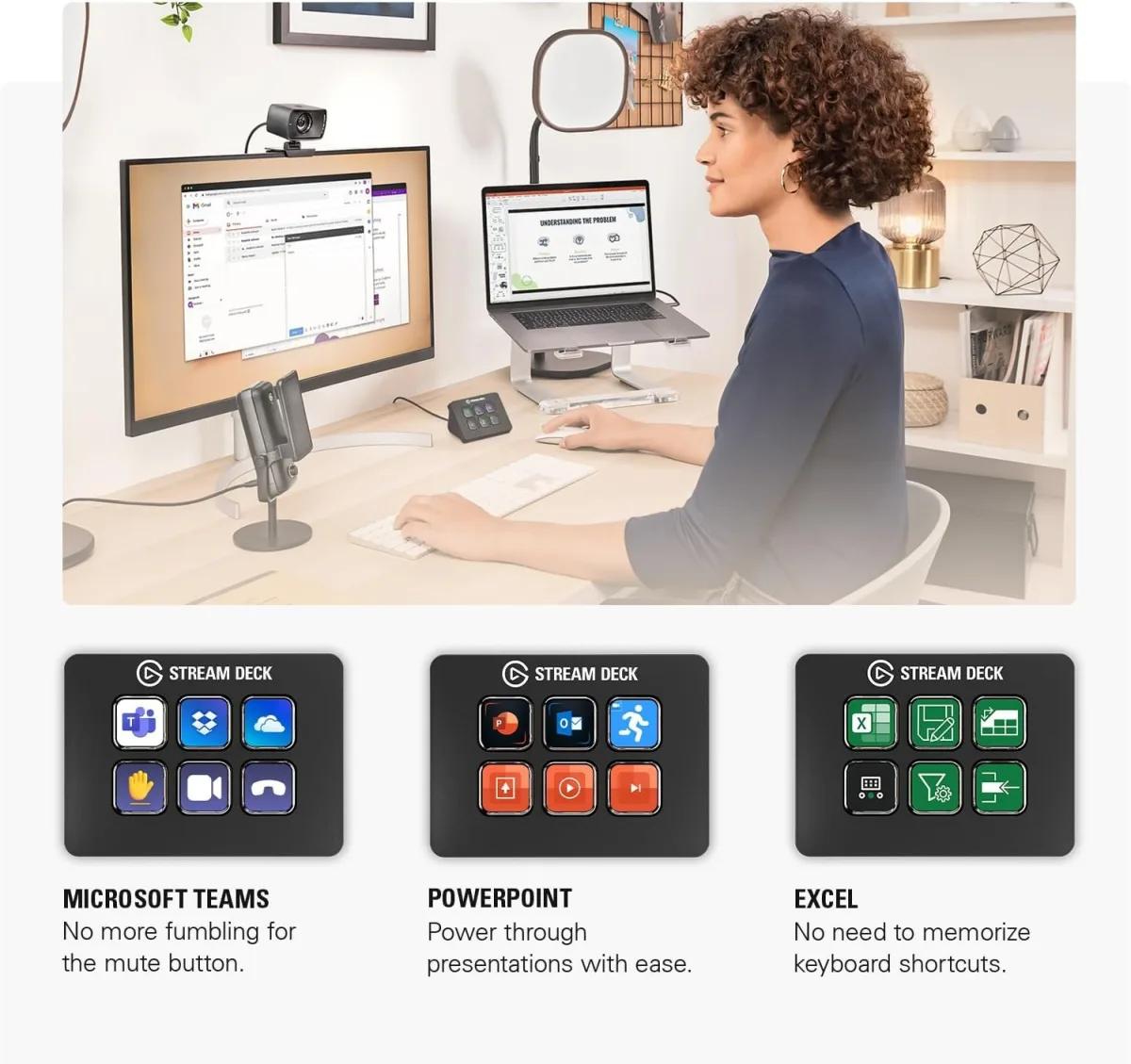
This is where the Stream Deck Mini truly shines. I quickly discovered it's not just for streamers. For my daily workflow, it’s become indispensable. Here’s what I found myself using it for constantly:
- App Launching: No more hunting for icons on my desktop or in the Start menu. One press and my most-used apps are open.
- Website Shortcuts: I set up keys to open specific websites I frequent for work or news.
- System Functions: Muting my microphone during video calls, adjusting speaker volume, even triggering Windows' "Print Screen" function became single button presses.
- Multi-Actions: This is the real power. I created a "morning routine" button that launches Chrome, opens my email, and starts Spotify with my morning playlist. Another one for "work mode" closes my entertainment apps and opens my work-specific software. It’s like having a personal assistant for my computer.
- Profile Switching: The software lets you create different profiles that automatically load based on the active application. So, when I switch to Photoshop, my Stream Deck Mini automatically shows my Photoshop hotkeys. When I go back to my desktop, it reverts to my general productivity profile. This is genius!
The speed and responsiveness of the keys are excellent. There's virtually no lag between pressing a button and the action happening on my screen. This little guy really cut down on the micro-frustrations of navigating my PC. If you're looking to streamline your digital life, you might want to check today's price.
The Annoying Bits / Cons
While I'm mostly positive about the Mini, it isn't perfect:
- Only 6 Buttons: This is the obvious limitation. While you can use folders and profiles to expand functionality, 6 physical buttons can feel restrictive if you have a ton of actions you want at your fingertips. For me, it's enough for my core tasks, but I sometimes wish I had a few more dedicated keys without having to dig into a folder.
- Fixed Angle: The device sits at a fixed angle. It’s pretty good for visibility and comfort, but I know some people prefer adjustable stands.
- Price for Entry: For "just" 6 buttons, it's not exactly cheap. You're paying for the excellent software, the LCD keys, and the Elgato ecosystem. If you only need one or two simple macros, a free software solution might be enough.
- Mac Integration: While it works fine on Mac, I found the deep system integrations (like muting specific apps) felt slightly more robust and straightforward on Windows. This might just be my perception, though.
Surprises
One thing that surprised me was how quickly muscle memory kicked in. After just a few days, I wasn't even looking at the icons; my fingers just knew where to go. It truly became an extension of my keyboard. I also found myself using it for things I hadn't even considered, like triggering sound effects during casual voice chats with friends (purely for comedic effect, of course!). The community around Stream Deck is also fantastic, with tons of custom icon packs and plugins available, which really extends its utility.
Who Should Buy This
The Elgato Stream Deck Mini is perfect for:
- Casual Streamers or Podcasters: If you need quick access to scene changes, mute buttons, or sound effects without breaking the bank for a larger model.
- Productivity Enthusiasts: Anyone who spends a lot of time on their computer and wants to shave seconds off repetitive tasks, launch apps instantly, or manage their workflow more efficiently.
- Content Creators (Video/Audio Editors): Great for hotkeys in editing software, opening specific project files, or triggering effects.
- Gamers: For quick access to Discord functions, specific game macros, or managing your streaming software during gameplay.
- Anyone with too many hotkeys to remember: It's a visual reminder and a physical button for those complex key combinations.
If that sounds like you, then you should definitely grab it on Amazon.
Who Should Skip It
It's probably not for you if:
- You only need one or two simple shortcuts: There are free software solutions for basic hotkeys.
- You need a massive array of dedicated buttons: The 6 buttons might feel too limiting, even with folders. You might consider the larger Stream Deck models (Mk.2 or XL) or a different solution entirely.
- You're on a very tight budget: It's a premium product with a price tag to match its functionality.
- You prefer a completely minimalist desk setup: It does take up a small footprint.
Final Thoughts
The Elgato Stream Deck Mini is a fantastic little device that genuinely improves my daily computer experience. It’s well-built, the software is excellent, and it offers a surprising amount of customization and utility for its size. For me, it quickly went from a "nice-to-have" gadget to a "can't-live-without" tool. If you're on the fence, and you fit into the "who should buy this" category, I'd say go for it. You might be surprised how much time and effort this tiny powerhouse can save you. You can pick one up here.