My Honest Take on the MNN 15.6-inch Portable Monitor
I've been eyeing a portable monitor for ages, mostly because my desk setup at home could use a second screen, but also for those times I'm working from a coffee shop or traveling. The idea of having an extended display without lugging around a full desktop monitor was incredibly appealing. After a bit of research, I decided to take the plunge and check today's price on this MNN 15.6-inch model. It seemed to hit a good balance between features and cost, and I’m glad I did.
First Impressions: Sleek and Slim
Right out of the box, I was struck by how slim and light the MNN monitor felt. It’s got a premium-ish feel to it, certainly not cheap plastic, which was a pleasant surprise for the price point. The bezels are reasonably thin, giving it a modern look. It slipped into my laptop bag easily alongside my 14-inch work laptop, barely adding any noticeable bulk or weight. The packaging was simple but effective, protecting the screen well during shipping. It comes with a good array of cables too: a USB-C to USB-C, a Mini-HDMI to HDMI, and a USB-A to USB-C for power. That's a nice touch, as you don't always get all the necessary cables.
The Display: Clear Enough for Most Tasks
The 15.6-inch IPS panel is a real highlight here. The 1080p (FHD) resolution is perfectly adequate for this screen size; text is sharp, and images look good. I've used it extensively for coding, writing documents, and browsing the web, and it holds up admirably. The IPS technology means viewing angles are excellent, so if you're showing something to a colleague or watching a movie with someone, there isn't much color shift when viewed off-center. Brightness-wise, it’s decent for indoor use. I wouldn't recommend it for direct sunlight or very bright outdoor environments, as it can struggle a bit, but for typical office or home lighting, it's perfectly fine. Colors are vibrant, though I wouldn't say it's color-accurate enough for professional photo or video editing without calibration, but for general consumption and productivity, it's more than sufficient.
Connectivity and Setup: A Breeze with USB-C
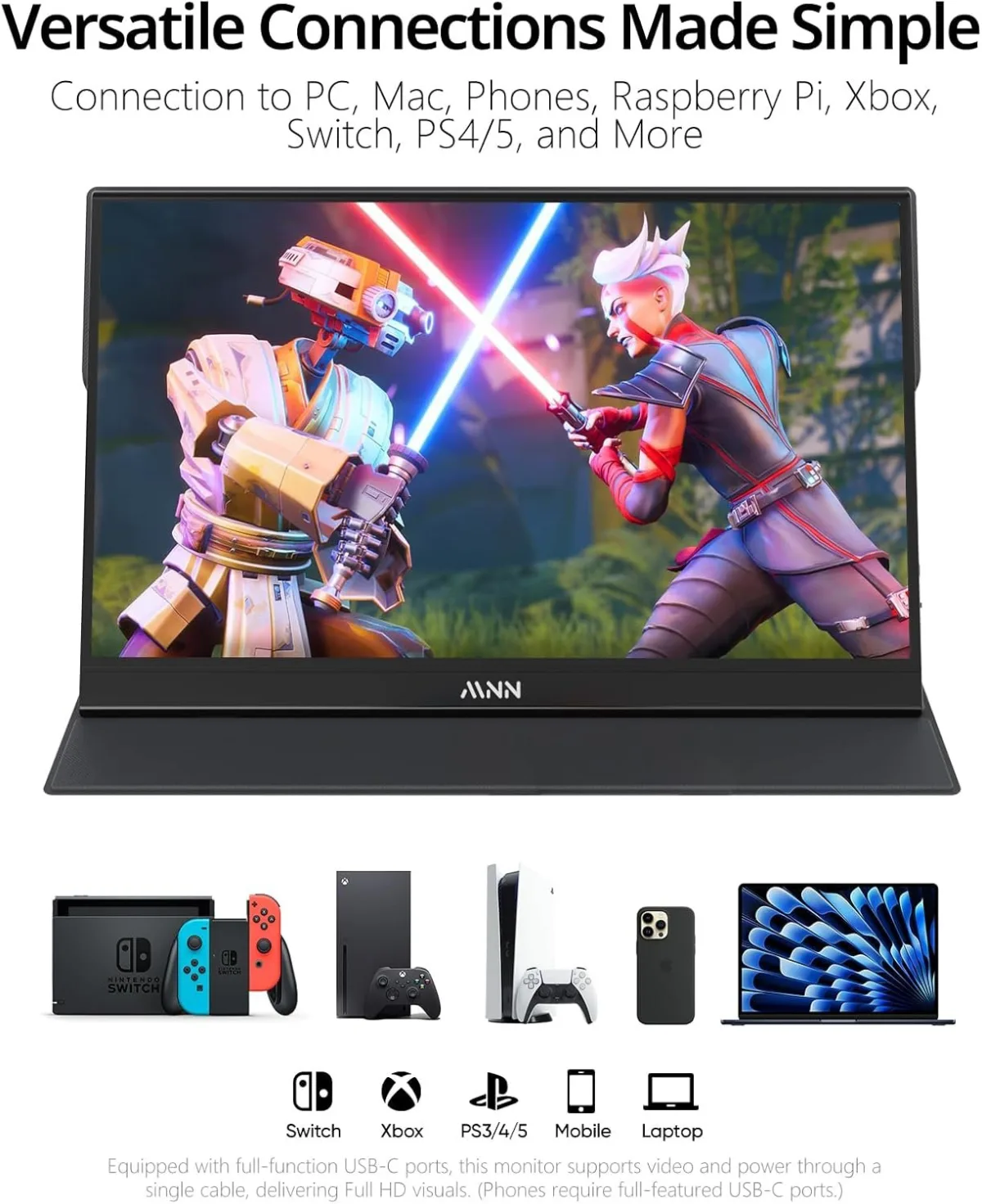
Connecting this monitor is surprisingly straightforward, especially if your laptop has a full-featured USB-C port (one that supports DisplayPort Alt Mode and power delivery). With just a single USB-C cable, I was able to get both video and power from my MacBook Pro, which is incredibly convenient and keeps the workspace tidy. For older laptops or devices without that USB-C capability, you'll need to use the Mini-HDMI cable for video and then power the monitor separately via the included USB-A to USB-C cable and a wall adapter (or a free USB port on your computer). I tested it with my Nintendo Switch (via USB-C, needing external power from a wall adapter for the monitor), my desktop PC (via HDMI), and even my Samsung phone (Dex mode via USB-C), and it worked flawlessly across all of them. The menu system to adjust settings like brightness, contrast, and color is a little clunky with the physical buttons on the side, but once you set it, you rarely need to touch it again.
Performance in Action: Work, Play, and Everything In Between
I primarily use this monitor for extending my laptop display during remote work. Having an extra screen for Slack, email, or documentation while my main screen is dedicated to coding or content creation has been a game-changer for my productivity. It truly feels like having a dual-monitor setup anywhere I go. I also tried some light gaming on it with my Switch – titles like Mario Kart and Zelda looked great, and I didn't notice any significant input lag. It's not a high refresh rate gaming monitor, but for casual gaming, it’s perfectly acceptable. Watching movies on it during travel has also been a pleasure; the larger screen beats watching on a phone or even a laptop display.
Sound Quality: Don't Expect a Concert Hall
Let's be real, built-in speakers on portable monitors are rarely stellar, and the MNN is no exception. It has dual speakers, and they get the job done for basic system sounds, video calls, or casual YouTube viewing if you're in a quiet room. However, they lack bass, clarity, and overall richness. For any serious media consumption, gaming, or music, you'll definitely want to use headphones or external speakers. I wasn't expecting much here, so I wasn't disappointed, but it's something to be aware of.
The Smart Cover/Stand: Functional, Mostly
The included magnetic smart cover doubles as a stand, much like those you find with tablets. It's functional and protects the screen when you're on the go. However, I found it a little less stable than I'd hoped, especially when trying to get it at just the right angle. It works best on a flat, solid surface. If you nudge your desk, it can sometimes wobble or even collapse if not set up carefully. After a few weeks, I’ve gotten better at positioning it, but it’s not the most robust stand design out there. Still, it's nice that it's included and eliminates the need for a separate stand.
Pros and Cons
- Pros:
- Excellent portability: ultra-slim and lightweight.
- Vibrant 15.6-inch FHD IPS display with great viewing angles.
- Single USB-C cable for power and video (with compatible devices).
- Broad compatibility: works with laptops, phones, Switch, Xbox, PS4, etc.
- Comes with all necessary cables.
- Good value for the features.
- Cons:
- Built-in speakers are weak and lack depth.
- Smart cover/stand can be a bit flimsy and tricky to position.
- Brightness might be insufficient for very bright environments.
- OSD menu navigation is a bit clunky.
- Requires external power for some devices/connections.
Who Should Buy This
This monitor is fantastic for remote workers, students, or anyone who needs extra screen real estate on the go. If you frequently travel and rely on a laptop, or if your home office setup could benefit from a temporary second screen without taking up much space, this is a solid choice. Gamers who want a larger screen for their Nintendo Switch or other portable consoles will also find it very useful. If you're ready to enhance your mobile productivity or entertainment, you can grab it on Amazon.
Who Should Skip It
If you need a monitor for professional color-accurate work (like graphic design or video editing), this isn't going to cut it. You'd need a higher-end, calibrated display. Also, if you need a monitor for bright outdoor use or a primary gaming monitor with high refresh rates, you'll want to look elsewhere. Finally, if you absolutely rely on powerful built-in speakers and don't want to use headphones or external audio, this monitor will likely disappoint.
Final Thoughts
Overall, I'm really happy with the MNN 15.6-inch portable monitor. It has become an indispensable tool for my productivity and a fun companion for entertainment on the go. It delivers on its promise of a portable, versatile external display without breaking the bank. The minor drawbacks like the speakers and the stand are easily overlooked given the overall performance and convenience it offers. For anyone in the market for a solid, reliable portable monitor for general use, I'd definitely recommend checking this one out. If you're thinking about it, you can pick one up here.