Finally Digitizing Those Old Memories
Like many people, I've had boxes of old 35mm slides and film negatives gathering dust in my attic for years. Every time I'd come across them, I'd promise myself I'd get around to digitizing them, but the thought of sending them out or buying an expensive, complex scanner always put me off. Then, I stumbled upon the KODAK Slide N SCAN. The promise of an all-in-one, standalone solution for converting old film to digital photos right at home was incredibly appealing. After a bit of research, I decided to grab it on Amazon and give it a try.
Setup & First Impressions: Surprisingly Simple
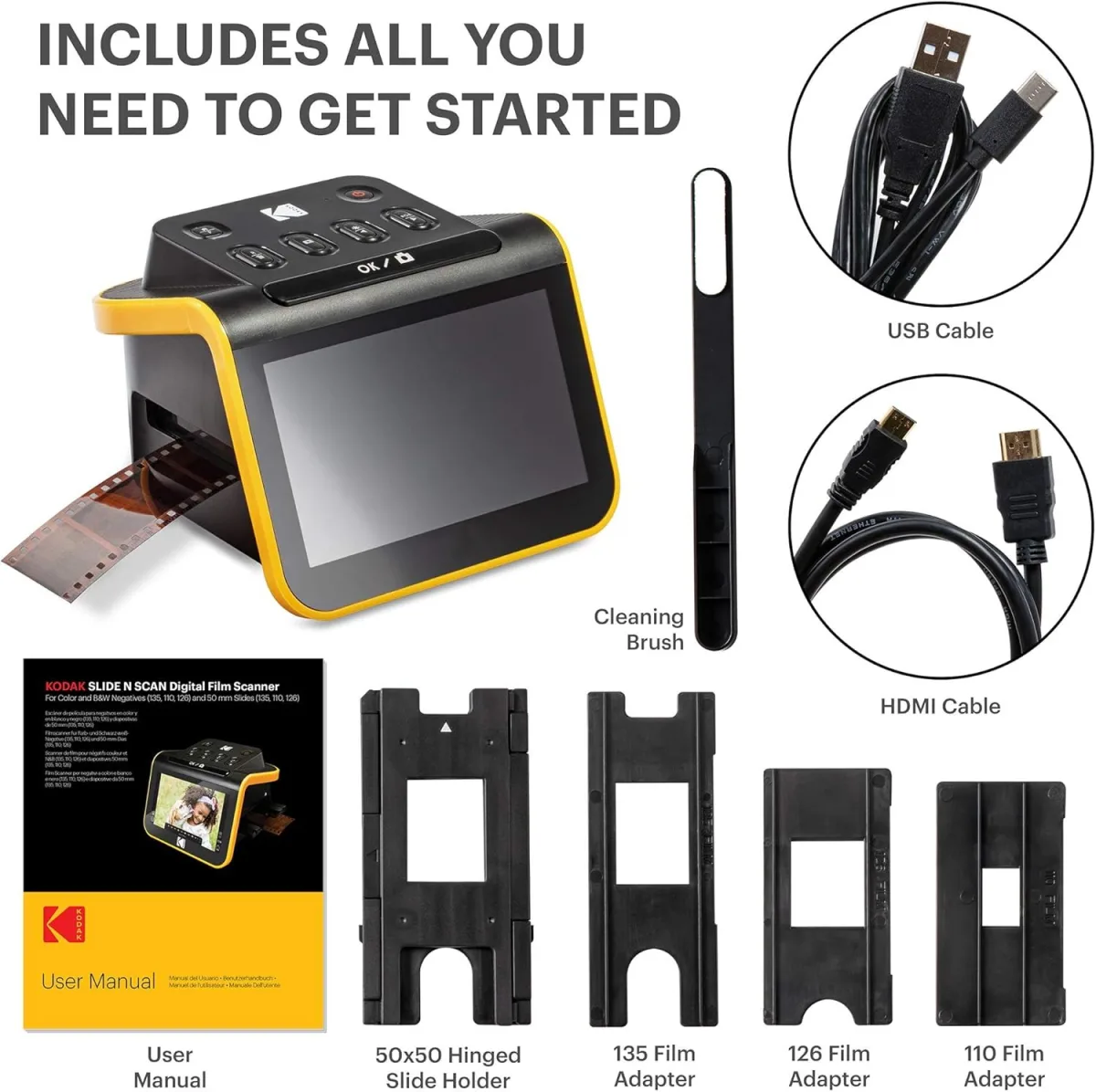
When the KODAK Slide N SCAN arrived, I was pleasantly surprised by its compact size. It doesn't take up much desk space at all. Setup was a breeze – plug in the power, pop in an SD card (not included, so make sure you have one!), and it was ready to go. The 5-inch LCD screen is a definite highlight; it's bright and clear enough for previewing your images directly on the device, which means you don't need a computer to start scanning. This standalone capability was a major selling point for me.
The device comes with several trays for different film types: 35mm slides, 35mm negatives, 126 film, 110 film, and even Super 8/8mm film. Loading the slides and negatives into their respective trays was pretty straightforward, though a bit fiddly initially until I got the hang of it. The trays slide smoothly into the scanner itself.
The Scanning Process: Patience is a Virtue
Once loaded, the scanning process is simple: slide the tray in, press the 'Scan' button, and then save. The scanner automatically adjusts exposure and color, but you can tweak these settings manually if you want. I found the automatic settings to be generally okay for most of my photos, but for some older, faded slides, manual adjustment was necessary to get a decent result. The resolution options go up to 22MP interpolated, which sounds impressive, but it's important to remember that interpolation isn't the same as true optical resolution.
Scanning isn't super fast, especially if you have hundreds of slides. Each scan takes a few seconds, plus the time to load and unload each slide/negative strip. I probably spent an hour or two each evening working through batches. For those with thousands of photos, it’s a marathon, not a sprint. The HDMI output is a nice touch if you want to see your scans on a larger TV, which can be fun for family viewing, but I mostly stuck to the built-in screen.
Image Quality: Good Enough for Nostalgia, Not for Pro-Prints
Let's be honest about image quality. This isn't a professional-grade scanner, and it doesn't pretend to be. For digitizing old family photos to share on social media, view on a tablet, or print small copies, the results are perfectly acceptable. The colors are generally good, and the details are preserved well enough to bring back memories. However, don't expect museum-quality reproductions. If your originals are faded or scratched, the scanner will capture those imperfections too. There's no fancy dust removal or scratch repair built-in, so you might need to do some post-processing on your computer if you're aiming for perfection. I did notice some color shifts in certain older Kodachrome slides, which required a bit of tweaking in a photo editor later.
What I Loved (Pros):
- Standalone Operation: No computer needed! Just pop in an SD card and start scanning. This was huge for me.
- Large 5-inch LCD: Makes previewing and navigating menus much easier than smaller screens on other models.
- Ease of Use: Once you get the hang of loading the trays, it's pretty intuitive.
- Versatile: Handles a good range of film types (35mm, 126, 110, Super 8 & 8mm).
- Compact Design: Doesn't take up much space on your desk.
- Affordable Preservation: A cost-effective way to save old memories from degrading further. You can check today's price to see if it fits your budget.
What Annoyed Me (Cons):
- Dust, Dust, Dust: This is my biggest gripe. Any tiny speck of dust on your slides or negatives will be magnified and captured. You'll spend a lot of time cleaning film with a microfiber cloth and air blower. The device itself doesn't have any dust removal capabilities.
- Color Accuracy: While generally good, some older or faded film types might require significant manual color correction or post-processing on a computer. The automatic adjustments aren't always perfect.
- Interpolated Resolution: The 22MP is interpolated, meaning it's digitally enhanced, not true optical resolution. It's fine for most uses, but don't expect super sharp, high-res images for large prints.
- Scanning Speed: It's not super fast. If you have thousands of slides, prepare for a long project.
- Tray Fiddliness: The film trays, especially for negatives, can be a bit delicate and frustrating to load perfectly straight, leading to slight cropping issues if not careful.
- No Internal Storage: You absolutely need an SD card, and it's not included. A minor point, but worth noting.
Who Should Buy This?
This KODAK Slide N SCAN is ideal for:
- Families wanting to digitize old family photos, slides, and negatives for sharing and basic preservation.
- Anyone with a large collection of film who doesn't want to spend a fortune on professional scanning services.
- Individuals who prefer a standalone device and don't want to connect to a computer for every scan.
- Those looking for a relatively easy-to-use solution for casual photo digitalization.
Who Should Skip It?
You might want to look elsewhere if:
- You're a professional photographer or require extremely high-resolution, perfectly color-accurate scans for archival or large-format printing.
- You're not willing to spend time cleaning your film before scanning.
- You need advanced features like automatic dust removal, scratch correction, or sophisticated color management.
- You have very delicate or unusual film formats not supported by the included trays.
Final Thoughts
Overall, the KODAK Slide N SCAN delivers on its promise of providing a convenient, easy-to-use way to digitize your old film and slides at home. It’s not perfect, and you'll need a dose of patience and a good air blower, but for the price, it’s a solid investment for preserving precious memories. I managed to scan hundreds of photos that would have otherwise remained unseen, and that alone makes it worth it for me. If you’re ready to finally tackle those dusty boxes, you can pick one up here and start your own digitization journey.