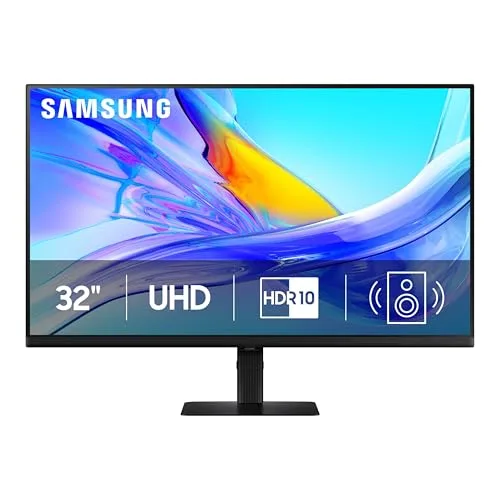
My Experience with the Samsung ViewFinity S80UD
I was on the hunt for a new 4K monitor. My old one was starting to feel cramped, and it certainly lacked modern connectivity options like a robust USB-C hub. I needed something big, sharp, and with good integration for my laptop, as I spend a lot of time working from home. After a fair bit of research, the Samsung ViewFinity S80UD (specifically the LS32D808UBNXGO model) caught my eye, especially with its promises of a stunning display and those intriguing smart features. I finally decided to bite the bullet and pick one up here.
First Impressions and Design
Unboxing was pretty straightforward. The stand attaches easily without any tools, which is always a plus for someone who isn't a fan of fiddly setups. The first thing I noticed was how sleek it looks. The bezels are impressively thin on three sides, giving it a very modern, almost edge-to-edge feel that really helps with immersion. The stand itself is robust and feels premium, not flimsy at all. It offers a full range of ergonomic adjustments: tilt, swivel, pivot, and height. This is huge for me – I can easily adjust it to my perfect viewing angle throughout the day, whether I'm sitting down or standing at my adjustable desk. It feels like a thoughtfully designed piece of hardware.
Picture Quality: Sharpness and Color
This is where the S80UD truly shines. The 32-inch 4K UHD (3840 x 2160) resolution is absolutely gorgeous. Text is incredibly sharp, making long hours of reading documents or coding much easier on the eyes. Images are vibrant and detailed. I spend most of my day working with spreadsheets, documents, and some light photo editing, and everything just pops. Colors seem accurate right out of the box, though I did do a minor calibration to suit my specific workflow better. Brightness is solid for my home office environment; I usually keep it around 70% and it’s plenty. HDR10+ is supported, and while HDR content looks good, it's not going to blow you away like a high-end OLED TV. It's an improvement over standard dynamic range for media consumption, but don't expect groundbreaking contrast for critical HDR work. For general media viewing, though, it’s more than adequate.
Connectivity and the USB-C Advantage
This was a major selling point for me, and it absolutely delivers. The single USB-C port is a dream. I connect my MacBook Pro with just one cable, and it handles everything: display output, data transfer, and 90W power delivery. This means fewer cables cluttering my desk, and my laptop is always charged. The built-in USB hub (three USB 3.0 ports) is super handy for my keyboard, mouse, and an external SSD. No more reaching for dongles or a separate hub. It also has HDMI 2.0 and DisplayPort 1.4, so connecting other devices like my work PC or a game console is easy. For anyone working from home primarily with a laptop, that USB-C functionality is a killer feature. You can find more details and grab it on Amazon.
Smart Features (Tizen OS)
This was honestly a pleasant surprise. The ViewFinity S80UD essentially has Samsung's Smart TV OS (Tizen) built-in. This means I can switch to YouTube, Netflix, Disney+, or Prime Video without even turning on my computer. The included remote control makes navigating these apps a breeze. I've found myself watching a quick show during lunch breaks or having background music playing from Spotify directly on the monitor. It also integrates with SmartThings, so I can control my smart home devices right from the monitor interface. There's even a basic web browser. While it won't replace a dedicated smart TV, it's a fantastic bonus for a monitor, adding real versatility and convenience to my workspace.
Sound Quality
Let's be honest, monitor speakers are rarely great, and the S80UD is no exception. They're perfectly fine for system sounds, casual YouTube videos, or a quick conference call where clarity isn't paramount. However, for anything serious – music, movies, or gaming – you'll definitely want to use external speakers or a good pair of headphones. They lack bass and overall richness, as expected from integrated monitor speakers.
Daily Use and Minor Annoyances
The auto-source switching is generally good, but occasionally it takes a beat too long to detect a new input, or it cycles through them when I just want it to stay on one. The On-Screen Display (OSD) menu is navigable with the included remote or the small joystick on the back, but I mostly use the remote for quick access to the smart features. One minor annoyance is the monitor sometimes taking a moment to "wake up" when my laptop does, leading to a brief black screen, but it's not a dealbreaker. The matte finish on the screen does an excellent job of reducing glare, which is essential in my brightly lit room.
Pros:
- Stunning 4K resolution (3840 x 2160) and incredibly sharp text.
- Excellent color accuracy for general productivity and media consumption.
- Robust, highly adjustable stand offering height, tilt, swivel, and pivot.
- Fantastic USB-C connectivity with 90W power delivery and a convenient built-in USB 3.0 hub.
- Integrated Smart TV features (Tizen OS, streaming apps, remote) are genuinely useful and add versatility.
- Sleek, modern design with impressively thin bezels.
- Effective anti-glare coating.
Cons:
- Built-in speakers are mediocre at best; external audio is highly recommended.
- HDR performance, while present, isn't groundbreaking compared to high-end, dedicated HDR displays.
- Auto-source switching can occasionally be a bit slow or finicky.
- No integrated webcam (some "smart" monitors do include this).
- Only a 60Hz refresh rate, so it's not ideal for serious competitive gaming.
Who Should Buy This:
- Professionals needing a large, crisp 4K display for productivity (coding, office work, data analysis, graphic design).
- Laptop users who want a single-cable docking solution with power delivery and a USB hub to declutter their desk.
- Anyone who appreciates the convenience of integrated smart TV features for casual media consumption without needing a separate device.
- Users who value ergonomic flexibility with a fully adjustable stand for comfortable long-term use.
Who Should Skip It:
- Hardcore gamers looking for high refresh rates (120Hz+, 144Hz+) and low response times.
- Color-critical professionals who need true reference-grade HDR or wider color gamut coverage (e.g., DCI-P3, Adobe RGB) for professional video editing or print work.
- Those on a very tight budget who don't need the smart features or the robust USB-C hub.
- Users who specifically need a built-in webcam for video conferencing.
Final Thoughts
Overall, the Samsung ViewFinity S80UD has been a fantastic addition to my setup. It strikes a great balance between being a top-notch productivity monitor and a versatile media hub. The 4K picture is beautiful, the connectivity is superb, and the smart features are surprisingly handy for daily use. If you're looking for a large, capable 4K monitor that can declutter your desk and offers more than just a display, I highly recommend checking it out. For what you get, it's a solid investment that I've been very happy with. You can see what others paid and check today's price.