SanDisk Professional 192TB G-RAID Shuttle: My Honest Take
As a video editor and content creator, I’m constantly battling storage limitations. My projects seem to grow exponentially, often involving multiple 4K and even 8K streams, complex VFX, and massive raw footage files. My old RAID array was groaning under the pressure, so when I decided it was time for a serious upgrade, I started looking at the big guns. That’s how I landed on the SanDisk Professional 192TB G-RAID Shuttle. I needed something that wouldn't just hold my data, but handle it with speed and rock-solid reliability.
I’ve had this beast for a few months now, pushing it hard through several demanding projects, and I’ve got a pretty good handle on its strengths and weaknesses. If you're on the fence about dropping a significant chunk of change on this, hopefully, my experience can help you decide. You can check today's price if you're curious about the investment.
First Impressions and Build Quality
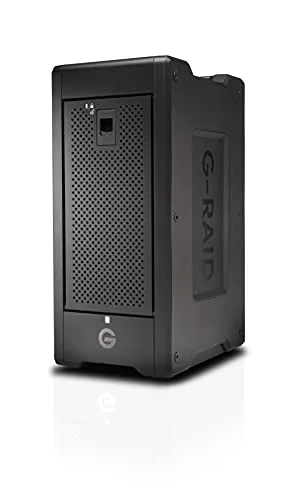
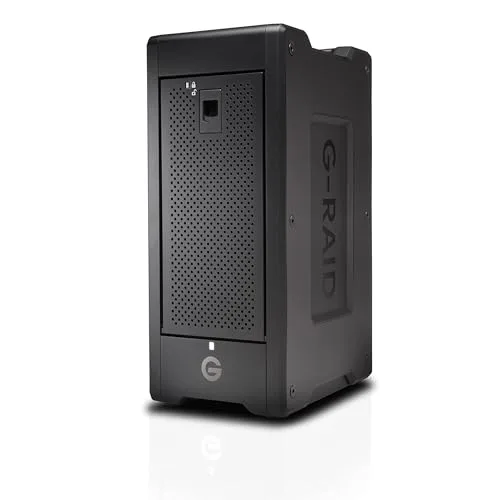
Right out of the box, you can tell this isn't some flimsy consumer-grade enclosure. It's hefty. The metal casing feels incredibly solid and professional, designed to withstand the rigors of a busy studio environment or even some light transport between locations. The handles on the top are a welcome addition, making it easier to move around, though at 192TB, it’s not exactly something you’ll be throwing in a backpack daily. The drives are hot-swappable, which is a huge plus for maintenance and peace of mind.
I noticed the fan grilles are well-placed, hinting at good airflow, which is critical for an enclosure housing eight high-capacity drives. It looks serious, sitting on my desk, and blends well with my other pro gear.
Setup and Performance
Setting up the G-RAID Shuttle was surprisingly straightforward. It came pre-configured in RAID 5, which for most users like me, offers a good balance of speed and data redundancy. If you need something different, the SanDisk Professional software allows for easy reconfiguration to RAID 0, 1, 10, 50, or 60. I stuck with RAID 5 initially, as it suited my need for both performance and protection against a single drive failure.
Connectivity is via dual Thunderbolt 3 ports, and boy, do they deliver. I immediately put it through its paces. Copying huge project files (multiple terabytes at a time) from my old system was incredibly fast. I'm talking sustained write speeds well over 1000 MB/s and reads even higher. In my video editing workflow, this translates to smooth playback of multiple 4K ProRes streams without dropping frames, even when applying complex effects. Editing 8K footage directly from the array felt just as responsive as working from my internal SSD, which is saying something. This is where the G-RAID Shuttle truly shines – it just keeps up, no matter what I throw at it.
Noise and Heat
Any device housing eight spinning hard drives is going to make some noise. However, I was pleasantly surprised by how quiet the G-RAID Shuttle is under normal operation. When it’s really churning through data, like during a massive render or a large transfer, the fans do ramp up, and you’ll definitely hear them. But it’s not an obnoxious whine; it’s more of a steady hum, which I found easy to tune out. For most of my editing work, it stays fairly unobtrusive. Heat management seems excellent; even after hours of intense use, the enclosure felt warm, never hot, which bodes well for the longevity of the drives inside.
Reliability and Software
Reliability is paramount for professional storage, and this is where SanDisk Professional (formerly G-Technology) has built a solid reputation. The drives inside are enterprise-class, designed for 24/7 operation. The fact that it’s hot-swappable means if a drive does fail (and eventually, all mechanical drives do), replacement is simple and doesn’t require taking the entire system offline. The included software is minimal but effective, giving you basic monitoring of drive health and RAID status. It’s not flashy, but it does what it needs to do, and I appreciate that simplicity.
After several intense projects, I haven’t had a single hiccup. My data feels secure, and that peace of mind is invaluable. If you're looking for serious capacity and speed, you can grab it on Amazon.
Pros:
- Blazing Fast Performance: Sustained speeds perfect for multi-stream 4K/8K editing.
- Massive Capacity: 192TB is truly liberating for large projects and archives.
- Robust Build Quality: All-metal enclosure, hot-swappable drives, built to last.
- Data Redundancy: RAID 5 (and other options) provides excellent data protection.
- Relatively Quiet: Quieter than expected for an 8-bay unit, especially during idle/light use.
- Dual Thunderbolt 3 Ports: Daisy-chaining capability is very convenient.
Cons:
- Price: This is a significant investment. It's not for casual users.
- Size and Weight: Not highly portable, despite the "Shuttle" in its name. It's meant to be moved occasionally, not daily.
- Fan Noise Under Load: While generally quiet, it can get noticeable when pushed hard.
- Minimal Software: Some might want more advanced monitoring or features, but I found it sufficient.
Who Should Buy This:
This G-RAID Shuttle is absolutely for serious professionals. If you are a:
- Video Editor: Especially those working with 4K, 6K, or 8K footage, or managing large project archives.
- Photographer/Archivist: Dealing with massive RAW image libraries or needing long-term, secure storage.
- Data Scientist/Researcher: Requiring high-speed access to enormous datasets.
- Small to Medium Studio: Needing a central, high-performance storage solution for multiple workstations (via network, or direct attach if only one workstation needs primary access).
If your livelihood depends on fast, reliable access to huge amounts of data, and you understand the value of enterprise-grade hardware, then this unit will be a fantastic addition to your workflow. If that sounds like you, you might want to pick one up here.
Who Should Skip It:
Unless you fall into the categories above, this is likely overkill. You should probably skip this if you are a:
- Casual User: If you just need external storage for documents, photos, or light video, a much smaller, cheaper, and simpler external drive or a smaller NAS will suffice.
- Budget-Conscious Buyer: The price tag is substantial. There are far more affordable solutions for less demanding needs.
- User Needing Extreme Portability: While it has handles, it’s not meant for throwing in a laptop bag.
Final Verdict
The SanDisk Professional 192TB G-RAID Shuttle is an absolute workhorse. It delivers on its promise of massive capacity and blistering performance, making it an indispensable tool for anyone whose professional workflow demands it. Yes, it’s expensive, and yes, it’s big, but for what it does, it offers tremendous value. I’ve found it to be utterly reliable and a significant upgrade to my studio setup. If you’re serious about your data and your productivity, this is one investment that truly pays off.