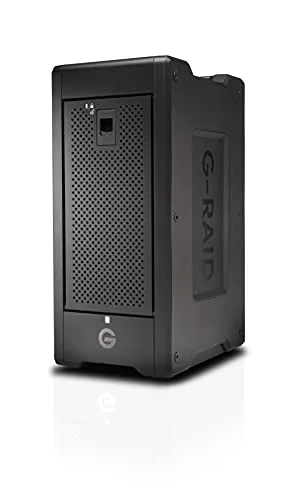
My Experience with the SanDisk Professional 144TB G-RAID Shuttle 8
As someone who deals with an ever-growing mountain of 4K and even 8K video footage, high-resolution photography, and massive project files, my storage needs are frankly insane. I've tried various solutions over the years – individual external drives, smaller RAID enclosures, even cloud storage for certain things – but nothing quite kept up with the relentless demand. That's why I finally decided to bite the bullet and invest in something truly substantial: the SanDisk Professional 144TB G-RAID Shuttle 8.
I know what you're thinking: 144 terabytes? That's a lot of storage, and a lot of money. But for my workflow, where losing a project due to drive failure or being slowed down by sluggish transfers means lost revenue, it’s a necessary tool. I needed something robust, reliable, and ridiculously fast. After several weeks of putting this monster through its paces, I'm ready to share my honest thoughts.
First Impressions and Setup: A Glimpse of the Future
When the G-RAID Shuttle 8 arrived, the first thing that struck me was its sheer size and weight. This isn't some sleek, portable SSD; it's a workstation-grade piece of equipment. The build quality is immediately apparent – a heavy-duty, all-metal enclosure that feels incredibly robust. It screams "professional." Inside, you've got eight enterprise-class hard drives, pre-configured in RAID 5, which is a great balance of speed and data redundancy right out of the box.
Setting it up was surprisingly straightforward, even for a non-IT professional like myself. I connected it to my Mac Studio via Thunderbolt 3, plugged in the power, and it spun right up. The unit comes formatted for macOS, but it’s easily reformatable for Windows if you need it. I appreciated the clear instructions for changing RAID configurations if I wanted to, though I stuck with the default RAID 5 for my initial tests. The G-RAID Shuttle Utility software is intuitive enough, letting you monitor drive health, rebuild arrays, and change RAID levels with relative ease. It’s not overcomplicated, which is a huge plus when you’re dealing with such critical data.
Performance That Doesn't Quit
This is where the G-RAID Shuttle 8 truly shines. With its Thunderbolt 3 connectivity and those enterprise drives, the read and write speeds are phenomenal. I regularly transfer multi-terabyte projects, and I've seen sustained transfer rates that blow my previous setups out of the water. Editing 4K footage directly off the array is smooth, with no noticeable stuttering or dropped frames, even with multiple streams. I can scrub through timelines, apply complex effects, and render previews without feeling like my storage is holding me back. For anyone dealing with high-bitrate video, this responsiveness is a game-changer.
I also use it for massive photo libraries, and opening large RAW files or processing batches of hundreds of images feels incredibly snappy. My previous bottleneck was always storage, but with the Shuttle 8, my CPU and GPU are finally the limiting factors, which is exactly how it should be. If you’re pushing the limits of your creative software and need storage that can keep pace, I highly recommend you grab it on Amazon.
Noise and Reliability: Living with a Workhorse
One concern with any multi-drive enclosure is noise. While the G-RAID Shuttle 8 isn't silent, I found the fan noise to be quite manageable. It's a low hum, not a high-pitched whine. In a quiet office, you'll definitely hear it, but it blends into the background of my editing suite quite well, especially once I'm focused on my work. It's certainly quieter than some other rackmount solutions I've encountered. The good news is that it runs cool, even under heavy load, which bodes well for the longevity of the drives.
Reliability is paramount, and so far, after several weeks of continuous operation, it hasn't skipped a beat. The enterprise-class drives are designed for 24/7 operation, and the hot-swappable bays mean that if a drive ever does fail (which is inevitable with any mechanical drive over time), I can replace it without taking the entire system offline. This kind of peace of mind is invaluable when you're dealing with client projects and deadlines.
What I Liked (Pros):
- Massive Capacity: 144TB is an incredible amount of storage, perfect for growing media libraries.
- Blazing Fast Performance: Thunderbolt 3 combined with enterprise HDDs delivers speeds essential for 4K/8K workflows.
- Robust Build Quality: All-metal enclosure inspires confidence in its durability.
- Data Redundancy: RAID 5 (and other options) provides protection against single drive failure.
- Hot-Swappable Drives: Easy, non-disruptive drive replacement if needed.
- User-Friendly Software: G-RAID Shuttle Utility makes management straightforward.
- Professional-Grade Reliability: Designed for continuous operation.
What Annoyed Me (Cons):
- Price: Let's be real, this is a significant investment. It's for professionals, not casual users. You can check today's price, but be prepared.
- Audible Fan Noise: While not terrible, it’s not silent. If you need absolute silence, this might not be for you.
- Size and Weight: It's a large, heavy unit. Not something you’ll be moving around often.
- Power Consumption: Eight spinning drives and a powerful controller draw a fair bit of power.
Who Should Buy This?
This G-RAID Shuttle 8 is clearly designed for a very specific type of user: the professional who demands high capacity, high performance, and robust data protection. I'm talking about:
- Video Editors: Especially those working with 4K, 6K, or 8K footage who need immediate access to large project files.
- Photographers/Studios: Managing immense RAW photo libraries and high-volume shoots.
- Graphic Designers/VFX Artists: Dealing with large asset libraries and complex renders.
- Small to Mid-Size Production Houses: Needing a central, high-speed storage solution for collaborative projects.
- Anyone with Critical Data: If your livelihood depends on your data, the RAID redundancy and enterprise drives offer peace of mind.
Who Should Skip It?
If you don't fit into the categories above, this product is likely overkill and overpriced for your needs. You should probably skip the G-RAID Shuttle 8 if you are:
- A Casual User: For basic backups, general file storage, or even light video editing, there are far more affordable and simpler solutions.
- On a Tight Budget: The cost is substantial. There are many other external drives or smaller RAID enclosures that cost a fraction of this.
- Looking for Portability: This is a desk-bound powerhouse, not something you toss in a bag.
- Not Needing RAID: If you don't understand or need the benefits of RAID data redundancy, you're paying for features you won't use.
Final Thoughts
The SanDisk Professional 144TB G-RAID Shuttle 8 is not a purchase to be taken lightly. It's a significant investment, but for me, it has proven to be an indispensable tool. It’s given me the speed, capacity, and reliability I needed to streamline my workflow and protect my valuable data. I no longer worry about running out of space or slow transfer speeds holding me back. It’s a workhorse that performs exactly as advertised, making it a worthy addition to any demanding professional setup.
If you’re serious about your craft and your data, and you’re tired of compromising on storage, then the G-RAID Shuttle 8 is definitely worth considering. You can pick one up here if you’re ready to take your storage game to the next level.