You're settling in for a relaxing evening, perhaps streaming a new show, gaming online, or catching up with friends on a video call. Then it happens: the dreaded buffering icon, the pixelated video, the lag that turns your online game into a frustrating slideshow. You’re left wondering, “Why does my internet slow down at night?” It's a common complaint, and it's not just your imagination. The scientific reasons behind this nightly digital crawl are complex, rooted in the physics of data transfer, the economics of infrastructure, and the sheer volume of human behavior.
The Evening Rush Hour: Peak Usage and Network Load
Just as roads clog during commuter hours, the internet experiences its own rush hour. This isn't random; it's a predictable pattern of human activity. As people finish work, come home, and settle down, they collectively flood the digital highways. Data from internet traffic analysis firms consistently shows a significant surge in usage between 7 PM and 11 PM in most time zones. Akamai's State of the Internet reports often highlight these peak periods, demonstrating how global traffic patterns mirror our daily routines.
Think of your internet service provider (ISP) as a massive, intricate system of pipes. During the day, many of these pipes have plenty of spare capacity. But when millions of users simultaneously decide to stream high-definition content, download large game updates, or participate in bandwidth-intensive video conferences, those pipes begin to narrow. This isn't just about the number of users; it's about the type of data they're consuming. Streaming 4K video, for instance, demands far more bandwidth than simply browsing social media, pushing the network to its limits.
The Physics of Bandwidth Saturation
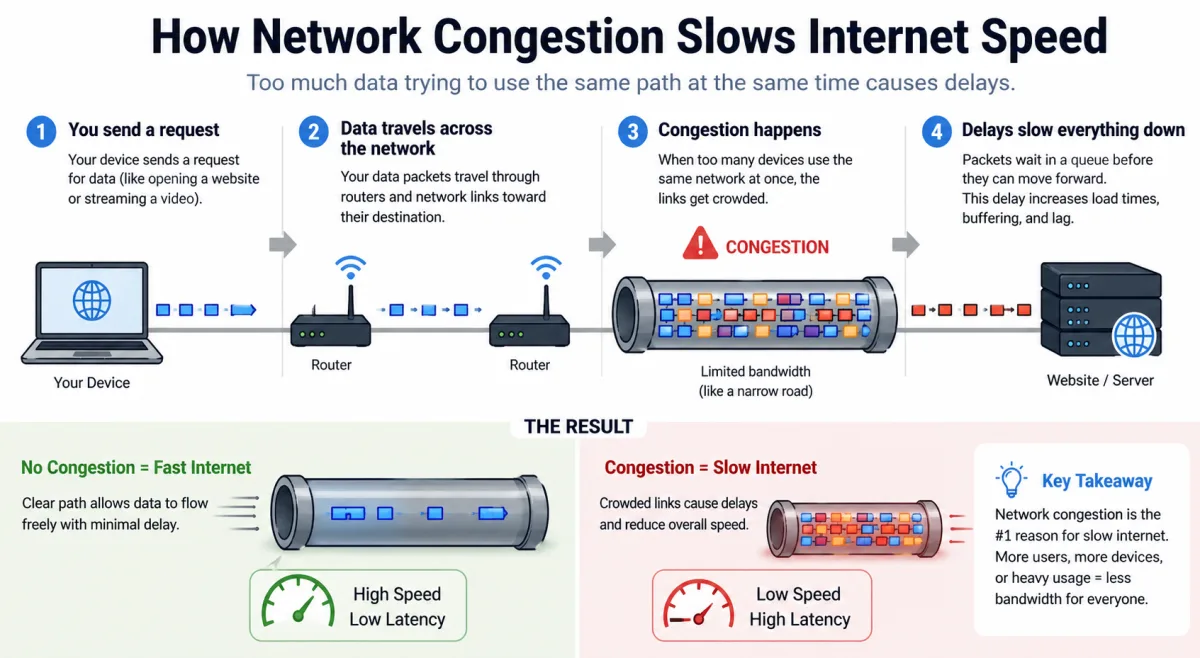
Bandwidth, measured in bits per second, dictates the maximum amount of data that can flow through a connection at any given time. When the collective demand for data from all users on a specific segment of the network exceeds its available bandwidth, saturation occurs. This creates a bottleneck. The data packets, which are the small units of information making up your internet traffic, must then wait in a queue, leading to increased latency and reduced throughput. It’s like trying to push too many cars through a single lane tunnel; they have to slow down and wait their turn. This isn't a problem of your individual connection failing, but rather the shared infrastructure reaching its capacity.
Understanding Network Congestion: The Digital Traffic Jam
Network congestion is the primary culprit behind your slow internet at night. It's a complex phenomenon that can occur at various points along the data's journey from its source to your device. When too many users try to access the same resources or pass through the same network segments simultaneously, the network's capacity becomes overwhelmed. This isn't just about your local ISP; it can involve peering points, backbone networks, and even the servers hosting the content you're trying to access.
Consider the analogy of a busy highway. During peak hours, even a perfectly maintained highway with multiple lanes can become gridlocked. Your internet connection works similarly. Each piece of data you send or receive travels through numerous network nodes and routers. Each of these components has a finite capacity. When the volume of data packets exceeds what these nodes can process efficiently, they start dropping packets or delaying their transmission. This results in the frustrating slowdowns you experience.
"Network congestion is a fundamental challenge in telecommunications. While infrastructure continually improves, demand often outpaces supply, especially during predictable peak usage windows. It's a continuous arms race between capacity and consumption."
— Dr. Anya Sharma, Lead Network Architect at GlobalCom Solutions
The impact of congestion isn't uniform. It often hits specific geographic areas or particular ISP segments harder. A neighborhood with many residents using a single fiber distribution hub might experience more severe slowdowns than a sparsely populated rural area. This localized congestion is a key reason why your neighbor might have a different experience than you, even with the same ISP. It's a testament to the granular nature of network design and its limitations.
The Last Mile Problem: Your Home's Connection Bottleneck
Even with a robust ISP backbone, your internet speed can falter due to what industry experts call "the last mile problem." This refers to the final segment of the network that connects your home or office to the ISP's main infrastructure. For many, this last mile still relies on older technologies like DSL or cable, which inherently have shared bandwidth limitations. Fiber optic connections are less susceptible but not immune to localized congestion.
Cable internet, for example, typically uses a shared coaxial cable network within a neighborhood. You and your neighbors are all drawing bandwidth from the same local node. If everyone in your street starts streaming 4K movies simultaneously at 8 PM, that shared pipe quickly becomes saturated. This isn't an issue of your individual modem being slow; it's the collective demand overwhelming the local distribution network. Fiber-to-the-home (FTTH) connections mitigate this by providing a dedicated fiber line to each household, but even these can experience slowdowns if the ISP's upstream capacity from the local hub is insufficient.
Here's the thing: your ISP advertises "up to" certain speeds. This "up to" clause often accounts for ideal conditions, not the reality of peak evening usage. A 2023 report by the FCC on broadband speeds highlighted that actual speeds often dip significantly during peak hours, particularly for cable internet subscribers. They found that advertised speeds were rarely met during the busiest periods, showcasing the persistent challenge of the last mile.
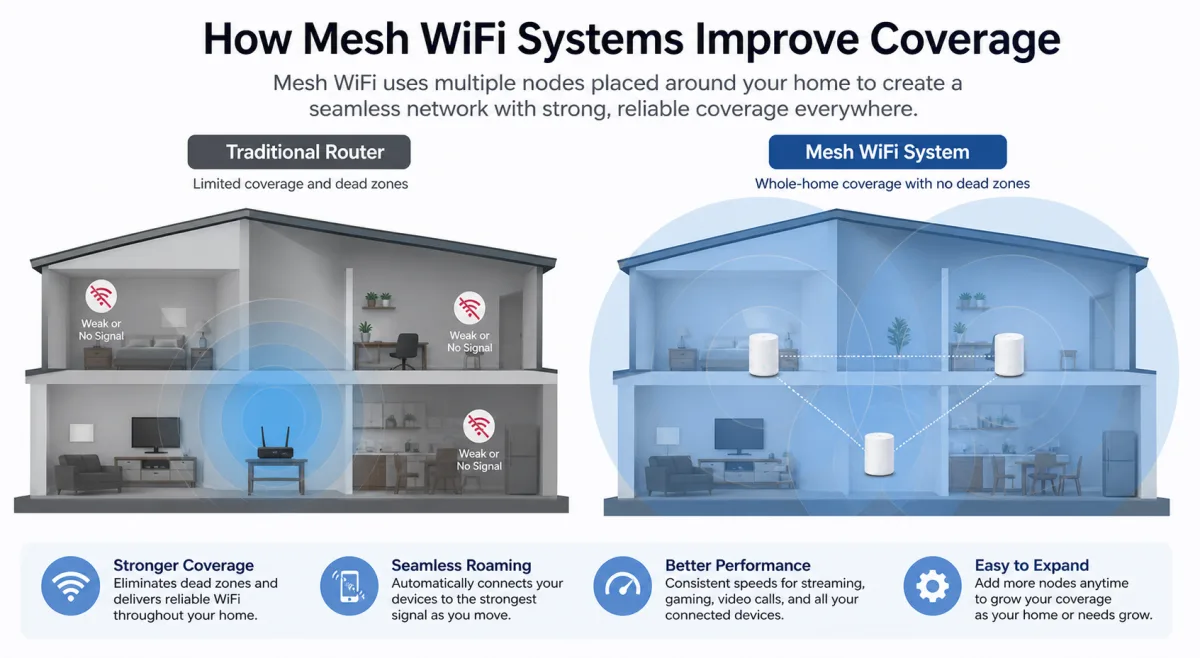
Your in-home network also plays a role. An old router, poorly placed Wi-Fi access points, or too many devices connected wirelessly can create internal bottlenecks. While these aren't "scientific reasons" for overall internet slowdowns at night, they exacerbate the problem by adding another layer of inefficiency when the external network is already struggling. Ensuring your internal network is optimized helps you get the most out of whatever bandwidth makes it to your home.
ISP Infrastructure and Capacity Management
ISPs are constantly investing in infrastructure upgrades, but it's an incredibly expensive and complex undertaking. They must balance the cost of expanding network capacity against the revenue generated from subscriptions. This often means they design their networks to handle typical peak loads, but extreme or unexpected surges can still overwhelm the system. It's a delicate balancing act.
They also employ various traffic management techniques. Sometimes, this includes "throttling" specific types of traffic, like torrenting or large downloads, during peak hours to ensure a baseline experience for all users. While ISPs generally state they don't discriminate against legal content, managing network resources effectively sometimes involves prioritizing certain data types over others. This isn't a malicious act; it's a necessity to prevent total network collapse when demand is exceptionally high.
Think about it: building out new fiber lines, upgrading data centers, and installing more powerful routers and switches costs billions. ISPs often prioritize upgrades in areas with the highest population density or where competition is fiercest. This leaves some regions with older, less robust infrastructure that struggles more acutely under the nightly strain. It's a continuous cycle of demand meeting supply, and supply often lags behind rapidly escalating demand for higher speeds and more reliable connections.
The Impact of Global Traffic and Content Delivery Networks
Your internet traffic doesn't just stay local; it often travels across continents to reach its destination. For example, if you're streaming a show hosted on a server in California while you're on the East Coast, that data traverses national backbone networks. When you're gaming with friends across the globe, your data packets are crossing oceans via submarine cables. These global pathways also experience their own versions of rush hour, compounding local congestion issues.
Content Delivery Networks (CDNs) help alleviate this by caching popular content closer to users. When you access a popular streaming service, the video might be delivered from a server in your city or region, rather than from the service's main data center far away. This significantly reduces the distance data needs to travel and offloads traffic from core networks. However, even CDNs have capacity limits. If a major new release drops on a streaming platform, and millions try to access it simultaneously, even the most robust CDN can struggle to keep up, leading to a dip in performance.
Here's a list of factors contributing to global and CDN strain:
- Geographic Distance: Longer distances mean more hops and potential for latency.
- Submarine Cable Capacity: While vast, these underwater cables can still be congested during peak international usage.
- Peering Agreements: The agreements between different ISPs and content providers dictate how traffic is exchanged, which can introduce bottlenecks.
- Server Load: The origin servers for popular websites or services can become overwhelmed by simultaneous requests.
- Software Updates: Large game or operating system updates, often scheduled for late hours, create massive, concentrated download spikes.
So, when your internet slows down at night, it might not just be your local neighborhood; it could be a ripple effect from a global surge in data traffic, even with the sophisticated systems designed to manage it.
What This Means for You: Navigating Nightly Lags
Understanding these scientific and infrastructural reasons is the first step to managing your expectations and potentially improving your experience. You're not alone in facing these slowdowns; they're a systemic issue born from collective usage patterns and the economics of network design. What can you realistically do when the internet slows down at night?
First, don't immediately blame your router. While an old router or poor Wi-Fi setup can exacerbate problems, the core issue often lies upstream. Test your internet speed during peak and off-peak hours using reliable speed test sites like Ookla Speedtest. This gives you concrete data to discuss with your ISP. If your speeds consistently fall significantly below your advertised plan during evenings, you have grounds to inquire about network congestion in your area.
Consider upgrading your internet plan if your current bandwidth can't keep up with your household's demands, especially if you have multiple users streaming or gaming simultaneously. While this won't solve systemic congestion, more bandwidth means you'll hit your personal ceiling later. You might also explore switching to a fiber optic provider if available in your area, as these networks generally offer more stable speeds due to their dedicated connections.
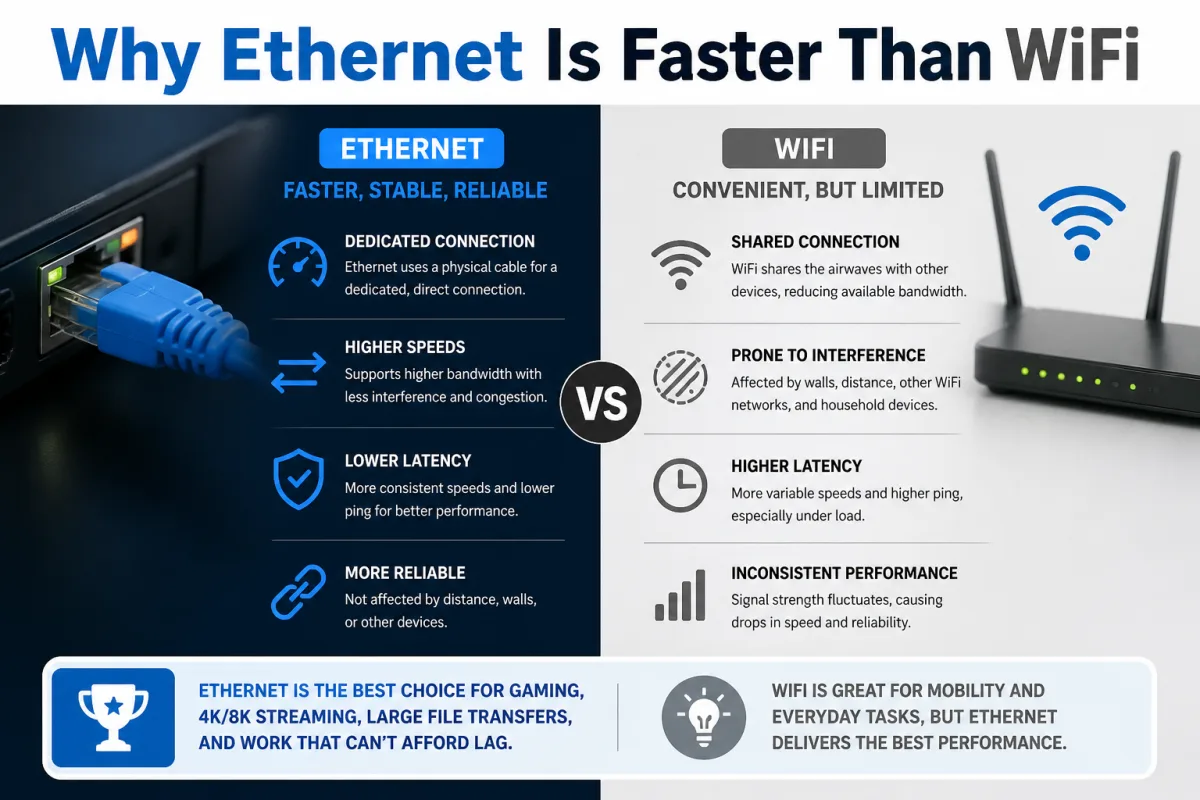
For immediate relief, try optimizing your home network. Ensure your router is centrally located and updated. Use Ethernet cables for critical devices like gaming consoles or streaming boxes to bypass Wi-Fi interference. Also, check for bandwidth-hogging background processes on your devices. Sometimes, it's the combination of external congestion and internal inefficiencies that creates the worst experience.
Frequently Asked Questions
Why does my internet get slow at certain times of the day?
Your internet typically slows down at certain times, especially evenings, due to peak network congestion. This happens when a large number of users in your area or on your ISP's network simultaneously demand high bandwidth for activities like streaming and gaming, overwhelming the available capacity.
Is my ISP intentionally slowing down my internet at night?
ISPs generally don't intentionally slow down your entire internet connection. However, they do employ traffic management techniques that might prioritize certain types of data or throttle specific bandwidth-heavy activities (like large downloads) during peak hours to ensure a more stable experience for all users.
What's the difference between bandwidth and internet speed?
Bandwidth refers to the maximum amount of data that can be transferred over a connection in a given time, like the width of a pipe. Internet speed is the rate at which data actually travels, or how fast water flows through that pipe. During congestion, your speed drops because the available bandwidth is shared among many users.