My Honest Take on the XPPen Deco Pro LW 2nd
As someone who spends a good chunk of my day in front of a screen, dabbling in digital art, animation, and a fair bit of video editing, I’m always on the lookout for tools that can genuinely improve my workflow. When the XPPen Wireless Drawing Tablet Deco Pro LW 2nd popped up, I was intrigued. An 11-inch wireless tablet with a new stylus and a key-dial? Sign me up! I decided to take the plunge and see if it could live up to the hype. After several weeks of putting it through its paces across various applications, here’s my detailed, unfiltered review to help you decide if it’s the right fit for your creative journey.
First Impressions & Build Quality
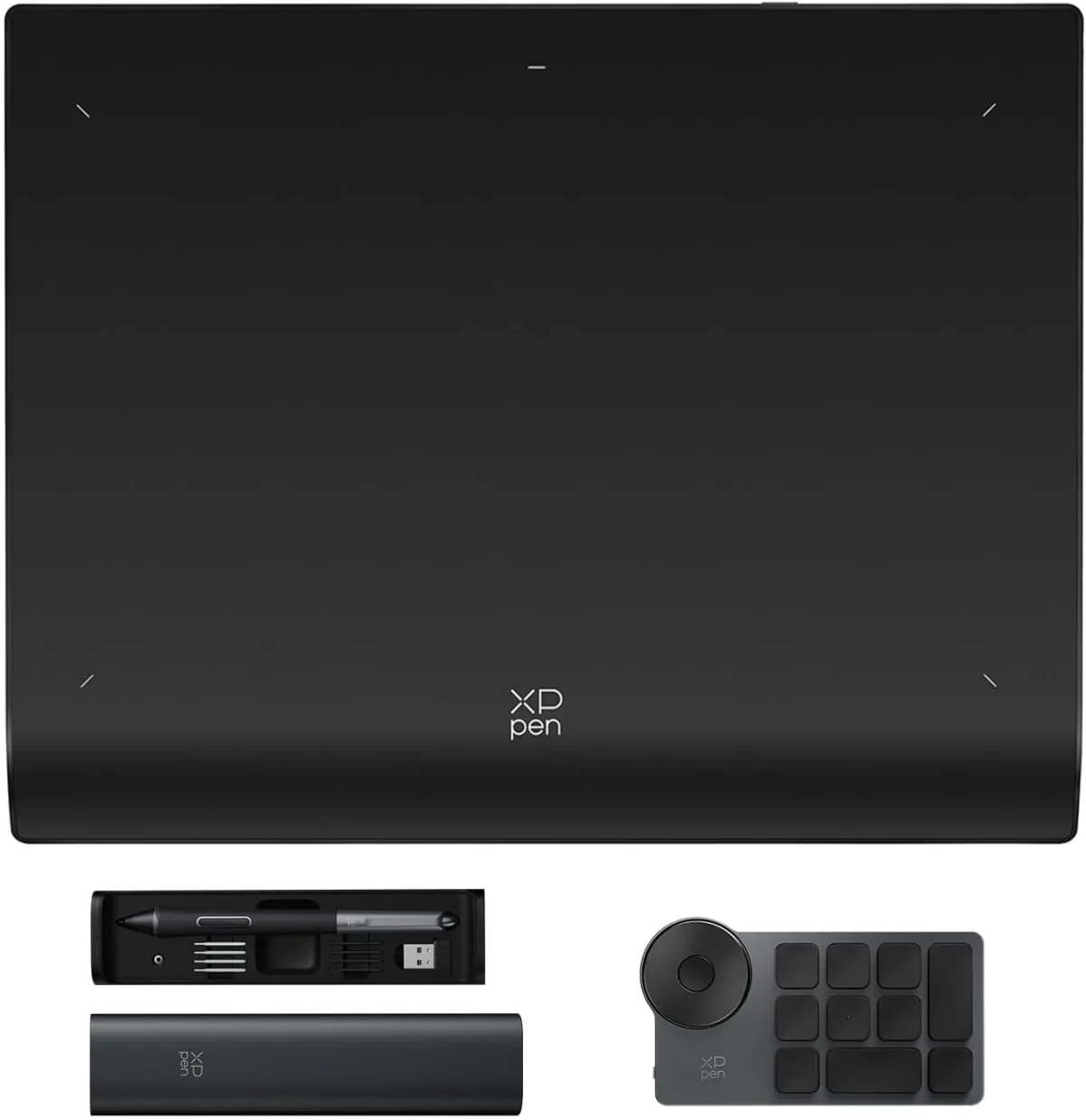
The XPPen Deco Pro LW 2nd arrived in a sleek box, and right away, I noticed the premium feel. Unboxing it was a pleasant experience; everything was neatly organized. The tablet itself is impressively slim and feels sturdy, thanks to its aluminum alloy casing. It’s got a decent weight to it – not heavy enough to be a burden for portability, but enough to feel substantial and well-built. The 11-inch active area felt just right for my desk setup, providing ample space without being overwhelmingly large. I really appreciate the minimalist design; it looks professional and doesn't take up too much real estate.
Setting it up was pretty straightforward. I downloaded the latest drivers from XPPen's website, plugged in the USB-C cable initially, and within minutes, I was mapping the active area to my dual monitors. The inclusion of both USB-C and Bluetooth connectivity right out of the box is a huge plus, offering flexibility depending on your setup.
The Star of the Show: X3 Pro Stylus
This is where the Deco Pro LW 2nd really shines. The new X3 Pro Stylus is a game-changer. XPPen boasts 16,384 pressure levels, and while I can’t quantify that exactly, I can tell you the sensitivity is phenomenal. Drawing with it felt incredibly natural, almost like using a traditional pen on paper. The lines transition smoothly from thin to thick with minimal effort, and I found myself having much better control over my strokes, whether I was sketching, inking, or painting in Photoshop or Clip Studio Paint.
The stylus itself is comfortable to hold, not too light, not too heavy, and it doesn't require charging, which is always a relief. The tilt recognition also performed flawlessly, allowing for expressive shading and brushwork. I've used tablets with older styluses, and the improvement here is genuinely noticeable. This stylus is definitely a highlight and a major reason to consider this tablet. If you want to experience this precision yourself, you can check today's price for this impressive piece of tech.
Wireless Freedom & Connectivity
The "Wireless" in its name isn't just for show. I primarily used the Bluetooth connection, and I was genuinely impressed with its stability. I experienced minimal to no lag during my drawing and editing sessions, even when moving around my workspace a bit. The freedom of not having a cable tethering the tablet to my computer is a huge quality-of-life improvement, especially when I want to lean back or work from a slightly different angle. The built-in battery held up well, giving me many hours of continuous work before needing a recharge. When it did need juice, the USB-C connection made charging quick and easy, and I could continue working while it charged.
The Mini Key-dial: A Handy Companion
The separate Mini Key-dial was a pleasant surprise. Initially, I thought it might be a bit gimmicky, but it quickly became an indispensable part of my workflow. It has ten customizable shortcut keys and a mechanical dial. I mapped my most frequent commands like undo, redo, zoom in/out, brush size, and layer switching. Having these physical buttons and a tactile dial at my fingertips, separate from the main tablet, meant I rarely had to reach for my keyboard. It’s incredibly intuitive and significantly sped up my process. The fact that it's wireless too just adds to the overall untethered experience.
Performance in Action: Art, Animation, & Video Editing
I put the Deco Pro LW 2nd through a rigorous test in various applications:
- Digital Art (Photoshop, Clip Studio Paint): This is where the tablet truly shines. The X3 Pro Stylus, combined with the smooth surface, delivers an excellent drawing experience. Lines are crisp, pressure sensitivity is superb, and I felt a strong connection between my hand and the digital canvas. Whether I was rough sketching or doing detailed line art, the tablet kept up without a hitch.
- Animation (Toon Boom Harmony, Krita): For frame-by-frame animation, precision is key. The tablet allowed for fluid drawing and efficient navigation. The key-dial was a lifesaver for quickly jumping between frames or adjusting brush properties.
- Video Editing (Premiere Pro, DaVinci Resolve): I don't typically use a drawing tablet for video editing, but I wanted to see how it performed. For precise scrubbing along timelines, adjusting color grades, or even subtle mask work, the stylus offered a level of precision that a mouse just can't match. It's not a primary use case for everyone, but it definitely added a layer of control for detailed tasks.
The drivers were generally stable across all these applications. I did have one minor hiccup initially with Photoshop not recognizing pressure, but a quick restart of the software (and making sure I had the latest drivers) resolved it immediately. This is pretty standard for graphics tablets, so it wasn't a deal-breaker.
Pros and Cons
Pros:
- Exceptional X3 Pro Stylus: The 16K pressure levels and tilt support offer incredibly precise and natural drawing.
- Reliable Wireless Connectivity: Bluetooth worked flawlessly for me, providing true freedom.
- Sturdy & Premium Build: Slim aluminum alloy design feels robust and looks great.
- Handy Mini Key-dial: Significantly boosts workflow with customizable shortcuts and a tactile dial.
- Good Active Area: 11 inches is a sweet spot for balance between workspace and portability.
- Battery-free Stylus: No need to worry about charging your pen.
- Versatile Use: Excellent for digital art, good for animation, surprisingly useful for video editing.
Cons:
- No Screen: This is a non-screen tablet, so if you absolutely need to draw directly on a display, this isn't for you (but you already knew that!).
- Initial Driver Setup: While straightforward, ensuring the latest drivers are installed and sometimes needing a software restart is par for the course with most graphics tablets.
- Learning Curve for Key-dial: It takes a little time to customize and get used to the key-dial, but it’s worth the effort.
Who Should Buy This?
If you're a digital artist, animator, or even a video editor looking for a precise input device, the XPPen Deco Pro LW 2nd is an excellent choice. It's particularly great for those who value wireless freedom and a highly sensitive, battery-free stylus. Hobbyists looking to upgrade from an older, less responsive tablet will find a significant improvement here, and even professionals might find it a solid, reliable workhorse, especially if they travel or prefer a minimalist setup. If you're serious about your craft and want a tool that can keep up without breaking the bank, I highly recommend you grab it on Amazon.
Who Should Skip It?
If your budget is extremely tight, or if you absolutely cannot work without seeing your lines appear directly under your pen on a screen, then this isn't for you. You'd need to look at screen-based drawing tablets, which are generally a different price point. Also, if you rarely use digital art software or editing suites, the investment might be overkill, and a simpler, cheaper tablet might suffice.
Final Verdict
I genuinely enjoyed my time with the XPPen Wireless Drawing Tablet Deco Pro LW 2nd. It’s a well-designed, high-performing non-screen tablet that truly delivers on its promises. The X3 Pro Stylus is a standout feature, making drawing feel incredibly intuitive and precise. The wireless functionality is robust, and the Mini Key-dial, once customized, becomes an invaluable tool for speeding up your workflow. For anyone looking to enhance their digital creative process without the hefty price tag of a display tablet, this is a fantastic option. It has certainly earned its spot on my desk, and I think it could earn a spot on yours too. If you're on the fence, I'd say it's definitely worth checking out – you can see what others paid and read more reviews there.