My Personal Experience with the HY300-ULTRA Mini Projector
I'm always on the hunt for cool tech gadgets that actually make my life more fun, and when I stumbled upon the HY300-ULTRA Mini Projector, I was instantly intrigued. The idea of a tiny, portable projector with WiFi6 and auto keystone correction sounded almost too good to be true for its price point. I picked one up, hoping it would be a fun addition to my entertainment setup, especially for impromptu movie nights or backyard projections. After a few weeks of putting it through its paces, I've got a pretty good handle on what this little device can and can't do.
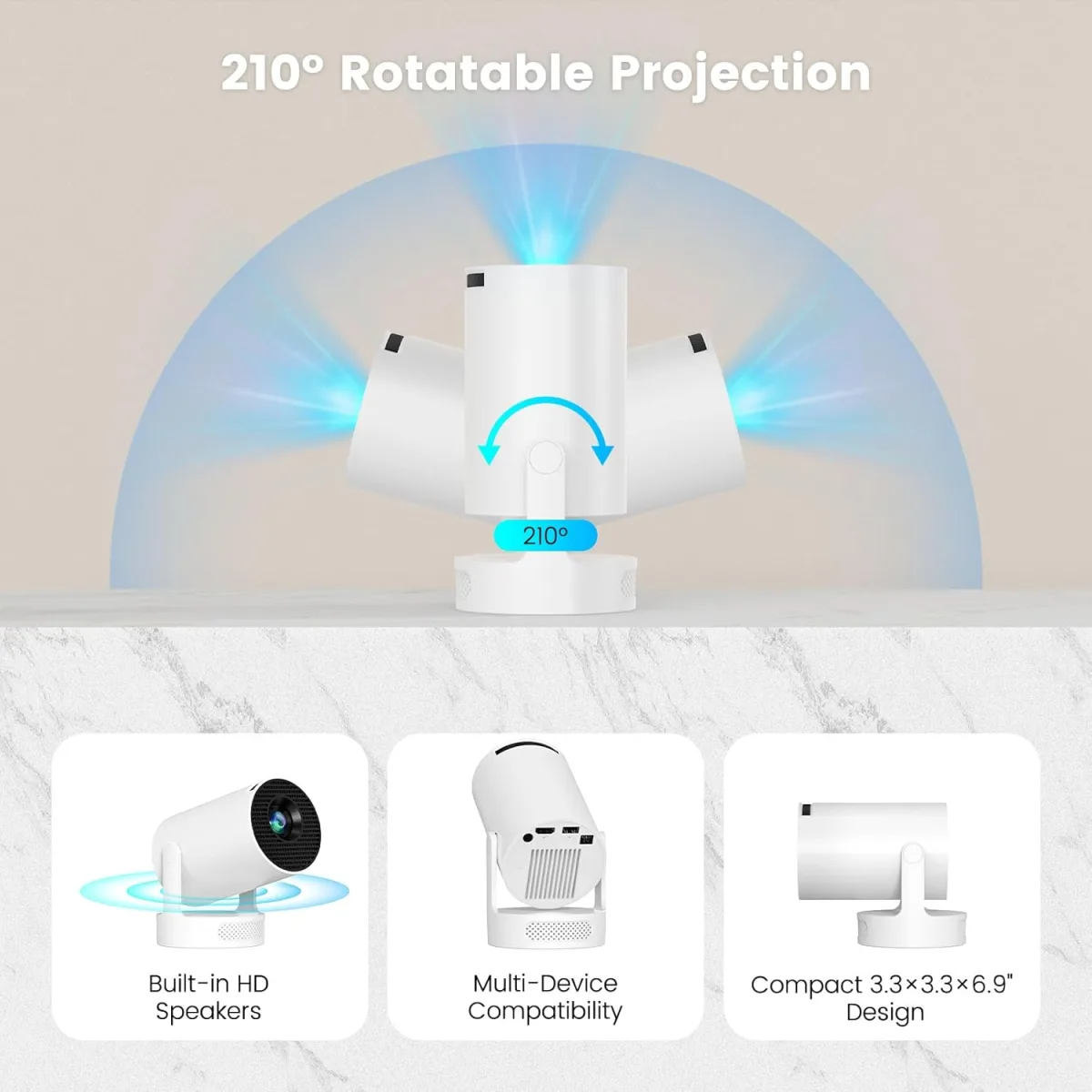
Right out of the box, I noticed how compact it is. It truly fits in the palm of your hand, which is fantastic for portability. It feels well-built, not flimsy plastic, which was a pleasant surprise. Setting it up was pretty straightforward. I plugged it in, and the initial boot-up was quick. The remote control is basic but functional, though I quickly found myself wishing for a pointer or a more intuitive navigation system when typing in Wi-Fi passwords.
Picture Quality and Brightness: Manage Your Expectations
Let's be real: this isn't a 4K, ultra-bright cinema projector, and it doesn't pretend to be. For its size and cost, I found the picture quality to be surprisingly decent. I primarily tested it in a dimly lit room or after sunset outdoors. In these conditions, it projected a clear, vibrant enough image. The native resolution is 720p, upscaled to 1080p, which is perfectly fine for casual viewing of movies, TV shows, or even some YouTube videos. Text, however, can get a bit soft around the edges, so I wouldn't recommend it for presentations where crisp detail is paramount.
Brightness is where you really need to manage your expectations. If you try to use this in a brightly lit room or even a moderately lit one during the day, you'll be disappointed. The image washes out considerably. But once the lights are low, it shines (pun intended). I projected an image up to about 80-90 inches, and it held up well enough for a fun viewing experience. Going much larger than that starts to degrade the image quality noticeably.
Smart Features: WiFi6, Bluetooth, and Auto Keystone
These are the features that really caught my eye. The HY300-ULTRA Mini Projector boasts WiFi6, and while I don't have a WiFi6 router, its general wireless performance was solid. Streaming from apps like Netflix, YouTube, and Prime Video (which are pre-installed or easily downloadable) worked without major buffering issues, assuming a good internet connection. Screen mirroring from my phone was also fairly seamless, though there was a slight delay as expected.
The Bluetooth connectivity is a huge plus. The built-in speaker is... well, it's there. It's adequate for dialogue but lacks any real depth. Connecting a separate Bluetooth speaker, however, transforms the audio experience entirely. I paired it with a portable JBL speaker, and suddenly, I had a much more immersive setup. This is almost a must-do if you care about sound.
Now, for the auto keystone correction – this feature genuinely surprised me. I've used other mini projectors where keystone adjustment was a fiddly, manual affair. The HY300-ULTRA did a pretty good job of automatically correcting the image distortion when I placed it at an angle. It wasn't always perfect, and sometimes I had to fine-tune it manually, but for quick setups, it saved a lot of hassle. The focus is still manual via a small wheel on the side, which is fine, but I sometimes wished it was automatic too.
Operating System and Usability
The projector runs on a customized Android system. It’s fairly basic but gets the job done. Navigation with the remote can feel a little clunky, especially when trying to type. I found myself wishing it had a touchscreen or a better remote for text input. However, once you're in an app and playing content, it's smooth enough. The app store is decent, letting you download popular streaming services, which is a huge convenience. I didn't have to hook up an external streaming stick, which keeps the setup super clean and portable.
Pros and Cons
- Pros:
- Ultra-Portable: Seriously small and lightweight, easy to take anywhere.
- Auto Keystone Correction: Mostly works well, saves time during setup.
- Built-in Android OS: Stream directly from apps without extra devices.
- WiFi6 & Bluetooth: Good connectivity options for streaming and external audio.
- Decent Picture for Size/Price: In dark rooms, it delivers a watchable 720p image.
- Affordable: Great value for the features packed in. If you want to check today's price, I think you'll be pleasantly surprised.
- Cons:
- Brightness Limitations: Needs a very dark room for optimal viewing.
- Mediocre Built-in Speaker: External audio is highly recommended.
- Remote Navigation: Can be clunky for typing and menu navigation.
- 720p Native: Not for those seeking sharp, high-resolution details.
- Manual Focus: Requires fiddling with a wheel.
- Not for Bright Environments: Absolutely useless in daylight.
Who Should Buy This?
This projector is perfect for:
- Casual movie watchers: If you want to throw up a movie on a wall for fun, indoors or outdoors after dark.
- Campers/Travelers: Its portability makes it ideal for taking on trips or camping adventures.
- Kids' rooms: Great for projecting cartoons or bedtime stories onto a ceiling.
- Budget-conscious buyers: Looking for smart projector features without breaking the bank.
- Anyone needing a secondary, portable display: For quick gaming sessions on the go or sharing content.
Who Should Skip It?
You might want to look elsewhere if you are:
- A serious cinephile: If you demand pristine 4K resolution, deep blacks, and perfect color accuracy.
- Planning to use it in well-lit rooms: It simply won't perform.
- Replacing a primary home theater projector: This is a companion device, not a main attraction.
- Someone who needs crystal-clear text for presentations: The resolution isn't quite up to that task.
- Expecting premium audio out of the box: You'll need external speakers.
Final Verdict
The HY300-ULTRA Mini Projector is a really neat little gadget that delivers a surprising amount of functionality for its compact size and price. It’s not going to replace a high-end home theater projector, but it was never designed to. What it does, it does well: providing convenient, portable big-screen entertainment in dark environments. The WiFi6, Bluetooth, and especially the auto keystone are features you often find on much more expensive units, making this a fantastic value.
If you understand its limitations and are looking for a fun, flexible, and truly portable projector for casual use, backyard movie nights, or camping trips, then I think you'll be quite happy with it. It's become a go-to for me when I just want to relax and project something fun without a lot of fuss. If you're ready to add some portable big-screen fun to your life, you can grab it on Amazon.