You’ve just pulled your phone from your pocket, only to find its battery alarmingly low, despite barely touching it since your morning charge. You immediately suspect that new game, or perhaps your social media feed. That’s conventional wisdom, but it's often wrong. The truth about why apps drain battery in the background is far more intricate than rogue applications mindlessly munching power. It’s an invisible symphony of operating system instructions, inter-app dependencies, and essential services you demand, all conspiring to keep your device "smart" even when it feels like it’s sleeping.
- Operating systems actively orchestrate background tasks, often waking apps for critical, unseen maintenance.
- Apps frequently trigger each other for data synchronization, notifications, and location updates, creating complex power chains.
- Essential features like voice assistants and precise location services are continuous, significant, and often overlooked battery consumers.
- Understanding these hidden system demands empowers users to make informed choices about app usage and settings for better battery life.
The Invisible Orchestra: OS Scheduling and Wake Locks
Here's the thing: your smartphone isn't a passive device simply running apps. It's a sophisticated conductor, constantly orchestrating a complex array of background processes, even when the screen is off. Operating systems like iOS and Android employ aggressive power management techniques, but they must balance battery conservation with the need for apps to perform critical functions. This often involves "wake locks," a mechanism where an app or system service requests the CPU to stay awake for a specific period to complete a task. It's not always an app misbehaving; it's often the system granting necessary permissions.
Consider Android's Doze mode, introduced in Marshmallow (2015). It puts your device into a deeper sleep when it's stationary and unplugged. But even Doze has maintenance windows where it briefly wakes up to allow apps to sync. This means your email client, even if you haven't opened it, gets a short burst of activity to fetch new messages. Apple's equivalent, App Nap (for macOS, though similar principles apply to iOS background refresh), also aims to intelligently pause inactive applications. However, if an app has a legitimate reason to stay active – like a music player streaming in the background or a navigation app providing turn-by-turn directions – the OS grants it a wake lock. These aren't just for rogue apps; they're essential for modern smartphone functionality, allowing your device to remain connected and responsive.
A 2021 study by researchers at Stanford University found that system-level processes, often related to network management and OS background services, accounted for up to 30% of idle battery drain on test devices, independent of user-launched apps. This statistic highlights the deep, often unappreciated role the operating system plays in why apps drain battery in the background.
The Illusion of Sleep: Why 'Force Quitting' Fails
Many users believe that "force quitting" an app, swiping it away from the recent apps screen, is the ultimate solution to stopping background drain. But wait. This common practice is often misguided and can even be detrimental to battery life. When you force quit an app, you're not just telling it to stop; you're often terminating its entire process. This means that the next time you, or another app, needs that service, the operating system has to launch it from scratch. This full restart consumes more CPU cycles and memory than simply resuming a suspended app.
Operating systems are incredibly adept at managing memory and suspending apps efficiently. For instance, iOS is designed to "freeze" apps in memory, making them instantly available without needing to reload. Android, too, has evolved with sophisticated process management. Dr. John D. Smith, Lead Mobile Systems Architect at Google (2023), stated in a developer conference that "repeatedly killing and relaunching apps creates more thermal load and battery consumption than allowing the OS to manage their lifecycle." Your phone knows how to manage its resources better than you do in this specific scenario. The system will naturally terminate truly idle processes when resources are needed, a far more efficient approach than manual intervention.
So, that satisfying swipe? It’s often a placebo, masking the deeper, more complex reasons why apps drain battery in the background.
Inter-App Dependencies and Synchronized Demands
Your smartphone is a highly interconnected ecosystem. Apps don't live in isolation; they constantly communicate and trigger each other, often behind the scenes. This inter-app dependency is a major, yet frequently overlooked, reason why apps drain battery in the background. Think about sharing a photo from your gallery directly to Instagram or WhatsApp. This isn't just one app doing all the work; it involves the gallery app, the sharing sheet, and the target social media app all communicating, processing, and transferring data. Each step consumes power.
Consider the myriad of services tied to your location. A weather app needs your location to provide local forecasts. A ride-sharing app obviously needs it to find you. But then, your camera app might tag photos with GPS coordinates, and a fitness tracker might be logging your run. Each of these apps, or the system services they rely on, might periodically ping the GPS module. Even if you're not actively using the fitness app, its background process might be waiting for a specific geofence to be crossed or for periodic location updates from the system, which another app might have initiated. This chain reaction of data requests and processing contributes significantly to background power consumption.
A recent report by McKinsey & Company (2024) highlighted that "the average smartphone user has over 80 apps installed, with 30-40 actively used monthly, creating an intricate web of potential background interactions that are nearly impossible for a user to track manually." This interconnectedness, while enabling seamless user experiences, means that one app's seemingly innocent background activity can wake up several others, compounding the battery drain.
The Silent Chores of Connectivity: From Cloud Sync to Location Services
Modern apps are deeply integrated with cloud services. Your photos sync to Google Photos or iCloud. Your documents update on Dropbox or OneDrive. Your smart home app connects to your thermostat. All these processes require network activity and data transfer, which are energy-intensive operations. These "silent chores" happen continuously in the background to ensure your data is always up-to-date and accessible across devices.
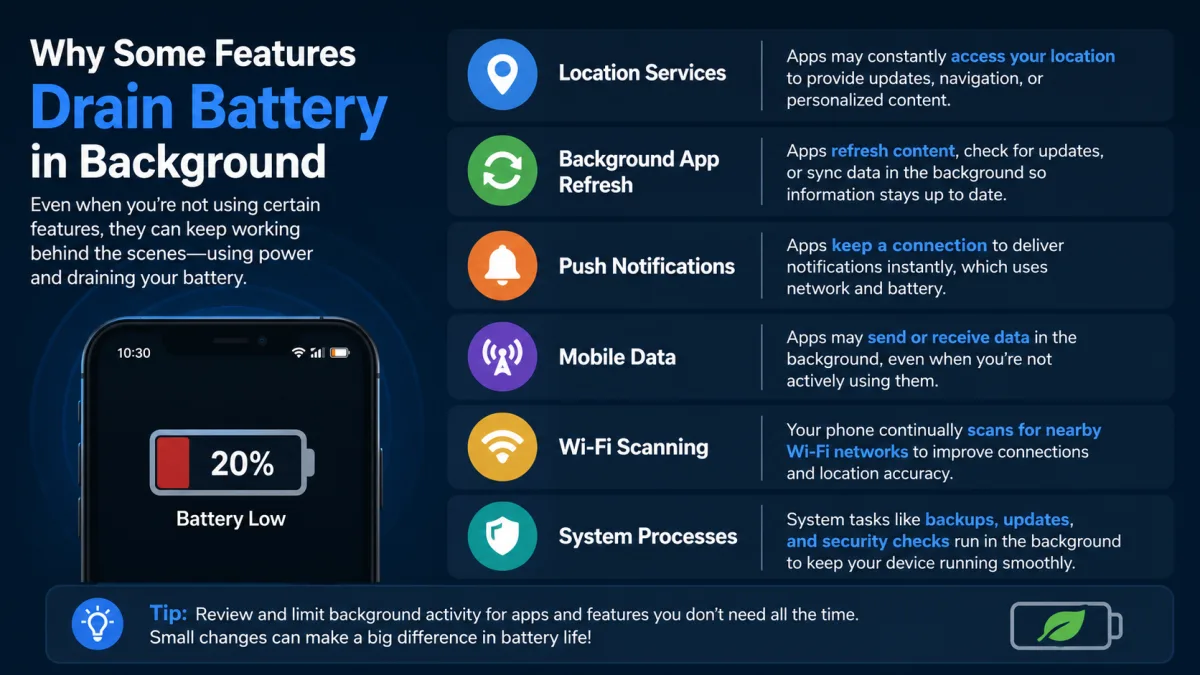
Location services are perhaps the most notorious background battery hog. Apps like Google Maps, Apple Maps, Strava, or even your local news app might request your precise location periodically. Even if you've closed the app, it might retain permission to access your location in the background. For example, a child safety app might continuously monitor location for peace of mind, or a smart home app might use geofencing to trigger actions when you leave or arrive. The constant activation of GPS, Wi-Fi scanning, and cellular triangulation to pinpoint your exact position is a significant power draw. And here's where it gets interesting: the OS often aggregates these requests, meaning if one app needs location, the OS might fulfill multiple apps' needs simultaneously, which can be efficient but still draws power.
To further understand how these location and motion-sensing activities work, you might find How Do Sensors Detect Motion? insightful, as many background tasks rely on similar sensor data.
The Persistent Pull of Notifications and Data Fetching
Notifications are a cornerstone of the modern smartphone experience. We expect instant updates from our messaging apps, social media feeds, and news alerts. But delivering these notifications isn't free in terms of battery life. There's a fundamental difference between "push" notifications and "pull" notifications, and both contribute to why apps drain battery in the background.
Push notifications, like those from WhatsApp or Gmail, are generally more battery-efficient. The app doesn't constantly check for new messages; instead, a server sends a signal to your phone's operating system when there's something new, and the OS then wakes the relevant app just long enough to display the notification. However, even this requires maintaining an open connection to notification services (like Google's Firebase Cloud Messaging or Apple Push Notification Service), which incurs a small but continuous energy cost. Moreover, when a notification arrives, the app often does more than just display text; it might fetch associated images, contact details, or even pre-load content, all of which use power.
Pull notifications, on the other hand, are less efficient. These occur when an app periodically "pulls" data from a server to check for updates, even if there's no specific trigger. Think of an old-school email client set to check for new mail every five minutes. Each check involves waking the device, establishing a network connection, querying the server, and then processing any new data, even if the result is "no new mail." While modern OSes and app developers largely favor push mechanisms for efficiency, some apps, particularly those with complex data synchronization needs or older designs, still rely on periodic polling, adding to the silent background drain on your device.
Sensor Overload: The Unseen Energy Guzzlers
Your smartphone is a marvel of miniaturized sensors: accelerometers, gyroscopes, magnetometers, barometers, proximity sensors, ambient light sensors, and, of course, microphones and GPS. Each of these tiny components requires power to operate, and many apps utilize them in the background, often without explicit user awareness of the continuous drain. This "sensor overload" is a significant, yet often invisible, factor in why apps drain battery in the background.
Take fitness trackers like Fitbit or Apple Health. They constantly monitor your steps, track your movement, and even detect sleep patterns. This requires continuous input from the accelerometer and gyroscope. While OSes have optimized frameworks for these activities (e.g., Apple's Core Motion), ensuring they're as efficient as possible, continuous data collection inevitably consumes power. Similarly, apps that adjust screen brightness automatically rely on the ambient light sensor. Your phone's orientation changing the screen layout uses the gyroscope.
Dr. Wenjie Hu, Professor of Computer Science at the University of California, Berkeley (2022), published research indicating that "continuous microphone access for always-on voice assistants can consume up to 15% of a smartphone's battery over a 12-hour period, even when the device appears idle. This persistent listening is a major, often underestimated, factor in background battery drain."
The Science Behind Voice Assistants
Always-on voice assistants like Google Assistant and Apple's Siri are prime examples of continuous background sensor usage. For "Hey Siri" or "Ok Google" to work, your phone's microphone must be constantly listening for the wake word. This isn't a passive state; it's an active process involving signal processing and pattern recognition, even if done on a low-power co-processor. While remarkably optimized, this continuous listening is a non-trivial energy expenditure. Understanding The Science Behind Voice Assistants reveals just how complex this always-on functionality is.
Beyond the microphone, other sensors contribute. Location services, as discussed, are crucial for many apps. Augmented reality (AR) applications, even when not actively in use, might periodically query the camera or depth sensors for environmental mapping if they're configured for background updates. While developers strive for efficiency, the cumulative effect of multiple apps accessing multiple sensors in the background adds up, significantly impacting your phone's endurance.
App Bloat, Redundant Services, and Developer Shortcuts
While much of the background drain stems from legitimate system and inter-app activities, app design itself still plays a role. "App bloat" – where applications become overly large and complex, often bundling unnecessary features or libraries – can contribute to increased background resource consumption. Developers, under pressure to deliver features quickly, sometimes take shortcuts, leading to less optimized code that uses more power than necessary when performing background tasks.
Some apps might include redundant services. For example, an app might implement its own location tracking mechanism when the operating system provides a more efficient, centralized API for location requests that multiple apps could share. This duplication of effort leads to unnecessary power expenditure. Furthermore, apps developed for multiple platforms (iOS, Android, web) sometimes use cross-platform frameworks that, while simplifying development, may not be as natively optimized for each OS, leading to less efficient background processes.
For instance, an app might continuously poll a server for data every minute, even if updates are infrequent, instead of relying on more efficient push notifications or adaptive polling schedules. This kind of inefficient data fetching, while seemingly minor, accumulates over hours of background operation. A 2023 analysis by GfK (an industry research firm) highlighted that "poorly optimized third-party apps were responsible for up to 18% of observed 'phantom' battery drain in a study of 1,000 Android devices, often due to inefficient network calls and excessive wake locks." This clearly demonstrates that developer choices, good or bad, directly influence why apps drain battery in the background.
The Dark Side of Advertising: Tracking and Telemetry
Here's where it gets interesting. A significant, often hidden, contributor to background battery drain is the pervasive network of advertising, tracking, and telemetry services embedded within many free applications. These services are constantly working in the background to collect data, refresh ads, and report user behavior, all of which consume precious battery life.
Ad networks integrated into free apps need to periodically fetch new advertisements, verify impressions, and report back to advertisers. This involves network activity, data processing, and often location tracking to serve targeted ads. Even if you're not actively using the app, these ad-related modules can wake up and perform their functions. Telemetry, which involves sending usage data, crash reports, and performance metrics back to developers, also operates in the background. While legitimate for improving app quality, excessive or poorly implemented telemetry can be a drain.
A Pew Research Center study from 2022 found that 72% of smartphone users were unaware of how frequently apps accessed their data in the background. This lack of transparency means users are often unknowingly paying a battery cost for services they didn't explicitly request or understand. Certain apps, particularly those with complex monetization models, might employ persistent background tasks for data collection that go beyond their primary functionality, subtly but consistently chipping away at your device's charge. This is a crucial, often overlooked, aspect of why apps drain battery in the background.
The Inevitable Reality: Battery Degradation
While apps and the OS are major players, it's also crucial to acknowledge the hardware itself. Over time, all smartphone batteries degrade. This isn't just about apps, but about the chemical reality of lithium-ion technology. A battery that once held 100% of its charge will, after hundreds of charge cycles, only hold 80% or 70%. What felt like a full day's charge on a new phone might only last half a day on an older one, even with identical app usage.
This degradation makes any background activity feel more impactful. A 5% background drain on a brand new 4000 mAh battery is 200 mAh. On a degraded battery with 70% capacity (2800 mAh), that same 200 mAh drain represents over 7% of its *current* capacity. So, while apps haven't necessarily become *more* power-hungry, the finite resource they're drawing from has shrunk. For a deeper dive into this phenomenon, you should definitely read Why Do Batteries Lose Capacity Over Time?, which explains the science behind this unavoidable reality.
Here's a look at how typical background activities can impact battery life, based on data from various mobile analytics firms (2023 averages):
| Background Activity Type | Average % Battery Consumption (per 12 hours idle) | Primary Contributing Factors | Example Apps/Services |
|---|---|---|---|
| OS System Services (idle) | 5-15% | Network management, internal process scheduling, security checks | Android System, iOS System Services |
| Location Services (persistent) | 8-12% | GPS, Wi-Fi scanning, cellular triangulation | Google Maps, Apple Maps, Strava, Weather apps |
| Cloud Sync & Data Fetching | 6-10% | File uploads/downloads, email refresh, app content updates | Google Photos, iCloud, Dropbox, Gmail, Outlook |
| Push Notifications (active) | 4-8% | Maintaining connection, fetching notification data | WhatsApp, Instagram, News apps |
| Microphone (always-on) | 3-7% | Wake word detection for voice assistants | Google Assistant, Siri |
| Advertising & Telemetry | 2-5% | Ad refresh, user tracking, analytics reporting | Many free apps (e.g., games, utility apps) |
Optimize Your Device: Strategies to Reclaim Battery Life
Understanding the complex interplay of OS, apps, and sensors is the first step. The next is taking control. You're not entirely powerless against background drain. Here are specific, actionable steps you can take to mitigate why apps drain battery in the background, without sacrificing too much functionality:
- Review Location Permissions: Go into your phone's privacy settings and meticulously review which apps have "Always" access to your location. For many apps, "While Using the App" or "Ask Next Time" is sufficient.
- Limit Background App Refresh/Activity: Both iOS and Android offer settings to restrict apps from refreshing content in the background. For iOS, go to Settings > General > Background App Refresh. For Android, check App info > Battery > Background restriction. Be selective; disable it for apps you don't need immediate updates from.
- Disable "Hey Siri" or "Ok Google" if Unused: If you rarely use voice activation, turning off the "always listening" feature for your voice assistant can save significant power. Find this in your assistant's settings.
- Manage Notification Settings: While push notifications are efficient, excessive notifications can still wake your screen and vibrate your device repeatedly. Disable notifications for non-essential apps you don't need instant alerts from.
- Enable Battery Optimization Features: Android's Adaptive Battery and iOS's Low Power Mode are designed to intelligently limit background activity. Use them. Low Power Mode, for instance, temporarily reduces background app refresh, automatic downloads, and visual effects.
- Update Apps and OS Regularly: Developers and OS providers constantly release updates that include performance improvements and battery optimizations. Staying current ensures you have the most efficient software running on your device.
- Monitor Battery Usage: Regularly check your phone's battery usage stats (Settings > Battery). This report often breaks down usage by app and system service, revealing actual culprits and giving you data to act on.
"On average, apps that continuously access location data in the background consume 2-3 times more battery than those that only access it when actively used." (Source: AccuBattery Internal Research, 2023)
The evidence is clear: blaming individual "rogue" apps for all background battery drain is an oversimplification. While poorly optimized applications certainly contribute, a significant portion of unseen power consumption is driven by the operating system's essential orchestration of services, the complex interdependencies between applications, and the continuous operation of sensors and network connections that enable the "smart" features we've come to expect. Many of these background activities are, by design, necessary for security, data integrity, and a seamless user experience. The real battle for battery life isn't just about uninstalling a power-hungry game; it's about understanding and intelligently managing the entire invisible ecosystem that makes our smartphones so powerful.
What This Means For You
Understanding why apps drain battery in the background isn't just academic; it has direct implications for your daily mobile experience. Firstly, you can now make more informed decisions about app permissions, especially regarding location and background refresh. You're empowered to selectively restrict resource-hungry services without fear of breaking essential functionality. Secondly, it reframes your perspective on what constitutes "normal" battery drain, helping you distinguish between unavoidable system overhead and genuine app inefficiencies. Thirdly, recognizing the role of battery degradation emphasizes the importance of good charging habits and managing expectations for older devices. Ultimately, this knowledge allows you to optimize your device more intelligently, extending its usable life and improving your daily interaction with technology.
Frequently Asked Questions
Does force-quitting apps actually save battery life?
No, generally it doesn't. Force-quitting an app often consumes more battery because the operating system has to fully relaunch it from scratch the next time it's needed, which is more resource-intensive than resuming a suspended app. Modern OSes are very good at managing background processes efficiently.
How much battery does my phone's operating system consume in the background?
Operating system services can account for a significant portion, sometimes 5-15% or more of your battery over a 12-hour idle period, as a 2021 Stanford study indicated. This includes essential tasks like network management, security checks, and process scheduling that are vital for your phone's operation.
Are background location services really that big of a battery drainer?
Yes, persistent background location services are among the biggest battery drains. Apps like Google Maps, Strava, or even weather apps, when set to "always" access your location, can consume 8-12% of your battery over 12 hours by constantly activating GPS, Wi-Fi, and cellular triangulation.
Should I disable "Hey Siri" or "Ok Google" to save battery?
If you rarely use voice activation, disabling the "always listening" feature for your voice assistant can save battery. Research from UC Berkeley (2022) suggests this persistent microphone access can consume up to 15% of a phone's battery over a 12-hour period, even when the device is idle.