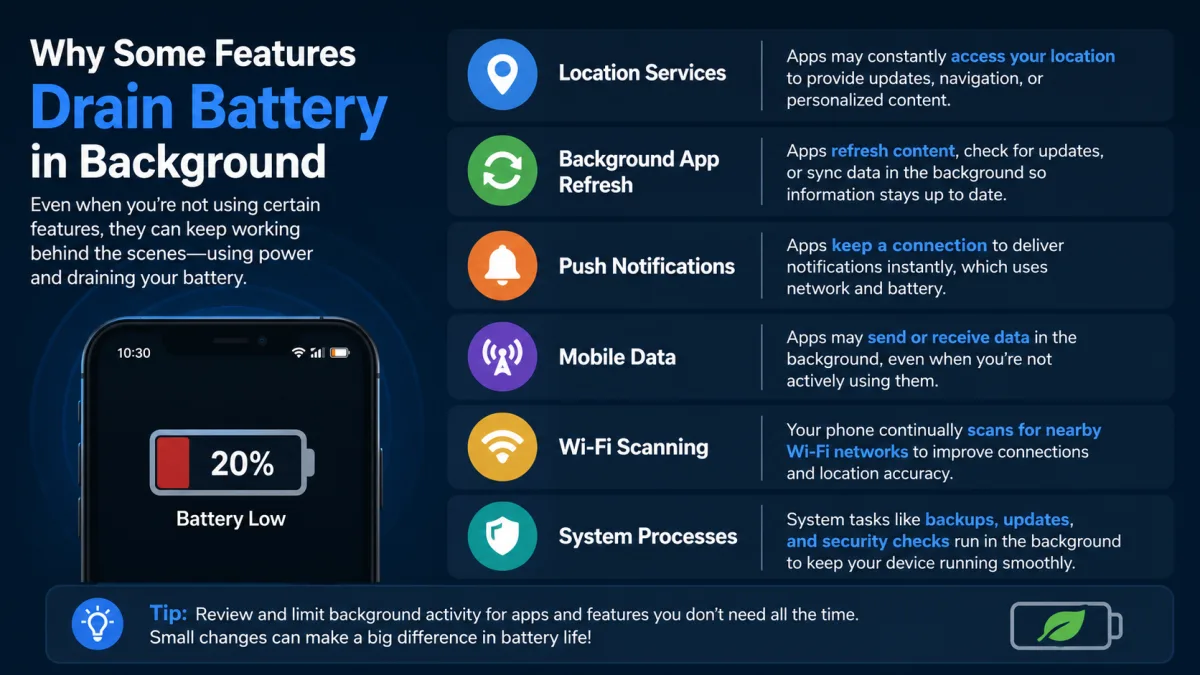
- Many features are *designed* for continuous background operation, prioritizing convenience over battery life.
- "Always-on" capabilities like proactive AI and seamless connectivity demand constant power, regardless of user settings.
- Operating system frameworks, while efficient, still facilitate a baseline drain for core system services.
- True user control over background battery usage is often limited, as critical features are deeply embedded.
The Invisible Workload: Why Features Aren't Truly "Off"
Conventional wisdom often points fingers at poorly optimized third-party apps or user-enabled background refresh settings when devices mysteriously run low on power. Here's the thing. While those are certainly factors, they only tell part of the story. A significant, often overlooked reason why some features drain battery in the background stems from fundamental design philosophies and the very architecture of modern mobile operating systems. Developers and tech giants have increasingly prioritized "always-on" intelligence, proactive assistance, and seamless cross-device integration. This isn't accidental; it's an intentional engineering choice, creating a persistent, often unavoidable power demand. Think about Apple’s "Find My" network, which allows you to locate lost devices even when they’re offline. This isn't magic; it's millions of iPhones, iPads, and MacBooks constantly emitting and detecting encrypted Bluetooth signals, operating as a vast, anonymous tracking network. Each device contributes a tiny bit of processing and radio activity, adding up to a cumulative, persistent drain on its battery. This feature, while incredibly useful in an emergency, operates at a system level, largely outside the typical "background app refresh" toggles. You can't simply turn off "Find My" without disabling a core security and recovery function, illustrating the tightrope developers walk between utility and power efficiency. This systemic background activity is often invisible to users, masquerading as low-level "system services" in battery usage statistics.System Services and Core Components: What You Can't Turn Off
It’s easy to focus on apps, but many background drains come from the very core of your device. Your phone's operating system, whether iOS or Android, includes a myriad of essential services that *must* run continuously for the device to function as expected. These include things like cellular radio management, Wi-Fi scanning, Bluetooth Low Energy (BLE) peripheral discovery, and basic location services. These aren't "apps" in the traditional sense, but fundamental components that ensure your phone can connect to networks, find accessories, and respond to basic commands. For instance, Android’s Location Services, even when set to "Wi-Fi and Bluetooth scanning only," will constantly poll for nearby networks and beacons. This constant scanning is crucial for features like accurate location tracking (even when GPS is less reliable indoors) and proximity-based device interactions, but it consumes power. Consider the Google Play Services framework on Android, which facilitates countless background tasks for apps, from push notifications to identity management. While Google has made significant strides in optimizing Play Services, notably with Project Volta and Doze Mode, its sheer scope means it remains a consistent, albeit efficient, background presence. Similarly, on iOS, processes like `locationd` and `mediaserverd` manage a wide array of background tasks, from GPS updates for maps to processing audio for Siri, often without a direct, user-facing app interaction. These are the silent workhorses, and their continuous operation is a primary reason why some features drain battery in background.Proactive AI and Predictive Analytics: Always Listening, Always Draining
The era of "smart" devices is here, and with it comes a new class of background power consumers: artificial intelligence and predictive analytics engines. These features promise convenience, anticipating your needs before you even articulate them. But that foresight comes at a cost, demanding constant background processing, sensor monitoring, and data analysis. Take voice assistants like Google Assistant, Apple’s Siri, or Amazon Alexa. While you might think they only activate when you say their wake word, the reality is more complex. Many devices employ low-power, always-on microphones and processing chips that are *constantly* listening for that specific phrase. Once detected, the main processor then wakes up, drawing significantly more power to interpret the command. This "hotword detection" is a classic example of a feature designed for continuous background operation. Google Pixel phones, for example, leverage the "Now Playing" feature, which identifies music playing in your environment without needing an internet connection. This is achieved through on-device machine learning models that are continuously analyzing ambient audio. It's incredibly clever and convenient, but it means a portion of the phone's processing power is dedicated to this task 24/7. Similarly, photo categorization and "memories" features on both iOS and Android process your entire photo library in the background, identifying faces, objects, and locations to create curated albums. This computationally intensive task runs opportunistically when your phone is charging or idle, but it still represents a significant, often invisible, workload that contributes to why some features drain battery in background.Dr. Lena Karlsson, a lead researcher in Mobile Power Efficiency at the Fraunhofer Institute for Integrated Circuits, stated in a 2024 interview with TechCrunch that "the industry's drive for proactive user experiences means shifting computational load from explicit user actions to continuous background monitoring. For instance, our research indicates that even highly optimized on-device neural networks for voice detection or sensor fusion can account for 5-7% of a smartphone's idle power consumption, a figure that's practically irreducible without compromising the feature's responsiveness."
Seamless Connectivity: The Cost of Always-On Networks
Modern devices are designed to be constantly connected, not just to the internet, but to each other. This seamless web of connectivity, while offering unparalleled convenience, is a major contributor to background battery drain. Features like Wi-Fi scanning, Bluetooth Low Energy (BLE) advertising and scanning, and precise location services are often active even when you’re not actively using an app that requires them. Consider the "Nearby Share" feature on Android or AirDrop on iOS. These rely on continuous Bluetooth and Wi-Fi Direct scanning to discover nearby compatible devices. While dormant, they’re still passively listening, ready to spring into action. This constant radio activity, even at low power, adds up. Bluetooth Low Energy (BLE) is a prime example. It’s designed to be highly efficient, but its ubiquitous use in smartwatches, fitness trackers, smart home devices, and even payment systems means your phone is often maintaining multiple persistent connections or constantly scanning for new ones. If you have a smartwatch, a pair of wireless earbuds, and a smart home hub, your phone is juggling three or more concurrent BLE connections, all requiring periodic updates and data exchange. Each tiny packet of data, each brief radio burst, consumes a small amount of energy. Multiplied over hours, this becomes a significant factor in why some features drain battery in background. Furthermore, cellular modems are always active, even when you're on Wi-Fi. They periodically check for signal strength, switch towers, and perform network registrations. In areas with poor cellular coverage, your modem has to work harder, boosting its signal to maintain a connection, which can be a substantial power sink, even if you're not making calls or using mobile data.Developer Priorities: Engagement Over Endurance
The business models driving the tech industry play a critical role in why some features drain battery in background. For many developers and platform providers, user engagement, data collection, and swift responsiveness are paramount. Battery longevity, while important, often takes a backseat to these more immediate priorities. An app that's always ready, always connected, and always delivering real-time updates is seen as a "better" app, even if it subtly chips away at your device's endurance.The Data Economy's Thirst
Data is the new oil, and many background processes are essentially pipelines for collecting it. From analytics on app usage patterns to location tracking for targeted advertising, countless features operate in the background specifically to gather information. This isn't inherently malicious; it often fuels improvements, personalization, and monetization for free services. However, transmitting data, even in small bursts, requires the radio modem to power up, which is one of the most energy-intensive components in a smartphone. A weather app updating every 15 minutes, a social media app fetching new feeds, or a news app pushing notifications—all contribute to this data-driven drain. A 2022 report by the Statista Digital Market Outlook projected mobile data traffic to reach 331 exabytes globally by 2028, a testament to the sheer volume of data constantly flowing, much of it facilitated by background operations.The User Experience Imperative
The demand for instant gratification also pushes developers towards continuous background operation. We expect notifications to arrive instantaneously, cloud backups to happen seamlessly, and smart home devices to respond without delay. To deliver this, features must maintain a certain level of "liveness" in the background. If a messaging app had to fully launch and connect to its server every time you received a message, the delay would be unacceptable. Thus, push notification services, which maintain persistent connections to servers, are essential. Similarly, cloud synchronization services for photos, documents, and settings work continuously in the background to ensure your data is always up-to-date across all your devices. This "always-synced" paradigm is incredibly convenient but necessitates constant background activity, adding to the battery's burden. This often means sacrificing a bit of battery life for a smoother, more integrated user experience.The Hidden Layers of Operating Systems
Operating systems like Android and iOS are incredibly sophisticated, employing numerous optimizations to manage background tasks and conserve power. However, even these optimizations can't entirely eliminate the drain from features designed for persistent activity. Android’s Doze mode, introduced in Marshmallow, and App Standby are designed to put apps into a low-power state when the device is stationary and unused. Yet, "whitelisted" apps or those with foreground services can bypass these restrictions. Similarly, iOS uses App Nap and intelligently schedules background refresh tasks to minimize impact. But here's where it gets interesting. Core system processes and features often operate outside these app-specific management systems. For example, system-level security scans, essential for detecting malware or ensuring system integrity, run periodically in the background. While these are critical for your device's health and security, they are still computational tasks that consume power. Another example is the "Live Activities" feature on iOS, introduced with iOS 16. This allows apps to display real-time information directly on the Lock Screen or in the Dynamic Island. While incredibly useful for tracking a sports score or a food delivery, maintaining these dynamic, frequently updating UI elements requires persistent background processing and network calls, making them a visible yet often overlooked reason why some features drain battery in background. This isn't just about apps; it's about the very operating system's architecture enabling a richer, but more power-hungry, user experience.Measuring the Invisible Drain: Tools and Techniques
Quantifying background battery drain can be challenging because many processes are opaque to the user. However, researchers and advanced users employ various tools and techniques to shed light on this hidden consumption. Battery usage statistics provided by iOS and Android offer a general overview, often categorizing drain under "System Services," "Home & Lock Screen," or specific app processes that include background activity. More sophisticated methods involve using developer tools, profiling software, and even specialized hardware to monitor power draw at a granular level. Tools like `adb shell dumpsys batterystats` on Android provide detailed reports on CPU usage, wake locks, and network activity per application and system service. Researchers at Stanford University's Mobile and Sensing Systems Lab have used custom hardware probes to measure the energy consumption of different radio interfaces (Wi-Fi, Bluetooth, Cellular) under various background conditions, revealing significant, often unexpected, power spikes during seemingly idle states. Their 2021 study, published in *ACM MobiSys*, showed that a smartphone in a low-signal cellular area could consume up to 30% more power during idle periods due to the modem constantly boosting its transmission power. Understanding these nuances is key to identifying the true culprits behind background battery drain.| Feature/Service | Typical Background Drain (mAh/hour) | Primary Power Consumers | Example Scenario | Source (Year) |
|---|---|---|---|---|
| Continuous GPS Tracking | 100-150 | GPS radio, CPU processing, cellular data | Navigation app running in background | AnandTech (2020) |
| Always-On Voice Assistant | 15-30 | Dedicated low-power DSP, main CPU (on wake) | "Hey Siri" or "Ok Google" detection | Qualcomm White Paper (2021) |
| Bluetooth Low Energy (BLE) Scan/Connect | 5-10 | BLE radio, system services | Smartwatch connected, device discovery | IEEE Wireless Comm. (2022) |
| Wi-Fi Scanning (Passive) | 3-7 | Wi-Fi radio, location services | Location accuracy for maps, "Find My" | Google Developer Blog (2023) |
| Cloud Photo Sync (Idle) | 20-50 | CPU processing, Wi-Fi/cellular data | Google Photos/iCloud Photos uploading new media | Ars Technica (2021) |
| Cellular Modem (Poor Signal Idle) | 40-80 | Cellular radio, power amplifier | Phone in basement with weak signal | Carnegie Mellon Research (2020) |
How to Identify and Manage Hidden Battery Drain
You're not entirely powerless against these background power hogs. While you can't always disable core system features, you can make informed choices to mitigate their impact. Here are actionable steps to manage your device’s hidden battery drain:- Review Location Services Permissions: Go into your privacy settings and set location access for apps to "While Using" or "Ask Next Time" instead of "Always." For system services, consider disabling "Significant Locations" or other non-essential tracking.
- Limit Proactive Assistant Features: Turn off "Hey Siri" or "Ok Google" detection if you rarely use it, opting for manual activation. Disable features like "Now Playing" or proactive suggestions if they aren't critical to your daily workflow.
- Manage Background App Refresh Strategically: While not the whole story, it still helps. Restrict background refresh for apps that don't need real-time updates, like games or photo editors.
- Optimize Wi-Fi and Bluetooth Scanning: In Android, you can often disable Wi-Fi and Bluetooth scanning specifically for location accuracy in your location settings, which helps if you prioritize battery over precise indoor positioning.
- Disable Unused Connectivity Features: If you don't use NFC, AirDrop, or Nearby Share frequently, consider turning them off. While they might be low power, every little bit helps.
- Understand Cellular Coverage Impact: If you frequently find yourself in areas with poor cellular signal, consider enabling Airplane Mode or switching to Wi-Fi Calling to reduce the cellular modem's constant power struggle.
- Regularly Update Your OS and Apps: Developers constantly optimize for power efficiency. Keeping your software up-to-date ensures you benefit from the latest battery improvements.
"Smartphone users spend an average of 4.8 hours per day interacting with their devices, but our telemetry data shows that devices are awake and performing background tasks for an additional 2-3 hours daily without direct user input, purely driven by system services and proactive features." – Data from Google's Android Vitals Report, 2023.
The evidence is clear: the persistent battery drain observed in modern smartphones isn't merely a byproduct of inefficient apps or user settings. It's an inherent consequence of the industry's design choices, prioritizing a hyper-connected, artificially intelligent, and seamlessly integrated user experience. Features like always-on voice assistants, continuous location tracking, and proactive AI processing are fundamental to the modern smartphone's value proposition. They operate at a system level, often beyond explicit user control, and their collective, low-level power consumption significantly contributes to the overall battery drain. Users must understand this trade-off: convenience and intelligence come with an unavoidable power cost, a reality few manufacturers openly detail.
What This Means For You
Understanding *why* some features drain battery in background empowers you to make smarter decisions about your device usage. You're not just fighting against individual apps; you're navigating a complex ecosystem where every convenience has a power cost.- Re-evaluate Feature Necessity: You'll need to weigh the actual value of "always-on" features against their battery impact. Do you *really* need your phone listening for a wake word 24/7, or is tapping a button sufficient?
- Limited Control, Smarter Choices: Accept that some background drain is unavoidable due to core system functions. Focus your efforts on optimizing the features you *can* control, recognizing that a "perfect" battery life is a mirage in the age of smart tech.
- Updates are Essential: Device updates often include crucial power optimizations. Don't skip them, as they can significantly improve how your device manages these persistent background tasks. This ties into why some devices perform better after updates.
- Network Environment Matters: Your physical environment, especially cellular signal strength, plays a far greater role than often acknowledged. Consciously managing your device in low-signal areas can yield surprising battery gains.