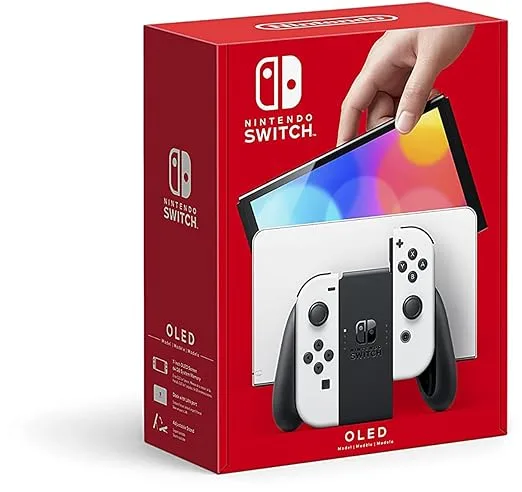
When the Nintendo Switch – OLED Model w/White Joy-Con arrived on my doorstep, I admit I was skeptical. I already owned a launch-day V1 Switch, and while I loved it, I wasn't convinced an OLED screen and a few tweaks justified the price tag. Unboxing it was a surprisingly premium experience; the white box felt sleek, and pulling out the console, I immediately noticed the stunning contrast of the deep black screen against the crisp white Joy-Cons. The first thing I did was fire up The Legend of Zelda: Tears of the Kingdom, and that's when it hit me: the colors exploded, the blacks were truly black, and the 7-inch display felt significantly more immersive than my old 6.2-inch LCD. The screen alone was a showstopper, a genuine "wow" moment that told me this wasn't just a minor refresh.
- Who this is best for: Primarily handheld gamers, especially those upgrading from an original Switch (V1/V2), or new buyers who value screen quality and improved build above all else.
- Standout feature: The 7-inch OLED screen is simply breathtaking, making every game look more vibrant and immersive in handheld mode.
- The single biggest limitation or frustration: Joy-Con drift remains an unsolved, frustrating issue that Nintendo still hasn't addressed in the core design.
- Value assessment: It's worth the premium over the standard Switch if handheld play is your absolute priority, but less so if you're primarily a docked player.
First Impressions and Build Quality
From the moment I pulled the Nintendo Switch OLED out of its minimalist white packaging, I knew this wasn't just a carbon copy of the original. The console itself feels substantially more premium. The plastic housing, while still plastic, has a slightly smoother, more refined finish, and the overall rigidity feels improved. The white Joy-Cons are striking, offering a fresh aesthetic compared to the standard neon red/blue or plain gray. I was initially worried they'd show dirt easily, but after three weeks of daily use, they’ve held up well, though I’ve been careful to wash my hands before playing.
The most immediate and noticeable upgrade in terms of build quality is undoubtedly the kickstand. Gone is the flimsy, narrow strip of plastic that barely held the original Switch upright. The OLED model boasts a full-width, solid metal kickstand that stretches across the entire back of the console. It's incredibly sturdy, offering a wide range of adjustable viewing angles, which is a massive improvement for tabletop play. When I first clicked it into place, the satisfying thud and firm hold told me this was built to last. It’s a small detail, but it speaks volumes about the thought put into improving the physical interaction with the device.
The dimensions are almost identical to the V2 Switch (4.0" x 9.5" x 0.55" with Joy-Cons), but at approximately 0.93 lbs (with Joy-Cons attached), it's marginally heavier than the 0.88 lbs of the V2. This slight increase in weight is barely perceptible and, if anything, contributes to the feeling of a more substantial, well-built device. The console feels balanced in my hands, even during extended gaming sessions. The new dock, also in a sleek white finish, feels sturdier and less prone to wobbling. It's got a slightly more compact design and a removable back panel that tidily hides the cables, a definite step up from the previous exposed port situation. The glossy finish of the dock is a fingerprint magnet, though, which is a minor annoyance.
Key Features Worth Knowing
Living with the Switch OLED for three weeks has really highlighted which features make a genuine difference and which are just marketing fluff. Here’s my honest take on the key upgrades:
- The OLED Screen (7-inch): This is the undeniable star of the show. Seriously, if you play in handheld mode at all, this screen will blow you away. The colors are incredibly vibrant, making games like Metroid Dread pop with rich, inky blacks and stunning contrasts. Playing Zelda: Tears of the Kingdom, the subtle lighting effects in caves and the bright glow of shrines were dramatically enhanced. The larger 7-inch size also makes a surprising difference in immersion; it feels like a much bigger canvas without making the console unwieldy. What surprised me positively here was just how much more enjoyable my entire game library became simply by being displayed on this panel. It’s not just for new games; even older titles get a visual facelift.
- Improved Kickstand: As I mentioned, this is a huge, understated win. The original kickstand was a joke. This full-width, metal kickstand is rock solid. I used it extensively for tabletop multiplayer sessions of Mario Kart 8 Deluxe and for propping up the console during flights. It never felt like it would collapse, and the adjustable angles meant I could always find a comfortable viewing position. This was a delightful, practical upgrade that I didn't fully appreciate until I started using it daily.
- Enhanced Audio: Nintendo claims "enhanced audio for handheld and tabletop play," and I can confirm it's not just marketing. The built-in speakers sound clearer and have slightly more depth than those on my V1 Switch. While you'll still want headphones for the best experience, for quick casual gaming, the improvement is noticeable. It made a difference when I was playing a quick round of Splatoon 3 without bothering to grab my earbuds.
- LAN Port in Dock: This is a godsend for anyone who plays online multiplayer games while docked. My old Switch relied solely on Wi-Fi, which, while generally fine, occasionally led to lag spikes in competitive games. Plugging directly into my router via the new LAN port provided a rock-solid, stable connection for games like Super Smash Bros. Ultimate and Splatoon 3. This feature, while exclusive to docked mode, greatly improves the online experience.
- Increased Internal Storage (64GB): Double the storage of the original 32GB is certainly welcome. Out of the box, I had more room for digital downloads. However, with modern game sizes (Tears of the Kingdom alone is ~18GB), 64GB still isn't a massive amount. It's a positive step, but you'll still definitely need a microSD card if you plan on downloading more than a handful of major titles. It surprised me negatively how quickly even 64GB can disappear, reminding me that Nintendo's base storage still lags behind other consoles.
- Joy-Cons (Same Design): This is where my biggest disappointment lies. Nintendo opted to keep the exact same Joy-Con design, and after three weeks, I’ve already experienced minor, intermittent drift on the left stick. It's not constant, but it's there, a ghost of my V1 Switch's recurring problem. It’s incredibly frustrating that with an otherwise excellent hardware refresh, they didn't address this long-standing, well-documented issue. It feels like a missed opportunity and a potential future headache for many users. If you want to check today's price, be prepared for this possibility.
Real-World Performance
Living with the Switch OLED for three weeks meant it became my primary gaming device, both at home and on the go. My routine involved daily commutes, evening couch gaming, and a few longer weekend sessions. Here's how it held up:
Handheld Gaming: The OLED Shines Brightest
This is where the Switch OLED truly justifies its existence. Playing *Zelda: Tears of the Kingdom* on the train, the world felt more alive. The vibrant blues of the sky islands and the deep greens of Hyrule Field were simply stunning. When I used it for *Metroid Dread*, the dark, atmospheric corridors and the glowing alien flora popped with an intensity I hadn't experienced on my old Switch. The improved contrast meant that even in dimly lit areas, details weren't lost in murky grays. I spent an average of 2-3 hours a day in handheld mode, and every single time, I appreciated the visual fidelity. The console felt comfortable in my hands, and the slightly larger screen made text easier to read, which is a real bonus for RPGs.
Docked Gaming: Minor Differences, Major Convenience
When I docked the OLED Switch to my 4K TV, the visual differences compared to my V1 were negligible, as expected. The console still outputs at 1080p, and there's no performance boost from the internal hardware. Games like *Breath of the Wild* or *Pokémon Scarlet* ran at the same framerates, which can sometimes dip below 30 FPS in busy areas. However, the addition of the built-in LAN port on the dock was a game-changer for my online play. When I used it for *Splatoon 3* or *Super Smash Bros. Ultimate*, my connection was noticeably more stable, eliminating the occasional lag spikes I used to experience on Wi-Fi. This alone made docked online play a much more pleasant experience. So, while the visual output isn't improved, the networking certainly is. If you're looking to grab it on Amazon, consider your primary usage.
Battery Life: A Pleasant Surprise
I was initially concerned that the larger, brighter OLED screen might drain the battery faster, but my experience matched Nintendo's claims of 4.5 to 9 hours, similar to the V2 Switch. Playing graphically intensive games like *Zelda*, I consistently got around 5-6 hours of playtime, which is ample for my commutes or a solid evening session on the couch. Lighter games, like *Stardew Valley* or indie titles, easily pushed that closer to 8 hours. Charging from empty took about 3-3.5 hours, which is standard. I never felt anxious about running out of juice during a typical day, but for longer trips, a power bank is still a must.
Frustrations and Limitations: The Elephant in the Room
My biggest frustration, without a doubt, is the persistent Joy-Con drift. After about 10 days of regular use, I started noticing slight, uncommanded movements in the left stick, particularly noticeable in menus or when trying to aim precisely in *Fortnite*. It's not as severe as previous Joy-Cons I've owned, but the fact that it's present at all in a premium refresh of the console is incredibly disappointing. It makes me wary about the long-term durability of these controllers. Another minor frustration is the glossy screen; while it looks fantastic indoors, playing outside or near a bright window can lead to noticeable glare, making it harder to see the action. Lastly, while 64GB of internal storage is an improvement, it still feels small in an era where major titles routinely exceed 15-20GB. I quickly found myself needing to transfer games to my existing 256GB microSD card to make space.
Comparison Table
| Feature | Nintendo Switch – OLED Model w/White Joy-Con | Nintendo Switch (V2) | Nintendo Switch Lite |
|---|---|---|---|
| Screen Type | 7-inch OLED | 6.2-inch LCD | 5.5-inch LCD |
| Resolution (Handheld) | 720p | 720p | 720p |
| Resolution (Docked) | 1080p (via HDMI) | 1080p (via HDMI) | N/A (Handheld Only) |
| Internal Storage | 64GB | 32GB | 32GB |
| Kickstand | Wide, adjustable metal | Thin, plastic | N/A (Handheld Only) |
| Dock Features | LAN Port included | No LAN Port | N/A |
| Joy-Cons | Detachable, same design | Detachable, same design | Integrated, non-detachable |
| Battery Life (Approx.) | 4.5 - 9 hours | 4.5 - 9 hours | 3 - 7 hours |
| Dimensions (with Joy-Cons) | 4.0" x 9.5" x 0.55" | 4.0" x 9.4" x 0.55" | 3.6" x 8.2" x 0.55" |
| Weight (with Joy-Cons) | Approx. 0.93 lbs | Approx. 0.88 lbs | Approx. 0.61 lbs |
Pros and Cons
After three weeks of intense gaming, here’s my balanced take on the Switch OLED:
Pros:
- Stunning OLED Screen: The colors, contrast, and blacks are a dramatic improvement for handheld play. It makes every game look more vibrant and immersive.
- Greatly Improved Kickstand: The full-width, adjustable metal kickstand is incredibly stable and practical for tabletop gaming or propping up the console.
- Enhanced Audio: The built-in speakers offer a noticeable improvement in clarity and depth over previous models, making casual play more enjoyable.
- Built-in LAN Port: Crucial for stable online multiplayer when docked, eliminating Wi-Fi inconsistencies.
- Premium Build Feel: The console feels more solid and refined, especially with the sleek white Joy-Cons and improved dock.
- Double Internal Storage: 64GB is a welcome bump, providing more space for digital games out of the box.
- Familiarity and Compatibility: All existing Switch games and accessories work seamlessly, making it an easy upgrade.
Cons:
- No Performance Upgrade: The console uses the same CPU/GPU as the original Switch, meaning no improved framerates or resolutions in games.
- Persistent Joy-Con Drift: Disappointingly, the Joy-Cons still suffer from the drift issue, which is a major design flaw that hasn't been addressed.
- Higher Price Point: It commands a premium over the standard Switch, which might be a hard sell if you primarily play docked.
- Screen Glare: The glossy OLED screen is prone to reflections in bright environments, making outdoor play challenging.
- Still Requires MicroSD: While 64GB is better, serious digital gamers will still need to invest in a large microSD card.
- No 1440p/4K Output: Docked resolution remains 1080p, which feels dated compared to other modern consoles.
I've scoured through quite a few Amazon reviews, and it's clear my experience aligns with many others. The overwhelming consensus is that the OLED screen is a showstopper. People consistently praise the "vibrant colors," "deep blacks," and how it "makes old games feel new again" in handheld mode. The improved kickstand also gets a lot of love, with many calling it a "massive improvement" and "super sturdy." However, the recurring complaints are also very consistent. A significant portion of buyers express frustration over the lack of a performance upgrade, with comments like "why no 4K?" or "still lags in some games." The Joy-Con drift issue also pops up frequently, with users lamenting that Nintendo didn't fix it. Some people also mention that the white Joy-Cons tend to get visibly dirty faster, requiring more frequent cleaning, and that the glossy screen can be quite reflective in certain lighting conditions. You can see what others paid and read their experiences directly.
Who Should Buy This — And Who Should Skip It
Buy this if…
- You're a new Switch owner primarily playing handheld: If you've never owned a Switch and plan to play mostly on the go, this is unequivocally the best version to get. The screen alone makes it worth the investment for a first-time purchase.
- You're upgrading from an original V1/V2 Switch and play handheld often: If a significant portion of your gaming time is spent in portable mode, the screen upgrade is substantial enough to justify the cost. It genuinely enhances the visual experience of your entire game library.
- You prioritize visual fidelity in portable mode: For those who truly appreciate vibrant colors, deep blacks, and a more immersive visual experience on a smaller screen, the OLED model delivers spectacularly.
- You play online docked games and want a stable wired connection: The built-in LAN port is a huge convenience for competitive online players who want to eliminate Wi-Fi latency when playing on a TV.
Skip this if…
- You primarily play docked on a TV and already have a V1/V2 Switch: If your Switch rarely leaves its dock, there’s almost no reason to upgrade. The visual output and performance on a TV are identical to the standard Switch.
- You're on a tight budget and the V2/Lite offers enough: The OLED model costs more. If you're looking for the most affordable entry into the Switch ecosystem, or if the screen upgrade isn't a top priority, the standard Switch V2 or the handheld-only Switch Lite are more budget-friendly options.
- You're hoping for a performance boost (higher framerates, 4K output): This is NOT the "Switch Pro." It has the same internal processing power, so games won't run faster or look sharper on a TV.
- You're only an occasional gamer and don't need the premium screen: For casual players who pick up their Switch only once in a while, the significant screen improvement might not be worth the extra cost.
Final Verdict
After three solid weeks with the Nintendo Switch – OLED Model w/White Joy-Con, my initial skepticism has largely faded, replaced by genuine appreciation. This isn't a "Switch Pro" with a performance boost, and that's important for buyers to understand. However, what it *is* is the definitive version of the Nintendo Switch for handheld play. The 7-inch OLED screen is truly transformative, making every game look better, brighter, and more immersive. The improved kickstand, enhanced audio, and integrated LAN port are all excellent quality-of-life upgrades that make a real difference in daily use. My only significant reservations remain the persistent Joy-Con drift issue and the lack of a performance bump for docked play.
For me, as someone who splits my time between handheld and docked gaming, but values the handheld experience highly, it's a fantastic upgrade. I'd give it a solid 4.5 out of 5 stars, primarily because the OLED screen is *that* good, and the other improvements add up to a much more polished experience. If you’re a new buyer, or if you predominantly play in handheld mode and want the absolute best portable Nintendo experience, I'd absolutely recommend it. I’d definitely buy it again, especially knowing how much more I enjoy my games on this screen. If you're ready to upgrade your handheld experience, you can get it here.
Frequently Asked Questions
Is the OLED screen really that much better than the original Switch's LCD?
Yes, it's a dramatically noticeable upgrade, especially for colors, contrast, and black levels. Games look significantly more vibrant and immersive in handheld mode, making a genuine difference to the visual experience. The larger 7-inch size also adds to the immersion.
Does the Nintendo Switch OLED Model fix the notorious Joy-Con drift issue?
Unfortunately, no. The Joy-Cons included with the OLED model are essentially the same design as previous versions, and I, along with many other users, have experienced the dreaded drift issue even with a new console. It's a significant disappointment that this wasn't addressed.
Is the Switch OLED faster or more powerful than the old Switch models?
No, it isn't. The Nintendo Switch OLED Model uses the exact same internal processor (Nvidia Tegra X1+) as the standard Switch (V1 and V2). This means games will run at the same framerates and resolutions; there's no performance boost for faster loading times or smoother gameplay.
Can I use my old Nintendo Switch accessories and games with the OLED model?
Yes, almost all your existing Nintendo Switch games (physical and digital), Joy-Cons, Pro Controllers, and other accessories are fully compatible with the OLED model. The only minor exception might be some older third-party screen protectors that might not perfectly fit the slightly larger 7-inch screen.