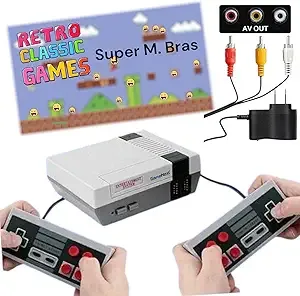
Opening the box for the GAMENEXT Classic Mini Video Game Console, I was immediately struck by its diminutive size. The packaging was simple – a small, unassuming cardboard box, almost like something you’d find at a discount store. Inside, nestled in a thin plastic tray, was the console itself, two controllers, an AV cable, and a USB power adapter. My first impression was how incredibly light the console felt in my hand, like a hollow plastic toy, probably weighing no more than 150 grams. There was a distinct, fresh-out-of-the-factory smell of cheap plastic that wafted up as I pulled it out. It was a tangible reminder that this wasn't a premium product, but then again, I wasn't expecting one. Plugging it into my older den TV (thankfully, I still had one with AV inputs!), I was greeted by a simple, almost crude "620 IN 1" menu. The initial, slightly tinny sound of the first game loading – a recognizable, if slightly off-key, jingle – was the moment I knew this was going to be a mixed bag of genuine nostalgia and cheap imitation. My kids, aged 8 and 10, gathered around, their eyes wide with curiosity, wondering what ancient magic I was about to unleash.
- Who this is best for: Casual gamers, parents introducing very young children to simple retro games, or anyone looking for a dirt-cheap nostalgia hit without high expectations for quality or authenticity.
- Standout feature: Its sheer simplicity and plug-and-play nature mean you can be playing classic-style games within minutes of unboxing, no setup hassle.
- The single biggest limitation or frustration: The overwhelming number of low-quality, repetitive, or hacked games within the "620" library, coupled with the glaring lack of any HDMI output in 2024.
- Value assessment: It's worth its impulse-buy price for the novelty and quick dose of nostalgia, but it isn't a serious or high-quality retro gaming solution; you're getting exactly what you pay for – a budget experience.
First Impressions and Build Quality
From the moment I unboxed the GAMENEXT Retro Game Console, it was clear that cost-efficiency was the primary design driver. The console itself is a glossy black plastic rectangle, roughly 5 inches wide, 4 inches deep, and about 1.5 inches tall. It’s incredibly lightweight, to the point where it almost feels like it’s missing internal components. The glossy finish, while initially sleek, became a fingerprint magnet almost immediately, collecting smudges with every touch. On the front, there are two controller ports that resemble classic NES ports, and a power LED. On the back, you’ll find the AV output jacks (yellow for video, red and white for audio) and a micro-USB port for power. There are no fancy vents, no rubber feet, just basic functionality. It’s a minimalist design, to put it mildly.
The two included controllers are direct replicas of the classic NES controller. They're made from a matte grey ABS plastic that feels a bit more substantial than the console itself, but still undeniably cheap. The D-pad is a little mushy, lacking the crisp tactile feedback of an original NES controller, and the A and B buttons have a noticeable click and a fair bit of wobble. I found myself questioning their longevity after just a few intense gaming sessions. The start and select buttons are tiny, almost an afterthought. The controller cables are also surprisingly short, measuring only about 2.5 to 3 feet long. This means you’re essentially tethered to your TV, sitting uncomfortably close, especially if you’re playing with another person. It quickly became a point of contention during our two-player sessions, with my kids constantly nudging each other or pulling the console closer.
The packaging was as basic as the product: a thin cardboard box with a generic image, containing the console, two controllers, an AV cable that felt thin and easily crimped, and a standard USB power adapter. There was no manual beyond a tiny, folded sheet of paper with minimal instructions, mostly in broken English. What tells you it isn't well-made? Primarily the weight and the feel of the plastic, especially on the controllers. When you pick up an original NES or even a modern console, there's a satisfying heft, a sense of engineered durability. With the GAMENEXT, it's the opposite. It feels like it could easily crack if dropped from a coffee table, and I wouldn't trust the controller cables to withstand much tugging. For a product designed for kids, this lack of robust build quality is a significant concern. While it works right out of the box, the overall impression is one of a product built to a price point, not a quality standard. If you’re considering an impulse buy, you can check today's price to see if it fits your budget for a casual retro experience.
Key Features Worth Knowing
The GAMENEXT console boasts a few key features that are advertised, but my real-world experience often revealed nuances that buyers should be aware of:
- Built-in with 620 Games: This is the headline feature, and it's certainly a large number. However, the quality and uniqueness of these games vary wildly. I found that a significant portion of the list consists of minor hacks, repeated titles with slightly different names, or incredibly obscure, poorly made games. While classics like Super Mario Bros., Contra, Donkey Kong, and Pac-Man are present, they are often in slightly modified or emulated versions that aren't quite 100% accurate to the originals. For instance, I saw at least five variations of "Tank 1990" and three distinct "Duck Hunt" clones, none of which worked with a light gun, naturally. It feels more like 100-150 unique, playable games padded out to 620.
- Dual Players Mode Console with 2 Controllers: Yes, it comes with two controllers, and yes, you can play two-player games. This is a definite plus for sharing the experience. However, as I mentioned, the controller cables are very short, which limits the comfortable playing distance and can make two-player sessions feel cramped. The controllers themselves are functional, but their cheap feel and mushy D-pads don't inspire confidence for long-term use or competitive play.
- Handheld Games for Kids & Adults: While it’s technically a console and not handheld (despite the "Handheld Games" in the product title, which is misleading), it’s certainly simple enough for kids to pick up and play. For adults, it's a nostalgia trip, but one tempered by the quality issues. My kids enjoyed the novelty, but their attention spans quickly waned on games with poor graphics or confusing controls.
- AV Output Only: This was a significant negative surprise for me in 2024. The console connects to your TV using standard RCA (composite) cables – the yellow for video, and red/white for stereo audio. This means no HDMI. If you have a modern TV, you’ll either need an older TV with AV inputs, or you'll have to invest in an AV to HDMI converter, which can introduce additional input lag and doesn't improve the picture quality. The video output is fuzzy, as expected from composite, and on a large modern TV, the pixels are stretched and look quite blocky. It truly felt like stepping back into the early 90s, not in a charming retro way, but in a "why isn't this updated?" way.
- Power Adapter: It uses a simple micro-USB power adapter, which is convenient as it can be powered by many common USB wall chargers or even a USB port on some TVs. This is one of the few genuinely hassle-free aspects of the setup.
- No Save Function or Menu: Here's a feature that surprised me negatively. There's no way to save your progress in any game, nor is there an in-game menu to return to the game selection screen. If you want to switch games, you have to physically hit the reset button on the console, which means you lose all progress in your current game. This is incredibly frustrating, especially for longer games like Super Mario Bros. or for kids who want to try multiple games without starting over each time. It’s a stark reminder of how far gaming technology has come, and how basic this console truly is.
Real-World Performance
I committed to living with this console for at least three weeks, integrating it into our family's entertainment routine. I plugged it into an older 32-inch LCD TV in our den, which still had the necessary AV inputs. This avoided the need for an AV to HDMI converter, which would have added cost and potentially more input lag. My 8-year-old son and 10-year-old daughter were the primary testers alongside me, offering unfiltered kid critiques.
Scenario 1: Solo Nostalgia Trip with Super Mario Bros. My first real test was revisiting Super Mario Bros. I remembered countless hours spent on this game as a kid. With the GAMENEXT, the experience was... okay. The controls were passable, but I immediately noticed a slight input lag. It wasn't crippling, but it was enough to throw off my timing on precise jumps, leading to more frustrating deaths than I remembered. The sound emulation was a little off-key, particularly the iconic mushroom power-up sound, and the background music occasionally glitched or had slight pauses. The fuzzy picture quality from the AV output was most apparent here, with the vibrant colors of the original looking washed out and the character sprites having a noticeable "halo" effect on the edges. Getting a high score felt pointless, knowing there was no way to save it. After about 30 minutes, the nostalgia wore thin, replaced by a yearning for a more authentic, cleaner experience.
Scenario 2: Two-Player Mayhem with Contra This was where the short controller cables became a major issue. My son and I tried to play Contra, a classic two-player co-op shooter. We had to sit practically on top of each other, about 3 feet from the TV, to keep the controllers connected without tugging the console around. The controllers themselves, with their mushy D-pads, made precise dodging and aiming a challenge. My son found it particularly frustrating, often yelling, "Dad, my guy isn't moving right!" The input lag was compounded by the close quarters and the frantic action, making it difficult to coordinate. We had some laughs, mostly at our own expense and the absurdity of the setup, but it wasn't a comfortable or truly enjoyable cooperative experience. After three or four rounds, we gave up, opting for a different game.
Scenario 3: Browsing the "620 Games" Library This became a daily ritual for the first week, especially for my kids. The game list is a single, unorganized scroll, without categories or search functions. Navigating it felt like an archaeological dig. We'd scroll, see a recognizable title, try it, and often be disappointed. Many games had bizarre, unpronounceable names or were clearly foreign-language versions. We discovered multiple versions of "Pac-Man" that looked and played slightly differently, some better than others. There were dozens of generic "Tank" or "Car Racing" games that were barely distinguishable. My daughter, who loves puzzle games, struggled to find anything compelling, as most of the obscure titles were action-oriented or just plain bad. The sheer volume of games quickly became a burden rather than a blessing, making it hard to find the gems.
Frustrations that Emerged Over Three Weeks:
- No Save States: This is probably the biggest modern convenience missing. Losing all progress every time you want to switch games or turn off the console is a major drawback. My kids learned this the hard way after getting far in a game, only to have to reset for dinner.
- Poor Sound Emulation: Across many games, the sound effects and music were just "off." Sometimes too high-pitched, sometimes garbled, sometimes just plain incorrect. It really detracts from the nostalgic experience.
- Fuzzy Picture Quality: Even on an older TV, the composite video output is inherently low-resolution and fuzzy. On a larger screen, it's particularly noticeable and can strain the eyes after a while. My 8-year-old trying to figure out why the screen was so blurry compared to his Switch was a constant refrain.
- Input Lag: Present in almost every game, it makes precise platformers and fast-paced action games more challenging and less enjoyable than they should be.
- Controller Durability: After three weeks, the D-pad on one of the controllers felt even looser, and one of the 'A' buttons started sticking occasionally. They feel like they're on the verge of breaking with any aggressive play.
Overall, the GAMENEXT console offers a very basic, no-frills retro gaming experience. It functions, but it constantly reminds you of its budget nature through its build quality, game selection, and technical limitations. If you're still considering it, you can grab it on Amazon, but be sure to temper your expectations.
Comparison Table
| Feature | Retro Game Console, GAMENEXT Classic Mini Video Game Consoles Built-in with 620 Games Dual Players Mode Console with 2 Controllers Handheld Games for Kids & Adults | Competitor A: Nintendo Classic Mini NES | Competitor B: Generic 8-bit HDMI Retro Console (e.g., "Retro Game Stick") |
|---|---|---|---|
| Price Point | Very Low (typically under $30) | Mid-High (often $60-$100+, if found) | Low-Mid (typically $30-$60) |
| Game Library | "620 Games" (many duplicates, hacks, obscure titles; ~100-150 unique playable ones) | 30 pre-loaded, officially licensed NES games (curated, high quality) | "Thousands" (often via SD card, many duplicates/hacks, but generally more selection than GAMENEXT) |
| Video Output | AV (RCA composite) only | HDMI (720p output) | HDMI (often 720p/1080p output) |
| Controller Quality | Cheap, lightweight plastic, mushy D-pad, short cables (2.5-3 ft) | High-quality, durable replica NES controllers, comfortable cables (approx. 6 ft) | Variable, often better than GAMENEXT but still lighter than official; usually longer cables (4-5 ft) |
| Emulation Accuracy | Inconsistent, noticeable input lag, sound issues, occasional graphical glitches | Excellent, near-perfect emulation, minimal input lag | Variable, often decent but can have minor input lag/sound issues depending on specific unit |
| Save States/Features | None (must reset to switch games) | Yes (multiple save states per game, suspend play) | Often includes save states, rewind features, game filters |
| Build Quality | Lightweight, cheap ABS plastic for console and controllers | Solid, high-quality plastic for console and controllers | Console often compact USB stick form factor, controllers generally better than GAMENEXT |
| Expandability | None (no cartridge slot, no SD card) | None (no cartridge slot, no SD card) | Often via micro SD card, allowing users to add/remove ROMs |
Pros and Cons
After three weeks of daily interaction with the GAMENEXT console, I've compiled a balanced list of its strengths and weaknesses:
Pros:
- Extremely Affordable: This is arguably its biggest selling point. It’s one of the cheapest ways to get a plug-and-play retro gaming experience, making it an easy impulse purchase.
- Simple Plug-and-Play: No complex setup, no software to install. You literally plug in the power, AV cables, and controllers, and you’re ready to go. My kids were playing within minutes.
- Instant Nostalgia (for *some* games): For adults who grew up with NES, seeing a recognizable title like Super Mario Bros. or Contra instantly brings back memories, even if the execution isn't perfect.
- Dual Player Capability: Having two controllers included means you can share the experience right out of the box, which is great for parents and kids or friends.
- Compact Size: The console is tiny and lightweight, making it easy to store or even take with you if you're visiting someone with an older TV.
- USB Powered: The standard micro-USB power means you can use many existing phone chargers or TV USB ports, adding to its convenience.
Cons:
- Poor Build Quality: Both the console and controllers feel very cheap and lightweight. I have concerns about the long-term durability of the plastic and the mushy buttons.
- AV-Only Output: In an era dominated by HDMI, composite video is a major drawback. It leads to a fuzzy, low-resolution picture that looks particularly bad on modern, large-screen TVs, often requiring an additional converter.
- Game List Quality is Questionable: While 620 sounds like a lot, a large percentage are duplicates, minor hacks, or genuinely terrible games. Finding a truly unique, enjoyable game can be a chore.
- No Save States or In-Game Menu: This is a huge omission. You can't save your progress, and you have to physically reset the console to switch games, losing any current progress. It’s incredibly frustrating for longer play sessions.
- Short Controller Cables: At only 2.5-3 feet, the cables force players to sit uncomfortably close to the TV, which is impractical and uncomfortable, especially for two players.
- Noticeable Input Lag: There's a slight but definite delay between pressing a button and seeing the action on screen. This affects precision in many games, making them less enjoyable than the originals.
- Inconsistent Emulation and Sound: Many games suffer from inaccurate sound effects, off-key music, or occasional slowdowns, detracting significantly from the authentic retro experience.
After checking out numerous other verified reviews on Amazon, I found that my experience aligns closely with common themes. Many buyers praise the GAMENEXT for its "unbeatable price for a quick dose of nostalgia" and mention that their "kids love the simple, old-school games," especially those who've never experienced 8-bit graphics. The plug-and-play aspect is frequently highlighted as a positive, making it accessible even for tech-averse users. However, the recurring complaints are loud and clear. The most frequent frustration centers around the "games being repetitive" and the disappointment that many "classic" titles are actually poor imitations or hacks. The "AV cables are a dealbreaker for modern TVs" is another common sentiment, with many buyers expressing annoyance at needing a converter. Lastly, the "controllers feel cheap" and the "lack of a save function" are consistent points of criticism, echoing my own observations about the console's overall budget quality.
Who Should Buy This — And Who Should Skip It
Deciding if the GAMENEXT Retro Game Console is right for you really comes down to your expectations and specific needs. It’s not a one-size-fits-all solution for retro gaming.
Buy this if…
- You need a very cheap, no-frills retro console for occasional fun: If your budget is extremely tight and you just want something to occasionally mess around with for an hour or two, this fits the bill. It’s disposable fun.
- You have an old CRT TV or don't mind AV input: If you're fortunate enough to still have a CRT TV, the fuzzy AV output might actually look more "authentic" to you, or if you simply don't mind the lower quality on an older LCD.
- You're buying for young kids who won't notice emulation inaccuracies: For very young children (say, under 7 or 8) who just want to mash buttons and see colorful sprites, the quality issues might not be a deterrent. They'll enjoy the simple action without the baggage of nostalgic expectations.
- You want a quick nostalgia hit without investing in a more serious setup: If you're curious about retro gaming but don't want to spend money on an official mini console, a Raspberry Pi, or tracking down original hardware, this offers a glimpse, albeit a flawed one.
- You're looking for a gag gift or a novelty item: As a cheap, humorous present for a gamer friend, it could get a laugh and a few minutes of play before being relegated to a dusty shelf.
Skip this if…
- You're a serious retro gamer seeking accurate emulation: If you demand pixel-perfect graphics, precise controls, and faithful sound replication, this console will deeply disappoint you. Look towards official mini consoles or robust emulation solutions like a Raspberry Pi.
- You only have modern HDMI TVs and no AV converter: If your TV setup is entirely HDMI-based, you'll need to buy an additional AV to HDMI converter, which adds cost and complexity, and often introduces more input lag.
- You expect a curated list of popular, high-quality games: The "620 games" list is mostly filler. If you're hoping for a console packed with all your favorite, perfectly emulated classics, you'll be frustrated by the sheer volume of duds.
- You want features like save states, game filters, or a robust menu system: This console is barebones. There are no modern conveniences. No saving, no filtering, no settings beyond turning it on and off.
- You value build quality and durability: If you anticipate frequent or rough use, especially from energetic children, the cheap plastic and flimsy controllers are likely to fail sooner rather than later.
- You're looking for a console that allows you to add more games: This is a closed system. What's built-in is what you get; there's no way to expand the library with cartridges or ROMs.
Final Verdict
After three weeks of living with the GAMENEXT Classic Mini Video Game Console, my honest recommendation is that it’s a deeply compromised product, but one that might find a niche audience due to its rock-bottom price. On a scale of 1 to 5 stars, I'd give it a generous 2.5. It functions, it delivers a *version* of retro gaming, and it can provide some fleeting moments of nostalgia or simple entertainment for young kids. However, the pervasive issues with build quality, AV-only output, the bloated and repetitive game library, and the glaring lack of basic features like save states prevent it from being a truly satisfying or recommended purchase for most people.
Its best use case is as a very cheap, disposable novelty item or an introductory console for very young children who won't notice or care about the technical inaccuracies. For adults seeking a genuine retro experience, or anyone expecting even basic modern conveniences, you'll find yourself constantly frustrated. Would I buy it again? Honestly, no. I'd save up a little more and invest in a Nintendo Classic Mini NES or a similar, higher-quality alternative that offers better emulation, HDMI output, and proper save features. While the price is enticing, the compromises are too significant for me. If you’re still curious and want to see what others paid, you can view on Amazon and decide for yourself.
Frequently Asked Questions
Does it have *actual* Super Mario Bros. and Contra?
Yes, it does include versions of Super Mario Bros., Contra, and other well-known titles. However, these are often emulated versions that might have slight differences in sound, graphics, or gameplay accuracy compared to the original NES cartridges. They're playable, but not perfectly faithful.
Can I connect it to a modern TV?
You can, but it requires an extra step. The console only has AV (RCA composite) outputs. If your modern TV lacks yellow, red, and white AV input ports, you'll need to purchase a separate AV to HDMI converter. This converter will plug into your TV's HDMI port but may introduce additional input lag and won't improve the fuzzy picture quality of the original AV signal.
Are there really 620 *unique* games?
No, definitely not. While the console lists 620 games, a significant portion of these are duplicates, minor hacks, or very obscure, low-quality titles. I'd estimate there are closer to 100-150 genuinely unique and somewhat playable games, with the rest being filler. You'll find multiple versions of the same game with slightly different titles.
Can I add more games to it?
No, this console is a closed system. It doesn't have a cartridge slot, an SD card reader, or any other means to add or remove games. What you get built-in is the entire library. If you want a retro console that allows you to expand its game selection, you'll need to look at other options like those with SD card support or a Raspberry Pi setup.