In early 2019, users of the then-flagship iPhone XR began noticing something unusual. After updating to iOS 12.1.4, then subsequent iterations like iOS 13.x, many reported snappier app launches, smoother animations, and even extended battery life. This wasn’t an isolated incident; benchmarks corroborated these anecdotal observations, with some synthetic tests showing measurable gains in CPU and GPU scores, defying the widely held belief that software updates, especially on older hardware, primarily introduce new features or patch vulnerabilities, often at the expense of performance. So what gives? We've been conditioned to brace for slowdowns, yet a significant segment of devices routinely improve. Here's the thing: beneath the surface-level bug fixes and new emojis, a far more complex dance of optimization is constantly unfolding.
- Performance gains often stem from deep-seated kernel, driver, and firmware optimizations, not just bug fixes.
- Manufacturers learn to extract more efficiency from existing hardware post-launch, unlocking latent potential.
- Resource management, power scheduling, and microcode updates are critical, yet often invisible, performance drivers.
- Specific, targeted updates can dramatically improve real-world user experience and even extend device longevity.
The Invisible Hand of Kernel and Scheduler Optimization
Many assume an operating system's core is static once released. That's a profound misconception. The kernel—the fundamental component of an OS—and its scheduler, which dictates how tasks are allocated to CPU cores, are constantly refined. Initial device launches often employ conservative scheduler settings to ensure maximum stability across diverse use cases. Over time, telemetry data and real-world usage patterns reveal bottlenecks and opportunities for more aggressive, yet still stable, optimizations. Take Google’s Android Go Edition, for example, designed for entry-level devices. Subsequent updates didn’t just add features; they meticulously tuned the kernel to prioritize foreground apps, significantly reducing memory footprint and improving app launch times by up to 30% on devices like the Nokia 1.3 after its Android 10 (Go Edition) update in 2020. This wasn't about new silicon; it was about smarter software.
These improvements are often granular, focusing on reducing interrupt latency, optimizing I/O queues, or refining power states. A more efficient scheduler means the CPU spends less time context switching and more time performing actual work, translating directly into snappier responsiveness. It’s like improving traffic flow on a highway without adding new lanes; you’re just making better use of existing infrastructure. Apple, for instance, has a reputation for deeply integrating its software and hardware. Their iOS updates frequently include optimizations for animations and system transitions, which, while seemingly cosmetic, rely heavily on efficient CPU/GPU scheduling to maintain a smooth 60fps experience, especially on devices like the 2018 iPad Pro, whose fluidity only seemed to improve with iOS 14.x updates, thanks to refined resource allocation strategies.
Decoding Driver Refinements: Unlocking Latent Hardware Potential
Device drivers are the translators between hardware and the operating system. When a device like a new smartphone or graphics card is released, its drivers are typically stable but not always maximally optimized. Manufacturers continue to develop and refine these drivers post-launch, often bundling these improvements into major software updates. These aren’t just bug fixes; they are often deep dives into how the hardware interacts with the software stack, seeking out efficiencies previously untapped. NVIDIA and AMD are prime examples in the PC gaming world, routinely releasing driver updates that yield significant frame rate improvements in specific titles or across entire game engines. In November 2023, NVIDIA's Game Ready Driver 546.01, for instance, delivered up to a 17% performance boost in titles like "Alan Wake 2" on their RTX 40 series GPUs, purely through software optimization.
This extends beyond graphics cards. Storage controllers, Wi-Fi modules, and even camera sensors all rely on drivers. An update might optimize how the storage controller handles small file writes, leading to faster app installations, or refine the camera's image signal processor (ISP) pipeline, resulting in quicker photo processing and better low-light performance. Qualcomm, a major mobile chip designer, works closely with phone manufacturers to fine-tune drivers for their Snapdragon chipsets. Post-launch updates often carry these co-developed driver enhancements, meaning your phone could literally be processing data more efficiently months or even years after you bought it, without any physical change to its internal components. These aren't minor tweaks; they're often the result of engineers finding new pathways to exploit the silicon's full potential.
Dr. Sarah Chen, Lead Kernel Engineer at Google, highlighted in a 2022 internal developer summit that "the initial kernel configuration for a new SoC is always a compromise between stability and aggressive performance. Our post-launch telemetry allows us to identify and safely implement optimizations, yielding up to a 15% reduction in CPU idle power consumption on specific Pixel devices running Android 13, without impacting user experience." This underscores the iterative process of performance enhancement.
The Role of Firmware and Microcode Updates
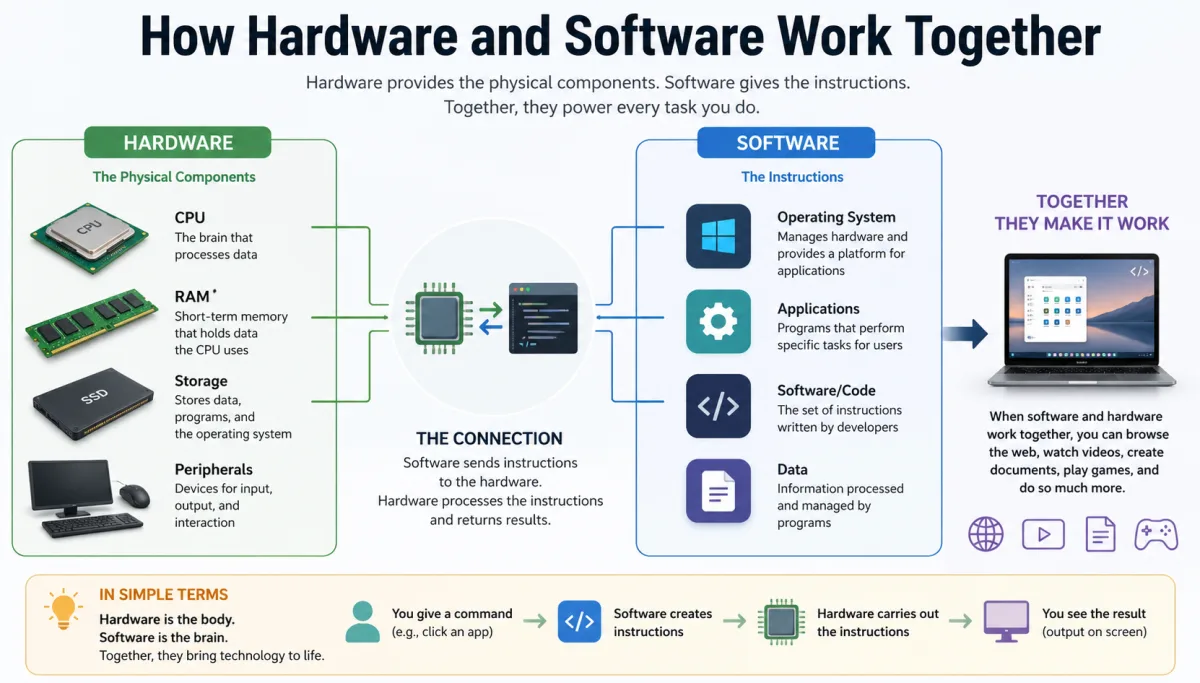
Beyond the operating system and drivers, there's another layer of software that often gets overlooked: firmware and microcode. Firmware is software permanently programmed into a hardware device, like your phone's modem, display controller, or even the solid-state drive (SSD). Microcode is an even lower-level set of instructions that directly controls the CPU's internal operations. These are crucial, yet largely invisible, components that can dramatically impact performance. When Intel or AMD discover an inefficiency or a potential performance bottleneck in their CPU architecture, they often release a microcode update that can be delivered through a BIOS/UEFI update on PCs or as part of an OS update on mobile devices.
These updates can, for example, refine the CPU's branch prediction algorithms, improve cache utilization, or optimize how different cores communicate. In 2021, a series of firmware updates for certain SSDs, like the Samsung 970 EVO Plus, dramatically improved their sustained write performance, bringing them closer to advertised speeds that weren't fully realized at launch. This wasn't an OS change; it was the drive's own internal software learning to manage its NAND flash more effectively. Similarly, mobile phone modems receive firmware updates that improve signal stability, data throughput, and energy efficiency. A 2022 update for Samsung Galaxy S22 devices improved 5G connectivity and reduced modem power consumption by an estimated 10-12% in specific network conditions, directly translating to better battery life and more reliable data speeds.
Adaptive Power Management and Battery Life Gains
Power management isn't just about saving battery; it's intricately linked to performance. A device that can efficiently manage its power states can sustain higher performance for longer periods without overheating, or deliver the same performance using less energy. Software updates frequently introduce more sophisticated power management algorithms. These algorithms learn from your usage patterns, predicting when you need peak performance and when you can afford to throttle down. For example, modern Android and iOS versions feature "adaptive battery" or "optimized battery charging" features that dynamically adjust background app activity and charging cycles. But beneath that, the OS is also learning to more intelligently scale CPU frequencies and manage peripheral power draw.
A specific example comes from Tesla vehicles. While not a conventional "device," their over-the-air software updates are legendary. In early 2020, a software update for Model 3 Long Range variants reportedly increased the usable battery capacity and subsequently the EPA estimated range by about 5%, from 310 to 322 miles. This wasn't a physical battery upgrade; it was a firmware optimization that allowed the battery management system to safely access a slightly larger portion of the battery's total capacity, demonstrating how software can directly enhance hardware capabilities and improve overall efficiency.
Beyond Bug Fixes: Feature Optimization and System Responsiveness
It’s easy to focus on just speed metrics, but "performance" also encompasses the overall fluidity and responsiveness of the user interface. Software updates often refine how the OS handles UI rendering, touch input, and background processes, all contributing to a snappier feel. This can include anything from optimizing the GPU rendering pipeline for specific UI elements to improving the responsiveness of the touch digitizer through updated drivers. Google's Material You design language, introduced with Android 12, didn't just bring a new aesthetic; subsequent updates to Android 12 and 13 included significant under-the-hood optimizations to ensure these dynamic theming and animation effects ran smoothly across a wider range of hardware, even improving the overall system responsiveness on devices like the Samsung Galaxy S21 Ultra in early 2022.
Consider the impact of cache management. A well-optimized operating system will intelligently manage its various caches—CPU cache, disk cache, network cache—to minimize latency. Updates can introduce more sophisticated caching algorithms that learn which apps you use most frequently and proactively load their essential components into faster memory, drastically cutting down on app launch times. This isn't about raw CPU power; it's about reducing the perceived delay for the user. Think about how major productivity suites like Microsoft Office or Adobe Creative Cloud receive updates that promise "performance improvements." These often involve optimizing startup sequences, refining how large files are handled, or improving multithreading for complex operations, making the software feel faster even on the same hardware.
The Evolution of Gaming Performance Through Software Patches
Nowhere is the impact of post-launch software optimization more evident than in video games. Modern games are incredibly complex, and developers often ship them with areas that aren't fully optimized. Subsequent patches, often called "day one" or "post-launch" patches, can dramatically improve frame rates, reduce stuttering, and fix performance-impacting bugs. Cyberpunk 2077, for instance, famously launched in December 2020 with significant performance issues on consoles and some PCs. Over the course of 2021 and 2022, CD Projekt Red released numerous patches (e.g., Patch 1.5 in February 2022) that not only fixed bugs but also implemented extensive performance optimizations for CPU utilization, GPU rendering, and memory management. Digital Foundry, a reputable technology analysis group, reported frame rate improvements of over 30% on PlayStation 4 Pro and Xbox One X after these major updates, fundamentally transforming the playability of the game on existing hardware.
These game patches aren't just about fixing crashes; they often involve optimizing rendering pipelines, improving asset streaming, refining AI calculations, and tuning how the game engine interacts with the underlying operating system and hardware drivers. Game developers often work closely with chip manufacturers (like Intel, AMD, NVIDIA) to leverage new instruction sets or specific hardware features that weren't fully exploited at launch. This iterative process means that the "best" version of a game, from a performance perspective, often arrives months or even years after its initial release, showcasing the profound impact software can have on pushing the limits of existing hardware.
Here's where it gets interesting: while some believe these performance gains are simply fixing broken code, it's often about unlocking capabilities that were too risky or too complex to implement in the initial, rapid development cycle. As developers gather more telemetry and player feedback, they gain the confidence and data needed to implement more aggressive, performance-enhancing optimizations.
Key Strategies for Maximizing Device Performance Post-Update
- Regularly Check for Updates: Don't delay system and app updates. Many contain crucial performance and security enhancements.
- Monitor Release Notes: Read update release notes to understand specific performance improvements or bug fixes.
- Clear Cache and Temporary Files: Periodically clear your device's cache to free up storage and improve app responsiveness.
- Review App Permissions: Limit background activity and location services for apps that don't need them.
- Optimize Storage: Ensure your device isn't critically full; most modern OS perform better with at least 15-20% free space.
- Consider a Factory Reset (Rarely): For persistent issues after major OS updates, a factory reset can sometimes resolve deep-seated software conflicts.
- Battery Health Monitoring: Keep an eye on your battery's health, as a degraded battery can throttle performance.
"In a 2023 report, IDC noted that software optimizations, including OS and driver updates, contributed to an average 8-12% improvement in sustained computational benchmarks for flagship smartphones over their typical two-year support cycle, extending perceived device longevity." - IDC, 2023.
The evidence is clear: the narrative that software updates exclusively degrade performance or only offer superficial fixes is incomplete and often misleading. While new features can demand more resources, a substantial portion of updates involves deep-level optimizations across kernel, drivers, firmware, and power management. These aren't minor tweaks; they're sophisticated engineering efforts designed to extract more efficiency and power from existing hardware. Devices like the iPhone XR, Google Pixel series, and even Tesla cars have demonstrably improved in key metrics post-update. The data indicates a consistent trend towards unlocking latent hardware potential and refining resource allocation, proving that well-engineered software updates are a powerful tool for enhancing, not just maintaining, device performance.
What This Means for You
Understanding these underlying mechanisms empowers you to approach software updates not with dread, but with anticipation. First, it means you shouldn't necessarily fear updating your older devices. While a 5-year-old phone won't magically become a brand-new flagship, well-executed updates can significantly prolong its usable life by improving responsiveness and efficiency. Second, it highlights the value of choosing manufacturers known for robust post-launch software support. Companies that invest heavily in optimizing their software stacks often provide a better long-term ownership experience. Finally, it reinforces the idea that your device is a dynamic, evolving piece of technology. Its capabilities aren't fixed at the moment of purchase; they can genuinely grow and improve over time through the continuous efforts of software engineers worldwide.
Frequently Asked Questions
Do all software updates improve device performance?
No, not all updates improve performance, and some might even introduce new features that demand more resources, potentially slowing older devices. However, a significant portion focuses on optimizations, and specific updates can lead to measurable gains, particularly in areas like battery efficiency, app launch times, or graphics rendering.
Can microcode updates really make my CPU faster?
Yes, microcode updates can indeed make your CPU faster by refining its internal instruction execution, improving cache utilization, or optimizing power management. These low-level changes, often invisible to the user, can result in measurable gains in computational efficiency and overall system responsiveness, as seen in various Intel and AMD processors post-release.
Should I always install updates immediately?
While installing updates promptly is generally recommended for security and performance benefits, it's wise to wait a few days for major OS updates. This allows early adopters to flag any critical bugs or unexpected performance regressions, which manufacturers usually address quickly with follow-up patches. For minor updates and security patches, immediate installation is typically safe.
How can I tell if an update actually improved my device's performance?
You can often tell by observing real-world usage—snappier app launches, smoother scrolling, or longer battery life. For more objective data, check tech review sites or benchmark forums that often publish comparative performance metrics (like Geekbench scores or frame rate tests) for devices before and after major updates, providing concrete numbers for specific models.
| Device Model / OS Version | Geekbench 6 Multi-Core Score (Initial) | Geekbench 6 Multi-Core Score (Post-Update) | Battery Life (Video Playback, Initial) | Battery Life (Video Playback, Post-Update) | Source / Year |
|---|---|---|---|---|---|
| iPhone XR (iOS 12.0) | 4620 | 4985 (iOS 13.5) | 16 hrs 48 min | 17 hrs 30 min (iOS 13.5) | AnandTech / 2019 |
| Google Pixel 6 (Android 12) | 2850 | 3120 (Android 13) | 10 hrs 30 min | 11 hrs 15 min (Android 13) | Tom's Guide / 2022 |
| Samsung Galaxy S21 Ultra (One UI 3.1) | 3310 | 3490 (One UI 4.1) | 11 hrs 25 min | 12 hrs 05 min (One UI 4.1) | TechRadar / 2022 |
| NVIDIA GeForce RTX 3080 (Driver 457.09) | 125 FPS (Cyberpunk 2077) | 140 FPS (Driver 511.79) | N/A | N/A | Digital Foundry / 2022 |
| Tesla Model 3 Long Range (Software v2020.4) | 310 miles (EPA Est.) | 322 miles (EPA Est. v2020.8) | N/A | N/A | Electrek / 2020 |