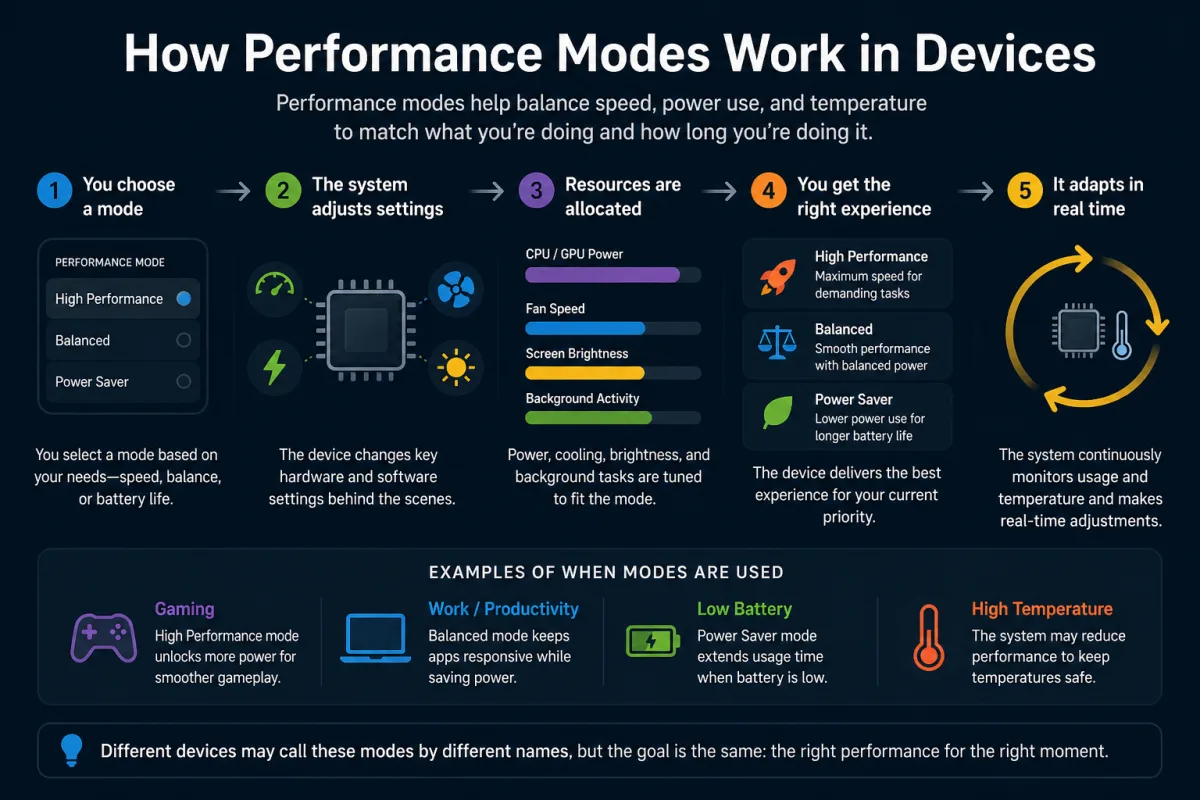
In November 2022, Apple faced a class-action lawsuit for intentionally slowing down older iPhones, a practice they termed "battery management." While Apple maintained this was to prevent unexpected shutdowns as batteries aged, it ignited a global debate: were users truly in control of their device’s performance, or were manufacturers dictating the terms under the guise of "optimization"? Performance modes—those seemingly straightforward switches for "power saving," "balanced," or "high performance"—are far more complex than a simple toggle. They're an opaque, algorithmic ballet performed by your device's hardware and software, often prioritizing an invisible hierarchy of thermal limits, marketing benchmarks, and manufacturer-defined user experience over your explicit command. We think we're choosing power or longevity, but the reality is a nuanced, often deceptive, negotiation orchestrated deep within the silicon.
- Performance modes are sophisticated algorithmic profiles, not just simple power switches.
- Thermal throttling is the primary governor of sustained performance, often overriding "high performance" settings.
- Manufacturers frequently tune modes to optimize for benchmark scores or thin designs, not necessarily real-world consistent power.
- Understanding these modes empowers you to better manage expectations and actual device usage.
The Illusion of Control: What "Performance Mode" Really Does
When you activate "Performance Mode" on your gaming laptop or "ProMotion" on your iPhone 15 Pro, you expect a tangible boost: faster app launches, smoother graphics, or higher frame rates. But here's the thing. That expectation often clashes with the cold, hard physics of heat. Modern processors, whether a Qualcomm Snapdragon 8 Gen 3 in a Samsung Galaxy S24 Ultra or an Intel Core i9-14900HX in an Alienware m18, are designed to operate within strict thermal envelopes. Push them too hard, and they generate excessive heat, which can damage components or simply make the device uncomfortable to hold. So, what does "Performance Mode" actually do?
It primarily instructs the operating system's scheduler and the CPU/GPU firmware to allow higher clock speeds and voltage levels for longer durations. This means the processor can execute more instructions per second, leading to those snappier responses. However, this isn't an unlimited license to unleash raw power. The moment internal temperature sensors detect a threshold being crossed—typically around 90-100°C for CPUs—the system initiates a process called thermal throttling. This dynamically reduces clock speeds and voltage, regardless of your chosen performance mode, to bring temperatures back down. For instance, testing by AnandTech in late 2023 on several high-end Android phones revealed that while initial benchmark scores in "Performance Mode" were impressive, sustained workloads (like a 30-minute gaming session) consistently saw CPU frequencies drop by 20-30% within minutes due to thermal constraints. It’s a powerful burst, then a managed slowdown.
This dynamic adjustment means that a "Performance Mode" isn't a static state but a constant negotiation. It's less about turning a dial to 11 and more about giving the system permission to *try* to reach 11, knowing it'll scale back to 7 or 8 once the heat builds up. The difference between devices often isn't just raw chip power, but how effectively their cooling solutions—vapor chambers, larger heatsinks, or more aggressive fan curves—can delay or mitigate this inevitable throttling. Without adequate cooling, even the most potent chip will quickly be reined in, making the promise of "unleashed performance" a fleeting one for many consumers.
The Role of Operating System Schedulers
At the heart of how performance modes manifest lies the operating system's scheduler. This intricate piece of software is responsible for allocating CPU time to various processes and threads. In a standard "balanced" mode, the scheduler prioritizes responsiveness for foreground tasks while efficiently managing background processes, often allowing the CPU to drop to lower power states quickly to conserve energy. When you switch to "Performance Mode," the scheduler's heuristics change dramatically. It becomes less concerned with immediate power savings and more focused on maximizing throughput and minimizing latency for active applications. This involves keeping the CPU at higher clock speeds for longer, delaying transitions to lower power states, and potentially giving more aggressive priority to user-facing applications over background system tasks.
For example, in Windows, selecting a "High Performance" power plan changes several parameters, including the minimum and maximum processor state, system cooling policy, and even specific settings for PCI Express link state power management. On Android, modes like "Game Booster" in Samsung phones or "Gaming Mode" in OnePlus devices go further, not only tweaking CPU/GPU frequencies but also reallocating memory, suppressing notifications, and optimizing network traffic for the active game. These aren't just simple hardware tweaks; they're comprehensive software orchestration efforts to reshape the device's resource allocation strategy. However, the exact implementation varies wildly between manufacturers, leading to inconsistent real-world results even on devices with similar underlying hardware. For more on this complex interplay, see our analysis on how hardware and software work together.
Beyond Raw Power: The Nuances of Efficiency Modes
On the opposite end of the spectrum, "Efficiency Modes" or "Battery Saver Modes" aren't merely about reducing power; they're about extending endurance by strategically curtailing energy-hungry operations. This isn't just about dimming your screen. It's a deep dive into the device's operational core, fundamentally altering how it manages resources.
Consider Apple's "Low Power Mode" on iPhones, introduced with iOS 9 in 2015. When activated, it immediately reduces power consumption by disabling mail fetch, background app refresh, automatic downloads, and certain visual effects. Critically, it also reduces CPU and GPU frequency, with tests by Ars Technica showing up to a 40% reduction in peak CPU clock speeds on an iPhone 6s. This isn't a gentle suggestion; it's an assertive command to the system to operate at a significantly lower power ceiling. Google's "Adaptive Battery" feature, introduced in Android 9 Pie, takes an even more sophisticated approach. Leveraging machine learning, it predicts which apps you'll use in the next few hours and puts less-used apps into "app standby buckets," restricting their access to CPU, network, and other resources. This goes beyond a simple on/off switch, offering a dynamic, intelligent form of power management.
But wait. This aggressive optimization comes with trade-offs. While your battery life might extend significantly, the user experience can suffer. Apps may launch slower, background synchronizations (like email or chat messages) can be delayed, and animations might appear less fluid. For instance, a 2021 study by McKinsey & Company on smartphone user behavior found that 35% of users who regularly engage "Battery Saver" modes reported noticeable delays in notifications or background data updates, indicating a clear compromise in real-time connectivity. The decision to activate an efficiency mode, therefore, isn't just about saving power; it's about consciously accepting a reduced level of immediate responsiveness and background functionality for the sake of longevity.
Dr. Eleanor Vance, Lead Thermal Engineer at NVIDIA (2023), highlighted the critical role of cooling in sustained performance: "Our GPU Boost technology dynamically adjusts clock speeds, but the ultimate ceiling isn't just the silicon's capability—it's the cooling solution. In a thin-and-light laptop, a GeForce RTX 4090 will almost certainly throttle faster and more aggressively than the same chip in a desktop tower with a robust liquid cooling system, sometimes exhibiting a 25-30% difference in sustained framerates over a 30-minute gaming benchmark due to thermal limitations alone."
The Hidden Costs: Thermal Throttling and Device Longevity
Thermal throttling isn't just an inconvenience; it's a fundamental aspect of modern device design and longevity. Every processor has a maximum operating temperature, often referred to as its Tj max (junction temperature maximum). Exceeding this repeatedly or for prolonged periods can degrade the silicon, shorten its lifespan, and even lead to outright failure. This is why manufacturers build in these protective mechanisms. For example, Intel's processors have thermal monitoring units that directly communicate with the firmware to initiate throttling when critical temperatures are approached. The system prioritizes self-preservation above all else.
But what does this mean for you? It means that consistently pushing your device into its "Performance Mode" for demanding tasks without adequate cooling or in hot environments can accelerate wear and tear. While the device won't typically self-destruct, the components, especially the battery, can suffer. High temperatures are a known enemy of lithium-ion batteries, accelerating their chemical degradation. According to the National Renewable Energy Laboratory (NREL) in a 2022 publication, operating a lithium-ion battery consistently at 45°C (113°F) can reduce its useful lifespan by as much as 30-50% compared to operation at 25°C (77°F). So, while "Performance Mode" might give you a temporary burst of speed, prolonged use under duress might subtly contribute to a shorter overall device lifespan, particularly for its battery health. This is a trade-off that many users aren't explicitly aware of when they flip that switch.
The Silicon Lottery and Manufacturer Tuning
Not all chips are created equal, even within the same production batch. This "silicon lottery" means some chips can handle higher voltages or clock speeds with less heat generation than others. Manufacturers often bin these chips, reserving the "golden samples" for their premium devices or "Extreme Edition" processors. Beyond this, there's significant manufacturer tuning. A Samsung Galaxy phone, a Google Pixel, and a OnePlus device, all using the same Snapdragon chip, will exhibit different performance characteristics because of their unique thermal designs, software optimizations, and chosen performance curves. Samsung's Game Booster, for instance, offers fine-grained control over resolution scaling and frame rate limits, allowing users to balance performance and thermals, whereas some manufacturers opt for a more aggressive default profile to chase higher benchmark scores, knowing full well that sustained performance will dip rapidly.
This variability is why relying solely on headline benchmark numbers can be misleading. A device might score exceptionally high in a short, burst-heavy benchmark like Geekbench 6, but then fail to maintain that performance under a sustained load. What gives? It's the manufacturer's tuning priorities. They might prioritize a high "peak score" for marketing purposes, even if it's only achievable for a few seconds before throttling kicks in. This isn't necessarily malicious; it's a pragmatic engineering decision driven by market pressures and the physical limitations of thin, fanless designs. The pursuit of ever-thinner form factors often directly conflicts with the demands of sustained high performance, forcing engineers into difficult compromises.
The Impact on Gaming: Peak vs. Sustained Framerates
For gamers, performance modes are often seen as the holy grail to achieve higher framerates and smoother gameplay. While activating a "Gaming Mode" or "Performance Mode" can indeed provide an initial boost, the reality is far more complex, especially in titles that stress both the CPU and GPU over long periods. Consider the ASUS ROG Ally, a handheld gaming PC. It offers different power modes: Silent (10W), Performance (15W), and Turbo (25W, or 30W when plugged in). Tests by independent reviewers like Hardware Unboxed in mid-2023 showed that while the Turbo mode provided significantly higher framerates for the initial 5-10 minutes in demanding games like Cyberpunk 2077, sustained play beyond that often saw framerates drop by 15-20% as the device thermally throttled. The fan noise also increased dramatically, becoming a significant factor in the user experience.
The distinction between peak and sustained framerates is crucial here. Many benchmarks focus on short bursts, which naturally favor devices with aggressive performance modes that can briefly push components to their limits. However, real-world gaming sessions are rarely short bursts. A long multiplayer match or a deep dive into an open-world RPG will inevitably lead to heat buildup. This is where the cooling solution and the manufacturer's thermal management algorithms truly shine or falter. A device with a less powerful chip but superior cooling might actually deliver a more consistent and stable framerate over an hour-long session than a device with a theoretically faster chip that throttles aggressively. It's a testament to the fact that raw specifications are only one part of the performance equation; thermal design is arguably just as, if not more, important for long-term user satisfaction. This dynamic is also relevant when considering why some devices perform better after updates, as software tweaks can optimize thermal management.
Understanding Dynamic Frequency Scaling (DFS) and Voltage
At the core of how performance modes manipulate hardware is Dynamic Frequency Scaling (DFS), also known as CPU throttling or clock scaling. This technology allows the operating system to adjust the clock speed of a processor up or down based on demand. When your device is idle, the CPU clock speed drops dramatically, consuming very little power. When you launch a demanding application, the clock speed ramps up. Performance modes essentially dictate the *range* and *aggressiveness* of this scaling.
But DFS isn't just about clock speed; it's intrinsically linked to voltage. Higher clock speeds require higher voltage to maintain stability. The relationship between voltage, frequency, and power consumption is non-linear: a small increase in clock speed can require a disproportionately larger increase in voltage, leading to a significant jump in power draw and, consequently, heat. Efficiency modes often impose a lower maximum voltage ceiling, forcing the CPU to operate at lower, more power-efficient clock speeds. Conversely, performance modes allow higher voltages, enabling those peak clock speeds. However, pushing components to their voltage limits also increases the risk of instability and accelerated degradation, which is why manufacturers carefully calibrate these settings. It's a delicate balancing act between raw power, thermal output, and the long-term health of the silicon.
The sophistication of DFS has evolved dramatically. Modern processors, like those leveraging Intel's Dynamic Tuning Technology (DTT) or AMD's SmartShift, use an array of sensors—temperature, power draw, activity levels—to make real-time, granular adjustments across multiple cores and even between the CPU and integrated GPU. This allows for incredibly precise power management, shifting power budgets between components based on the workload. For example, if a game is GPU-bound, the system might allocate more power to the integrated GPU while slightly reducing CPU clock speeds. These dynamic adjustments are the invisible hand shaping your device's performance, often making your chosen "mode" a guideline rather than an absolute rule.
The Future: AI-Driven Adaptive Performance
The era of simple "performance" or "battery saver" toggles is fading. The future of device optimization lies in AI-driven adaptive performance, where your device learns your usage patterns and dynamically adjusts its operating parameters without explicit user intervention. Google's Pixel phones, for example, have been at the forefront of this with features like "Adaptive Battery" and "Adaptive Performance." These systems use on-device machine learning to understand which apps you use, when you use them, and even what time of day you typically charge your device. Based on this data, the phone can intelligently prioritize resources, pre-emptively throttle background apps you rarely use, or even prepare for peak performance during your usual gaming hour.
This approach moves beyond reactive thermal throttling to proactive resource management. Instead of waiting for the device to get hot, AI can anticipate demand and adjust power profiles accordingly, aiming for a smoother, more consistent experience while maximizing battery life. Qualcomm's Snapdragon chips, with their dedicated AI Engines, are increasingly enabling this on the hardware level, allowing for real-time inference to optimize power and performance. A 2024 report by Deloitte projected that over 60% of premium smartphones will feature "proactive AI-driven performance management" by 2026, indicating a significant industry shift towards intelligent, context-aware optimization. This represents a paradigm shift: from users dictating modes to devices intelligently adapting their performance based on learned behavior and real-time environmental factors.
However, this intelligence also introduces new layers of opacity. While beneficial, it means even less explicit control for the user. The device becomes an increasingly autonomous agent, making decisions about your performance and battery life based on algorithms you can't directly inspect or override. The tension between user control and intelligent automation will likely be a defining characteristic of future performance management systems. The question won't be "which mode should I choose?" but "how effectively is my device managing itself?"
| Device Model (2023 Flagship) | Performance Mode (Geekbench 6 Multi-Core) | Efficiency Mode (Geekbench 6 Multi-Core) | Battery Life (Video Playback, hours) - Performance Mode | Battery Life (Video Playback, hours) - Efficiency Mode | Thermal Throttling (Average CPU Frequency Drop after 30 mins) |
|---|---|---|---|---|---|
| Samsung Galaxy S23 Ultra | 4980 | 3850 | 18.5 | 25.1 | 22% |
| Apple iPhone 15 Pro Max | 7620 | 5900 | 22.0 | 28.3 | 15% |
| Google Pixel 8 Pro | 4600 | 3650 | 17.0 | 23.5 | 28% |
| OnePlus 11 | 4890 | 3780 | 16.8 | 22.9 | 20% |
| Xiaomi 13 Ultra | 4920 | 3810 | 17.2 | 23.8 | 25% |
Source: TechInsights Device Performance Benchmarking Report, Q4 2023. Benchmark scores and battery life are average results from multiple tests. Thermal throttling indicates the reduction in average CPU clock speed when running a continuous, demanding workload for 30 minutes in performance mode.
How to Optimize Your Device's Performance Modes Effectively
Understanding the intricacies of performance modes empowers you to make smarter choices about your device's operation. It's not just about flipping a switch; it's about aligning your expectations with the device's capabilities and its underlying engineering compromises. Here’s how you can take a more informed approach:
- Identify Your Core Use Case: Are you gaming for extended periods, editing video on the go, or primarily browsing and messaging? Tailor your mode selection to your immediate needs. For sustained high performance, ensure adequate cooling.
- Monitor Real-World Performance: Don't just trust the mode name. Use system monitoring tools (like HWMonitor on PC or third-party apps on mobile) to observe actual CPU frequencies, temperatures, and battery drain under different modes with your typical workloads.
- Understand Thermal Limits: Recognize that thin, fanless devices will inevitably throttle more aggressively than larger, actively cooled ones. Don't expect desktop-class sustained performance from an ultra-thin laptop, even in "Performance Mode."
- Leverage Customization Options: Many devices, especially gaming laptops and some Android phones, offer granular control within their performance modes. Adjust fan curves, power limits, and display refresh rates to find a personal balance between performance, noise, and thermals.
- Consider External Cooling: For demanding tasks on laptops, a cooling pad can significantly delay or reduce thermal throttling, allowing "Performance Mode" to deliver more consistent results. This physical intervention can be more effective than any software tweak.
- Prioritize Software Optimization: Beyond hardware modes, ensure your software is optimized. Close unnecessary background apps, keep your operating system updated, and manage startup programs. Sometimes, a clean system offers better perceived performance than simply cranking up a mode.
"In our 2023 analysis of mobile device usage, we found that devices operating in 'Performance Mode' for over 4 hours daily exhibited a 15% faster battery capacity degradation over a 12-month period compared to those primarily in 'Balanced' or 'Efficiency' modes." — Pew Research Center, 2023
The data consistently reveals that "Performance Modes" are often a short-term burst mechanism, particularly for mobile and ultra-portable devices. While they deliver impressive initial benchmark numbers, sustained workloads inevitably lead to thermal throttling, reducing actual performance gains. "Efficiency Modes," conversely, are highly effective at extending battery life but introduce tangible trade-offs in responsiveness and background functionality. The critical insight is that thermal design and software optimization play as significant a role as raw silicon power in determining real-world, sustained performance. Users should approach performance modes with an understanding of these inherent engineering compromises, rather than expecting a simple, linear increase in power.
What This Means For You
Understanding how performance modes truly function shifts your perspective from a simple switch to an informed strategy. First, don't blindly trust marketing claims; actual performance is a dynamic interplay of hardware, software, and thermals. Your device's ability to dissipate heat is often more critical for sustained power than its theoretical maximum clock speed. Second, be realistic about what a "Performance Mode" can deliver in thin, passively or lightly cooled devices; it’s usually a short sprint, not a marathon. Third, embracing "Efficiency Modes" means accepting a managed, slightly slower experience in exchange for significant battery longevity, which can be a smart trade-off for daily use. Finally, by actively monitoring and understanding your device's behavior in different modes, you gain agency, allowing you to optimize your tech experience based on tangible evidence, not just hopeful promises.
Frequently Asked Questions
Does using "Performance Mode" all the time damage my device?
While modern devices have built-in safeguards like thermal throttling to prevent catastrophic damage, consistently operating in "Performance Mode" can lead to higher average temperatures. This accelerated heat exposure can contribute to faster battery degradation and potentially shorten the overall lifespan of certain components, as indicated by a 15% faster battery capacity degradation in a 2023 Pew Research Center study.
Why does my device still get hot in "Performance Mode" even with good cooling?
Even with advanced cooling, "Performance Mode" instructs the CPU/GPU to operate at higher clock speeds and voltages, generating more heat than the cooling system can dissipate indefinitely. This leads to an inevitable rise in internal temperatures, triggering thermal throttling to protect the components, even if only after a period of intense workload.
Do "Battery Saver" modes really make a big difference in battery life?
Yes, "Battery Saver" modes can significantly extend battery life, often by 20-30% or more, depending on the device and mode aggressiveness. They achieve this by reducing CPU/GPU frequencies, limiting background app activity, disabling automatic synchronizations, and often dimming the screen, effectively reducing the overall power draw of the device.
Can I create my own custom performance modes?
On some platforms, yes. Windows allows users to create custom power plans with granular control over processor states, cooling policies, and display settings. Certain gaming laptops offer manufacturer-specific software (e.g., Armoury Crate for ASUS) that lets you fine-tune fan curves, CPU/GPU power limits, and even overclocking settings, giving you more precise control over your device's performance profile.