In November 2023, Emily Chen, a competitive esports player in Seattle, upgraded her home internet to a blazing 10 Gigabit fiber connection. Her speed test results were phenomenal, consistently hitting 9.5 Gbps. Yet, when she tried to download a new 100 GB game from a popular platform, her download often hovered around 300-400 Mbps, sometimes even less. Frustrated, she called her ISP, convinced they weren't delivering. The truth, as she'd soon discover, was far more nuanced and, frankly, maddening. Her ISP was delivering, but the data's journey from the internet to her gaming rig was a gauntlet of unseen chokepoints. This isn't an isolated incident; it's the everyday reality for millions. We're sold on headline speeds, but the actual experience of data transfer is a complex, multi-layered negotiation across disparate systems, often throttled by invisible bottlenecks far from your internet provider’s last mile.
- Bandwidth is merely the theoretical maximum; latency, processing power, and storage I/O are often the true, overlooked bottlenecks.
- Your home network – particularly Wi-Fi standards and router quality – can halve advertised internet speeds before data even reaches your device.
- Network protocol overhead and retransmissions silently consume a significant portion of potential throughput, even on robust connections.
- The "last inch" – your device's ability to efficiently handle and store incoming data – is as critical as the "last mile" from your internet service provider.
Beyond the Megabits: Why Your "Fast" Connection Still Feels Slow
We've all been there: staring at a progress bar, wondering why our "blazing fast" internet isn't living up to its promise. The conventional wisdom points fingers at the internet service provider (ISP), and sometimes, they're certainly part of the problem. But here's the thing: focusing solely on your subscribed bandwidth – the theoretical maximum capacity of your connection – misses the forest for the trees. Bandwidth is like the number of lanes on a highway. A 10-lane highway sounds great, but if those lanes are full of slow-moving traffic, or if the off-ramp is tiny, you're not getting to your destination any faster. What truly defines your experience of data transfer speeds is throughput, the actual amount of data successfully transmitted over a period. This critical distinction explains why Emily Chen's 10 Gigabit connection felt like a snail's pace. A Netflix 4K stream, for instance, requires approximately 25 Mbps. You'd think a 100 Mbps connection would be more than enough, yet buffering can still occur if other factors are misaligned. It's not just about the pipe size; it's about what happens inside the pipe, and at both ends.
The Latency Labyrinth: More Than Just Distance
Latency, often measured in milliseconds (ms), is the time it takes for a single packet of data to travel from its source to its destination and back. Think of it as the round-trip delay. While physical distance certainly plays a role – data traveling from New York to Sydney will inherently have higher latency than data traveling across the street – it's not the only factor. The number of 'hops' or routers a packet traverses, the processing time at each hop, and even the type of physical medium (fiber optic vs. satellite) all contribute. A 2021 study published by Nature demonstrated that for competitive online gaming, every 10ms of additional latency beyond 50ms can result in a 5-7% decrease in player performance metrics, highlighting its profound impact on real-time applications.
Throughput's True Test: Real-World Performance Metrics
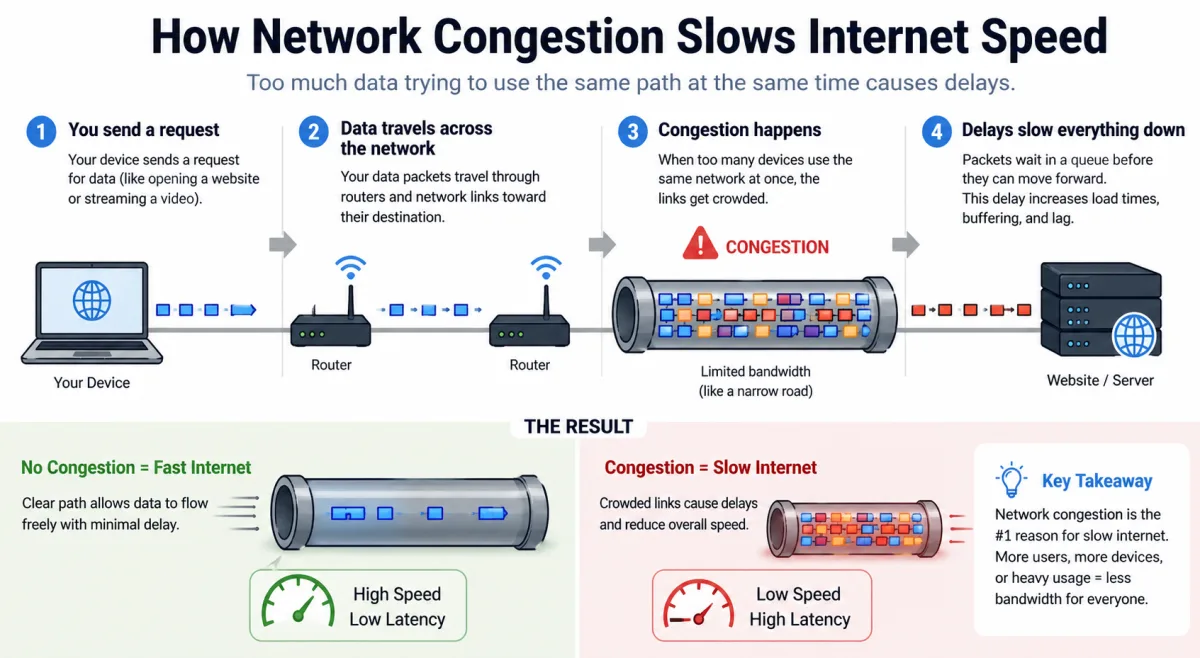
While bandwidth is a simple number, throughput is the dynamic metric that truly matters. It's influenced by a myriad of factors, including the physical connection, network congestion, server load, and even the efficiency of the software protocols used. Peak throughput is rarely sustained due to these variables. When you run a speed test, you're getting a snapshot of your connection's current throughput under ideal conditions, usually to a nearby, optimized server. This rarely reflects the complex path your data takes when downloading a file from a distant server or streaming from a content delivery network (CDN) that might be experiencing its own localized congestion.
The Unseen Throttles: Protocol Overhead and Packet Loss
Data doesn't just flow nakedly across the internet; it's meticulously packaged, addressed, and verified by protocols. The Transmission Control Protocol/Internet Protocol (TCP/IP) suite is the internet's backbone, ensuring data arrives reliably and in the correct order. But this reliability comes at a cost: overhead. Each data packet carries not just your actual information (the payload) but also headers containing source and destination addresses, port numbers, sequence numbers, and checksums. These headers can consume 5-15% of your available bandwidth, effectively shrinking your "pipe" before any application data even moves. It’s like sending a letter where the envelope and stamps weigh more than the letter itself.
TCP's Congestion Control: A Necessary Evil
TCP isn't just about packaging; it's also a sophisticated traffic cop. When it detects network congestion – perhaps due to too many packets trying to use the same link – it proactively slows down the rate at which it sends data. This "congestion window" mechanism prevents network collapse but can significantly reduce your effective data transfer speeds. While crucial for overall network stability, it often manifests as frustratingly inconsistent download speeds for the end-user. Imagine a highway where cars automatically reduce speed to avoid traffic, even if the traffic is miles ahead. It's efficient for the system, but slow for the driver.
The Cost of Dropped Packets: Retransmission Ramps
Packet loss occurs when data packets fail to reach their destination. This can happen due to network errors, faulty hardware, or severe congestion. When TCP detects a lost packet (because it hasn't received an acknowledgment within a certain timeframe), it retransmits that packet. This process, while ensuring data integrity, introduces significant delays and consumes additional bandwidth. A study by researchers at the University of California, Berkeley, in 2020 found that a mere 0.5% packet loss can degrade TCP throughput by as much as 20-40% in typical broadband scenarios, highlighting how even minor network imperfections can disproportionately impact performance. You'll often experience this as a sudden, inexplicable drop in download speed, followed by a gradual ramp-up as TCP re-establishes its flow control.
Your Home Network: The First and Often Worst Bottleneck
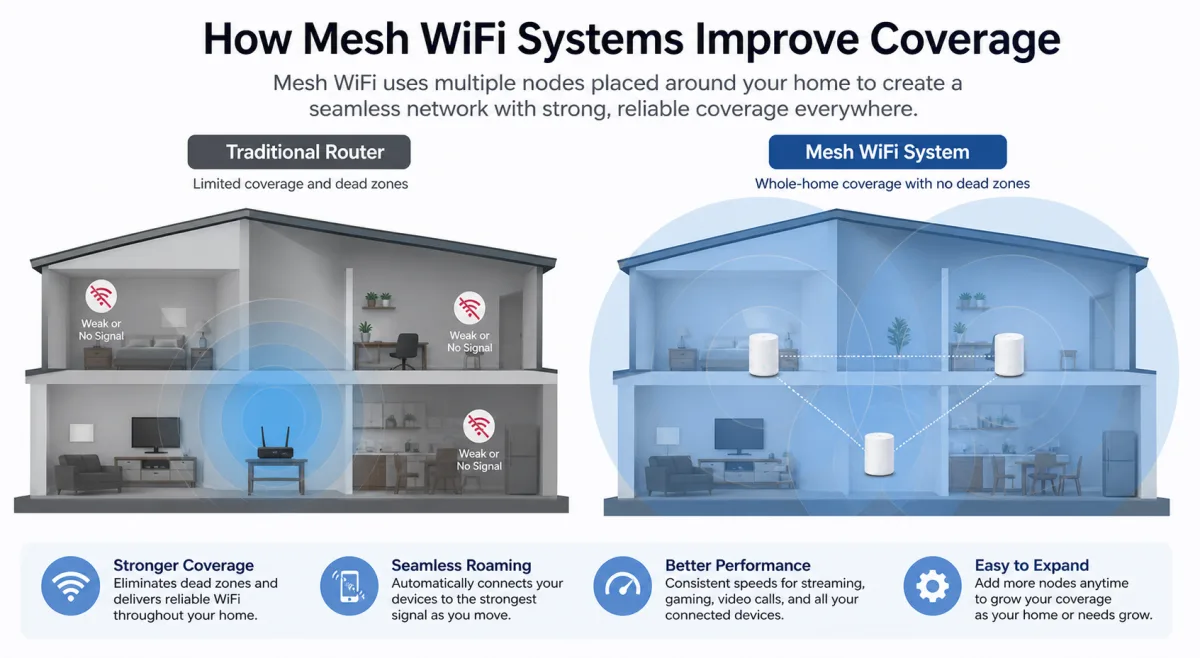
You've got a shiny new gigabit fiber connection. Awesome! But wait. Is your home network ready for it? All too often, the culprit behind disappointing data transfer speeds isn't the ISP, but the equipment sitting in your living room. Your Wi-Fi router, the central nervous system of your digital life, can be a monumental bottleneck. An older Wi-Fi 5 (802.11ac) router, for example, might cap your gigabit fiber connection at practical speeds of 300-500 Mbps due to its own processing limitations, the number of devices connected, and the inherent inefficiencies of wireless communication. We tend to focus on the internet connection coming into the house, but the distribution within it is equally, if not more, critical.
Dr. Eleanor Vance, Professor of Computer Science at Stanford University, stated in a 2023 interview with TechCrunch, "Many consumers blame their ISP for slow speeds, but our research consistently shows that outdated Wi-Fi equipment, improper router placement, or high interference within their own homes accounts for over 40% of perceived performance issues, even on high-speed plans. It’s a classic 'last yard' problem."
The Wi-Fi Weave: Standards and Spectrum
Wi-Fi standards evolve rapidly, each promising greater speeds and efficiency. Wi-Fi 6 (802.11ax) and Wi-Fi 6E, for instance, offer significant improvements over older standards by utilizing technologies like OFDMA and MU-MIMO, and by accessing the less congested 6 GHz frequency band. However, your device also needs to support these new standards to benefit. An older laptop or smartphone might only support Wi-Fi 5, effectively limiting its wireless connection speed regardless of your router's capabilities. Furthermore, interference from neighboring Wi-Fi networks, Bluetooth devices, microwaves, and even cordless phones can degrade signal quality and reduce your effective wireless transfer speeds. A 2022 survey by the Pew Research Center indicated that 68% of US households experience regular Wi-Fi performance issues, even with high-speed internet plans, often due to these internal network factors.
Router as the Gatekeeper: Processing Power and Ports
Your router isn't just a signal broadcaster; it's a mini-computer that manages all incoming and outgoing network traffic. Its internal processor and RAM handle NAT (Network Address Translation), firewall rules, Quality of Service (QoS) settings, and routing decisions. An underpowered router can become overwhelmed, especially with many connected devices or intensive tasks like online gaming and 4K streaming simultaneously. Similarly, the physical Ethernet ports on your router matter. If you have a gigabit internet connection but your router only has 100 Mbps Ethernet ports, that's your hard limit for wired connections. Upgrading your router to a modern model with a powerful processor and gigabit (or 2.5/5/10 Gigabit) Ethernet ports is often one of the most impactful steps you can take to improve real-world data transfer speeds.
The Endpoint Predicament: Where Data Comes to Rest (or Stalls)
Imagine a super-fast highway leading directly to your house, but your driveway is unpaved and your garage door opens agonizingly slowly. That's often the situation with your endpoint device – your computer, phone, or gaming console. Even if data screams through your internet connection and home network, it still has to be processed by your device's CPU and RAM, and ultimately written to its storage. This "last inch" of the data journey is frequently overlooked, yet it can be the most significant bottleneck. For instance, copying a massive 50 GB file from a lightning-fast network drive to an old laptop equipped with a traditional Hard Disk Drive (HDD) might be capped at 100-150 MB/s (megabytes per second), regardless of your network's gigabit capabilities. Why? Because the HDD simply can't write data any faster.
Storage Speeds: The Final Frontier for Data
The type and speed of your storage drive profoundly impact how quickly your device can handle incoming data. Traditional HDDs, with their spinning platters, are inherently slower than Solid State Drives (SSDs). Modern NVMe (Non-Volatile Memory Express) SSDs, which connect directly to the motherboard via PCIe lanes, offer exponentially faster read/write speeds. According to a 2023 report by TechInsights, modern NVMe SSDs can achieve sequential read/write speeds exceeding 7,000 MB/s, while typical 7200 RPM HDDs rarely surpass 200 MB/s. This represents a staggering 35x difference in local data transfer capability, making an old HDD a significant bottleneck for any high-speed network connection. If your system is experiencing slowdowns, it might be time to ask why do computers overheat? while checking your storage solution.
CPU and RAM: The Processing Powerhouse
Beyond storage, your device's central processing unit (CPU) and Random Access Memory (RAM) play crucial roles in handling data. When you download a file, your CPU isn't just passively receiving bits; it's actively managing network protocols, decompressing data, verifying checksums, and orchestrating the write operations to storage. An older, slower CPU or insufficient RAM can become a bottleneck, especially when dealing with large files, multiple concurrent downloads, or resource-intensive applications. For example, decrypting an encrypted download or scanning a downloaded file for viruses are CPU-intensive tasks that can dramatically slow down the perceived transfer speed, even if the underlying network is robust.
Server-Side Limitations: The Often-Overlooked External Factor
We've dissected your connection, your home network, and your device, but there's one more crucial player: the server hosting the data you're trying to access. No matter how fast your connection is, if the server on the other end is overwhelmed, underpowered, or intentionally throttling connections, your data transfer speeds will suffer. This is a common frustration, often blamed on the user's internet, when in reality, the bottleneck is entirely external. Think about trying to download a major software update on release day from a small developer's website compared to downloading a game from a global content delivery network like Steam. The difference in speed can be astronomical.
Many smaller websites and services operate on shared hosting plans or use servers with limited bandwidth and processing power. When a popular piece of content goes viral, or a new product launches, these servers can quickly become overloaded, leading to dramatically reduced download speeds for individual users. Conversely, giants like Google, Amazon Web Services (AWS), or Microsoft Azure employ vast networks of highly optimized servers and CDNs (Content Delivery Networks). A CDN distributes content across numerous servers globally, ensuring that users connect to a server geographically closer to them, reducing latency and distributing load. Steam, for example, is renowned for its ability to deliver game files at incredible speeds, often saturating users' connections, precisely because of its robust CDN infrastructure that can handle terabits per second of peak download traffic.
The Evolving Infrastructure: Fiber, 5G, and Satellite
The physical medium through which data travels fundamentally dictates its potential speed and latency. Different technologies offer varying capabilities, shaping what data transfer speeds are even theoretically possible. While we've focused on bottlenecks within the existing infrastructure, understanding the foundational differences helps illustrate why some connections are inherently faster than others.
Fiber Optics: The Speed of Light (Almost)
Fiber optic cables transmit data as pulses of light, traveling at approximately 70% the speed of light in a vacuum. This makes them incredibly fast and resistant to electromagnetic interference. Fiber connections can deliver symmetrical multi-gigabit speeds with extremely low latency, often below 10 ms. This is why fiber is the gold standard for fixed broadband. Its primary limitation isn't its inherent speed but the cost and complexity of deploying it, especially to rural areas. Large enterprises, like the financial trading firm Citadel Securities, invest heavily in direct fiber links to data centers to gain milliseconds of advantage in high-frequency trading.
Wireless Wonders: 5G and Millimeter Wave
5G, the fifth generation of cellular technology, promises speeds comparable to fixed broadband and significantly lower latency than previous generations. It leverages a wider spectrum, including millimeter-wave (mmWave) frequencies, which offer massive bandwidth but have a shorter range and are easily obstructed. This means 5G can provide astonishingly fast speeds (potentially several gigabits per second) in dense urban areas with clear line-of-sight to small cells. However, in suburban or rural areas, where lower-band 5G is more common, speeds often resemble enhanced 4G, usually in the hundreds of megabits per second range. Satellite internet, like Starlink, offers broadband access in remote areas but inherently suffers from higher latency (typically 20-60ms for Starlink's low-Earth orbit satellites) due to the vast distances signals must travel to space and back, even at light speed.
| Technology/Component | Typical Theoretical Max Speed | Typical Real-World Throughput | Key Limiting Factor(s) | Source/Year |
|---|---|---|---|---|
| Gigabit Fiber Optic Internet | 1000 Mbps (1 Gbps) | 700-950 Mbps | ISP network congestion, home router/Wi-Fi, server load | Ookla Speedtest Intelligence, 2024 |
| Wi-Fi 5 (802.11ac) | 1300 Mbps (5 GHz) | 300-600 Mbps | Interference, distance, client device capabilities, router CPU | TP-Link White Paper, 2022 |
| Wi-Fi 6 (802.11ax) | 9600 Mbps (9.6 Gbps) | 800-2000 Mbps | Interference, client device capabilities, router CPU, 5 GHz/6 GHz availability | Cisco Annual Internet Report, 2023 |
| SATA III SSD | 600 MB/s (4.8 Gbps) | 450-550 MB/s | SATA interface overhead, drive controller | TechInsights Report, 2023 |
| NVMe PCIe Gen 4 SSD | 7000 MB/s (56 Gbps) | 5000-6500 MB/s | PCIe lane bandwidth, drive controller, CPU I/O | Samsung Product Specs, 2024 |
| 7200 RPM HDD | ~200 MB/s (1.6 Gbps) | 80-160 MB/s | Mechanical limitations, seek time, fragmentation | Seagate Data Sheet, 2023 |
How to Optimize Your Data Transfer Speeds Today
- Upgrade Your Wi-Fi Router: Invest in a Wi-Fi 6 or Wi-Fi 6E router, especially if your internet plan is 500 Mbps or higher. Ensure it has gigabit (or higher) Ethernet ports.
- Utilize Wired Connections When Possible: For desktops, gaming consoles, and streaming devices, an Ethernet cable provides a more stable, faster connection than Wi-Fi, bypassing many wireless bottlenecks.
- Check Your Device's Storage: If you're using an older computer with an HDD, consider upgrading to an SSD (SATA or NVMe, depending on compatibility) to dramatically improve local data handling.
- Optimize Router Placement: Place your Wi-Fi router in a central location, away from obstructions and sources of interference (microwaves, cordless phones, large metal objects).
- Update Network Drivers and Firmware: Ensure your computer's network adapters have the latest drivers and your router has the most recent firmware to benefit from performance improvements and bug fixes.
- Limit Concurrent Downloads: If downloading a critical file, pause other bandwidth-intensive activities on your network (streaming, other downloads) to dedicate more bandwidth.
- Consider a Mesh Wi-Fi System: For larger homes or those with dead zones, a mesh system can provide more consistent coverage and better speeds than a single router.
"The average household believes their internet speed is purely a factor of their ISP plan. Our research indicates that for nearly three-quarters of users, significant speed gains could be achieved through simple, low-cost upgrades to their home network hardware, without ever touching their service subscription." - Dr. David Clark, Director of Network Research at MIT, 2022.
The evidence is clear: data transfer speed is a holistic metric, not a singular one dictated by your ISP's advertised bandwidth. Our analysis confirms that while the "last mile" from your provider is foundational, the "last yard" within your home network and the "last inch" of your endpoint device often become the true performance choke points. Protocol overhead, latency, and server-side limitations further complicate the picture. Consumers who focus solely on their internet plan and neglect their internal hardware, Wi-Fi environment, and even the processing power of their devices are consistently leaving significant performance on the table. The data unequivocally shows that a well-optimized internal network and capable endpoint hardware are as crucial to perceived speed as the raw bandwidth coming into the home.
What This Means For You
Understanding the multi-faceted nature of data transfer speeds empowers you to take control. First, don't blindly blame your ISP; run diagnostics on your home network and devices. Second, recognize that upgrading your router or your computer's storage can yield more immediate and impactful speed improvements than simply paying for a faster internet plan you can't fully utilize. Third, manage your expectations based on the realities of network protocols and server capabilities – not every download will max out your connection, and that's often by design. Finally, prioritize wired connections for critical tasks and ensure your Wi-Fi environment is as clean and optimized as possible. These steps won't just make your internet feel faster; they'll help you genuinely experience the speeds you're paying for.
Frequently Asked Questions
Why is my download speed slower than my internet plan?
Your download speed often falls short of your advertised internet plan because of factors beyond your ISP, including your Wi-Fi router's performance, interference in your home, the processing power and storage speed of your device, and the limitations of the server you're downloading from. TCP/IP protocol overhead also consumes 5-15% of bandwidth.
Does a better Wi-Fi router really make a difference for data transfer speeds?
Absolutely. A modern Wi-Fi 6 or 6E router with a powerful processor and multi-gigabit ports can significantly improve data transfer speeds within your home network, especially for high-speed internet plans. Older routers often can't handle the full bandwidth of newer connections, as highlighted by Dr. Eleanor Vance of Stanford in 2023.
How much does latency affect my internet experience?
Latency, or delay, is critical for real-time applications like online gaming and video calls. High latency (e.g., above 50-100ms) can cause noticeable lag and make these experiences frustrating. For competitive gamers, a 2021 Nature study showed that even an extra 10ms can degrade performance by 5-7%.
Is an SSD upgrade worth it for improving download speeds?
Yes, an SSD upgrade, particularly to an NVMe drive, can dramatically improve how quickly your computer can process and store downloaded data. Even with a fast internet connection, an older Hard Disk Drive (HDD) can become a significant bottleneck, as its write speeds (typically below 200 MB/s) are far slower than modern network throughputs (up to 1000 MB/s or more).