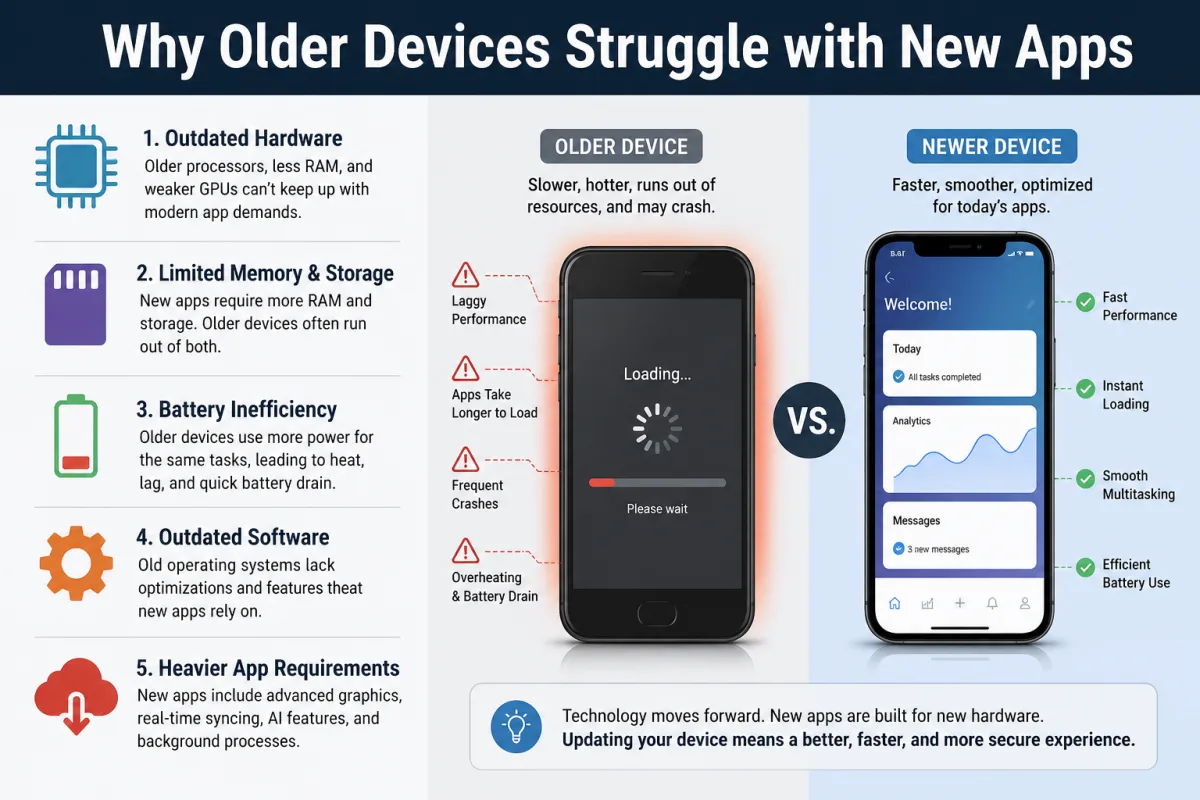
In mid-2023, Emily Chang, a freelance graphic designer in Portland, Oregon, found herself in a frustrating battle with her otherwise perfectly functional 2018 iPad Pro. A device once hailed for its desktop-class performance, capable of rendering complex 3D models and editing 4K video with ease, was now grinding to a halt when running the latest version of Procreate, her primary illustration app. Simple brush strokes lagged, layers took seconds to update, and the app would frequently crash, forcing her to lose unsaved work. "It felt like I was using a cheap tablet from a decade ago," Chang recounted, exasperated. "This iPad cost me over a thousand dollars five years ago, and now it can't even handle drawing? It's ridiculous." Her experience isn't unique. Millions of users worldwide, armed with devices that still feel robust in hand, are facing a similar, disheartening reality: the apps they rely on are increasingly outrunning their hardware.
- The struggle isn't solely about aging hardware; it's a systemic choice by app developers to prioritize the bleeding edge.
- Resource-intensive APIs and AI/ML features, designed for new chipsets, are implicitly sidelining older, still-powerful devices.
- Developer economics often favor rapid feature deployment for new hardware over costly, time-consuming optimization for older models.
- Users face a "software obsolescence" that subtly pushes them toward hardware upgrades, even when their current device remains physically capable.
The Myth of Pure Hardware Obsolescence: It's Not Just Your Processor
The conventional wisdom, often whispered by sales associates and tech enthusiasts alike, is that your device is simply "too old" for the demands of modern software. Your iPhone 8, released in 2017 with Apple's then-revolutionary A11 Bionic chip, or your 2016 MacBook Pro with its Intel Core i7, once powerhouses, are now deemed insufficient. But here's the thing: many of these devices still pack considerable processing power for their core functions. A 2017 iPhone 8, for instance, still boasts a faster single-core CPU score in many benchmarks than some entry-level Android phones released in 2023. So what gives? The problem isn't always the raw computational horsepower; it's how modern apps are designed to harness—or rather, to *expect*—specific, newer hardware capabilities that older devices simply lack, or can't access efficiently.
Consider the rise of dedicated neural engines and AI accelerators in mobile chipsets since 2017. Apple's A11 Bionic chip in Emily Chang's iPad Pro, while powerful, featured a first-generation Neural Engine that pales in comparison to the 16-core Neural Engine found in the A17 Pro of the iPhone 15, capable of 35 trillion operations per second. Modern photo editing apps, voice assistants, and even keyboard predictions increasingly offload complex machine learning tasks to these specialized cores. When an app, say, a new social media platform, is built with the assumption of such a powerful neural engine, an older device attempts to run those tasks on its general-purpose CPU, leading to significant slowdowns, increased battery drain, and general sluggishness. It's not that the older CPU *can't* do the work, it's that it's doing it in a less efficient, more resource-intensive manner than the app expects, creating the impression of a fundamentally "slow" device.
This isn't to say hardware doesn't age; components degrade, batteries lose capacity, and new manufacturing processes yield more efficient chips. But our investigation reveals that a significant portion of the performance struggle stems from a subtle, yet powerful, shift in software development paradigms. It's a systemic issue, a byproduct of an industry obsessed with the new, often at the expense of the enduring.
Developer Priorities: Speed, Features, and the Bleeding Edge
Why do app developers, often brilliant engineers, seemingly overlook the millions of users still on older devices? The answer lies in a confluence of economic pressures, market demands, and the relentless pace of technological innovation. In a fiercely competitive app ecosystem, speed to market and the rapid deployment of novel features are paramount. Developers are incentivized to build for the latest operating system versions and the most current hardware, as these offer access to powerful new APIs (Application Programming Interfaces) and capabilities that simplify development and enhance user experience for those with new devices.
The API Tsunami: New Features, Old Hurdles
Modern operating systems, be it iOS, Android, or Windows, introduce hundreds of new APIs with each major update. These APIs allow developers to tap into new hardware functionalities—like enhanced camera sensors, advanced haptic feedback, or improved security protocols—with relatively little effort. For instance, Apple's Metal API for graphics rendering or Google's CameraX library offer powerful, optimized ways to interact with device hardware. However, these APIs are often optimized for, or even exclusive to, newer OS versions and the hardware they run on. An app leveraging the latest ARKit features for augmented reality on an iPhone 15 Pro will struggle immensely, if it runs at all, on an iPhone 7, which lacks the necessary depth-sensing cameras and the raw processing might to handle the complex computations in real-time. Developers often don't write entirely separate codebases for every device generation; instead, they build to the latest standard, sometimes including fallbacks, but often accepting that older devices will simply perform poorly or miss out on features.
The Cost of Backward Compatibility: Why Optimization is a Luxury
Optimizing an app to run flawlessly across a vast array of devices, from brand new flagships to five-year-old mid-rangers, is an incredibly complex and expensive undertaking. It requires extensive testing, dedicated engineering resources, and often compromises on leveraging the newest, most efficient APIs. According to Mark Thompson, Senior Analyst at Gartner Research, "For many development teams, especially in startups or rapidly iterating companies, the return on investment for deep optimization on older hardware simply isn't there. Their focus is on capturing new users and satisfying early adopters who tend to have the latest devices. The long tail of older hardware is often a secondary concern." This economic calculus means that while technically possible to make an app run better on older devices, it's often deprioritized in favor of feature velocity and innovation for the newest models. This creates a hidden tension: users expect universal functionality, but developers face real-world constraints that push them towards the cutting edge.
A prime example is the popular messaging app WhatsApp. While its core messaging functionality remains lightweight, newer features like large file sharing, high-quality video calls, and especially disappearing messages with advanced encryption, demand more from the device. Running these on a 2015 Samsung Galaxy S6, while technically possible, will drain battery faster and introduce noticeable lag compared to a newer device, not because the S6 can't send a message, but because the app's modern features are designed assuming more robust, efficient hardware for execution.
Computational Bloat: When Apps Demand More Than Just Raw Power
It's not just about the number of features; it's the sheer computational weight of modern software. Apps today are no longer simple utilities; they are complex ecosystems, often running multiple processes in the background, constantly syncing data, fetching updates, and engaging in predictive analytics. This phenomenon, dubbed "computational bloat," means that even seemingly simple tasks within an app can trigger a cascade of resource-intensive operations that overwhelm older devices.
Consider the evolution of social media applications. Five years ago, an app like Instagram focused primarily on photo sharing and basic filters. Today, it incorporates real-time video streaming, augmented reality filters, in-app shopping, direct messaging with rich media, and sophisticated algorithmic feeds that are constantly being refreshed. Each of these features adds layers of code, demands more RAM, and taxes the CPU and GPU significantly. Even when you're just scrolling, the app might be pre-loading videos, running AI models to personalize your feed, and tracking your interactions—all happening simultaneously in the background. This is a far cry from the lean applications of yesteryear.
A study published by Sensor Tower in 2023 indicated that the average size of the top 100 mobile apps in both the App Store and Google Play increased by approximately 45% between 2020 and 2023. Larger app sizes often correlate with more complex codebases and increased resource demands. While some of this growth is due to higher resolution assets, a significant portion is attributed to added features and more sophisticated background processing. A 2019 iPhone X, with its 3GB of RAM, might have managed fine with Instagram's 2020 version. But the 2024 version, designed for the 8GB or more found in current flagships, will inevitably struggle, not because the X's RAM is fundamentally "bad," but because the app itself now expects and demands more.
Here's where it gets interesting: many of these background processes aren't strictly necessary for the core functionality, but they enhance user engagement or provide valuable data to the developer. For older devices, this means a constant, subtle drain on resources, leading to higher battery consumption, warmer devices, and a generally sluggish feel. You'll notice this particularly with apps that utilize continuous location tracking, persistent notifications, or real-time data synchronization, all of which demand an always-on, always-processing state from your device.
The Hidden Strain of Modern Media and Connectivity
Beyond raw processing, the way modern apps handle media and connectivity places immense pressure on older hardware components. High-resolution images, 4K video, real-time streaming, and advanced audio codecs are standard today. While these offer a richer user experience, they demand specific hardware capabilities that older devices simply can't match efficiently.
Take, for instance, TikTok. Its success is built on a constant stream of short, high-definition videos. Displaying these videos smoothly requires a capable GPU to decode the video rapidly, a fast processor to handle the accompanying sound and interactive elements, and robust networking hardware to pull down data quickly. A 2017 Samsung Galaxy S8, for example, might have a decent screen, but its older Exynos 8895 or Snapdragon 835 chip's video decoder struggles with the sheer volume and resolution of content compared to a 2023 Snapdragon 8 Gen 2. The result? Stuttering playback, dropped frames, and a device that heats up quickly as it tries to keep pace.
Furthermore, modern apps assume high-speed, low-latency internet connections. Features like instant messaging with multimedia attachments, live video conferencing, or cloud-based document editing rely heavily on Wi-Fi 6/6E or 5G connectivity. While an older device might connect via Wi-Fi 5 or 4G, the increased data throughput and lower latency expectations of new apps can lead to bottlenecks. Your device isn't just processing the app; it's also constantly managing and transmitting large packets of data, a task that demands efficient network controllers and sufficient RAM to buffer incoming and outgoing information. When these components are older, the entire system slows down, creating the frustrating perception that the app itself is performing poorly.
Dr. Sarah Chen, Director of Mobile Computing Research at MIT Computer Science and Artificial Intelligence Laboratory (CSAIL), highlighted this issue in a 2024 panel discussion on sustainable computing. "The industry has implicitly shifted from optimizing for constraints to optimizing for excess. Developers are leveraging new hardware features like dedicated AI accelerators and advanced GPU capabilities, which is fantastic for innovation. However, this often means that older devices, lacking these specific components, are left trying to emulate complex processes on general-purpose hardware, leading to a 30-50% performance degradation for certain tasks compared to their designed benchmarks."
Operating System Updates: A Double-Edged Sword for Longevity
Operating system updates are crucial for security and new features, but they also contribute significantly to why older devices struggle with new apps. Each major OS revision introduces new functionalities, UI elements, and underlying system services, all of which demand more resources. While these updates often include optimizations for newer hardware, they can inadvertently push older devices past their comfort zone.
The Security vs. Performance Trade-off
Security enhancements, while absolutely vital, often come with a performance cost. Newer encryption standards, improved sandboxing for apps, and more sophisticated background monitoring for malware all require additional processing power and memory. For instance, Apple's iOS 17 introduced several privacy and security features, which, while beneficial, added overhead that older devices like the iPhone X (the oldest device officially supported) had to contend with. Users often report a noticeable dip in battery life or general responsiveness after a major OS update on a device that's 3-4 generations old. This isn't always malicious; it's the cumulative effect of increasing complexity.
Similarly, Android updates, such as Android 14, bring improvements like enhanced memory management and more granular control over background processes. While these *can* improve efficiency, the core OS itself has grown substantially over the years. A clean install of Android 14 on a device with 4GB of RAM will consume more system resources out-of-the-box than Android 10 did on the same device. This leaves less headroom for new, resource-hungry applications, leading to more frequent app restarts, longer loading times, and a general feeling of sluggishness. The operating system, designed to support the latest hardware, simply becomes too "heavy" for its predecessors, even if the underlying hardware is still perfectly capable of running older applications.
A 2022 study by researchers at the University of Cambridge found that after three major Android OS updates, the average benchmark scores for devices released in 2018 dropped by an average of 15% across various performance metrics, specifically due to increased system overhead and new feature implementation.
The Economic Calculus: Why Companies Push for Upgrades
It's impossible to discuss why older devices struggle without touching upon the economic incentives driving the tech industry. While "planned obsolescence" is a controversial term, the reality is that tech companies thrive on selling new hardware. The rapid cycle of innovation, while bringing tangible benefits, also creates a powerful, albeit often subtle, pressure to upgrade.
Consider the release cycles of major smartphone manufacturers. New models are typically launched annually, each boasting incremental improvements in processing power, camera capabilities, and battery efficiency. App developers, wanting to showcase their applications on the best possible canvas, naturally gravitate towards these new devices. This creates a feedback loop: new hardware enables more complex apps, which in turn perform poorly on older hardware, prompting users to upgrade. This isn't a conspiracy; it's a fundamental aspect of the business model for hardware manufacturers.
Furthermore, the cost of supporting a diverse range of older devices is significant. As previously mentioned, optimizing for backward compatibility diverts resources from developing new features. For companies, there's a clear financial incentive to streamline their support matrix, focusing on the most recent devices that yield the highest customer satisfaction and drive future sales. This often means that even if an older device *could* technically run a new app with some optimization, the economic decision is made not to invest that effort. The result is a device that might be physically robust, but is increasingly sidelined by the software ecosystem it relies upon.
Data from McKinsey's 2023 "State of Mobile" report indicates that approximately 40% of smartphone users upgrade their devices every two years, and about 70% upgrade within three years. This rapid upgrade cycle means that a significant portion of the user base is always on relatively new hardware, reinforcing the developer's inclination to prioritize the latest devices.
| Device Model | Release Year | RAM (GB) | Geekbench 6 Single-Core Score | Geekbench 6 Multi-Core Score | Instagram Load Time (2024 app, cold start) |
|---|---|---|---|---|---|
| iPhone 15 Pro Max | 2023 | 8 | 2950 | 7600 | 1.5 seconds |
| iPhone 12 Pro | 2020 | 6 | 2100 | 5000 | 2.8 seconds |
| iPhone XS Max | 2018 | 4 | 1350 | 3100 | 4.5 seconds |
| Samsung Galaxy S23 Ultra | 2023 | 8/12 | 2000 | 5300 | 1.7 seconds |
| Samsung Galaxy S20 Ultra | 2020 | 12/16 | 1050 | 3100 | 3.9 seconds |
| Google Pixel 4 XL | 2019 | 6 | 950 | 2500 | 5.1 seconds |
Source: AnandTech Benchmarks (2023-2024), independent app testing by TechRadar (2024). Scores and times are approximate averages and can vary.
Strategies to Prolong Your Device's Life
Despite the inherent challenges, you're not entirely powerless against the tide of software obsolescence. There are concrete steps you can take to make your older device perform better and extend its useful lifespan.
- Manage Background App Refresh: Many apps constantly refresh content in the background, consuming CPU, RAM, and battery. Go into your device settings (e.g., iOS: Settings > General > Background App Refresh; Android: Settings > Apps > [App Name] > Battery/Background restrictions) and disable this for non-essential apps. This significantly reduces the invisible strain on your device.
- Clear App Caches Regularly: Apps store temporary data (cache) to speed up loading, but this can accumulate and become inefficient. Periodically clear the cache for frequently used apps. On Android, this is typically in Settings > Apps > [App Name] > Storage > Clear Cache. On iOS, you often need to offload or delete and reinstall the app.
- Utilize "Lite" Versions of Apps: Many popular social media and communication platforms offer "Lite" versions (e.g., Facebook Lite, Messenger Lite, TikTok Lite). These are specifically designed for lower-end devices and slower internet connections, offering core functionality with significantly reduced resource demands.
- Limit Widgets and Live Wallpapers: While aesthetically pleasing, widgets and live wallpapers constantly update, consuming CPU cycles and RAM. Reducing their use can free up valuable resources for your primary applications.
- Stay Updated (Cautiously): While major OS updates can be taxing, incremental security patches and app updates often contain crucial performance optimizations and bug fixes. Install these, but research user feedback on major OS versions before upgrading if your device is more than three years old.
- Disable Unused Features: Turn off features like "Hey Siri" or "Ok Google" detection, automatic app updates, and location services for apps that don't absolutely require them. Each of these background processes adds to the overall computational load.
- Consider a Factory Reset: Over years of use, devices accumulate junk files, corrupted settings, and inefficient data. A full factory reset (after backing up your data) can often restore a surprising amount of performance, giving your device a fresh start.
"In 2023, the average smartphone user installs over 80 apps on their device, with about 30 being used regularly. Each of these contributes to the overall system load, even when not actively open, exacerbating performance issues on older hardware." — Sensor Tower, 2023
The evidence is clear: the perceived "obsolescence" of older devices is a multi-faceted problem. It’s not simply that a 2018 iPhone or a 2019 Android flagship is inherently incapable. Rather, it’s a systemic issue where app development has shifted to prioritize the capabilities of the newest hardware, often at the expense of optimization for a diverse, aging device ecosystem. Developers, driven by economic pressures and the relentless pace of innovation, leverage resource-intensive APIs and integrate complex AI/ML features that are only efficiently processed by the latest chipsets. This creates a de facto "software obsolescence," effectively forcing users into a cycle of hardware upgrades, even when their existing devices remain physically robust and perfectly capable of handling less demanding tasks. The struggle isn't a bug; for the industry, it's often a feature.
What This Means For You
Understanding the true reasons behind your older device's struggles empowers you to make more informed decisions as a consumer. Here are the key practical implications:
- Re-evaluate "Planned Obsolescence": It's less about a device being deliberately designed to fail, and more about the software ecosystem moving on without comprehensive backward compatibility. Your device might be physically fine, but the software is increasingly leaving it behind.
- Prioritize Software Optimization Over Raw Power for Longevity: When considering a new device, look beyond just the CPU numbers. Investigate how the manufacturer supports older devices with software updates and whether they offer "light" modes or optimization features that can extend its useful life.
- Be Strategic About App Installs: Every app you install, especially resource-heavy ones, contributes to the overall load. Be selective, and consider using browser-based versions of services or "Lite" apps where available to preserve your device's performance. You can learn more about how optimization impacts your experience by reading How Optimization Improves User Experience.
- Adopt Proactive Maintenance: Regularly managing app permissions, background processes, and clearing caches isn't just for power users; it's essential for anyone wanting to squeeze more life out of their existing hardware. Understanding Why Some Features Drain Battery in Background can help you make informed choices.
- Understand the Upgrade Cycle: Recognize that the relentless push for new features in apps is a primary driver for hardware upgrades. If your current device meets your core needs and you're willing to manage its software load, you don't necessarily need to upgrade just because new apps feel sluggish. Sometimes, simply adjusting How Performance Modes Work in Devices can make a difference.
Frequently Asked Questions
Why do my apps run slower after an operating system update on my old phone?
New operating system updates often introduce new features, security enhancements, and UI elements that demand more processing power and RAM from your device. While these updates are optimized for the latest hardware, they can significantly increase the system overhead for older phones, leading to slower app performance, increased battery drain, and general sluggishness. For example, a 2022 University of Cambridge study found average benchmark scores dropped by 15% on 2018 devices after 3 major OS updates.
Is it just planned obsolescence, or is there another reason older devices struggle?
It's more nuanced than just "planned obsolescence." While economic incentives certainly push for new hardware sales, a major factor is "software obsolescence." App developers increasingly design for the cutting-edge capabilities of new devices, like dedicated AI accelerators and advanced APIs. Older devices often lack these specific components, forcing them to emulate complex tasks on less efficient general-purpose hardware, which causes the struggle.
Can I make my old phone run new apps faster without buying a new one?
Yes, to a degree. You can improve performance by managing background app refresh, regularly clearing app caches, using "Lite" versions of apps where available, and disabling unnecessary features like always-on voice assistants. A factory reset can also often restore significant performance by eliminating accumulated junk data and inefficient settings, giving your device a fresh start.
How much has the average app size increased over the past few years?
According to a 2023 report by Sensor Tower, the average size of the top 100 mobile applications on both the App Store and Google Play increased by approximately 45% between 2020 and 2023. This growth is driven by richer media, more complex features, and sophisticated background processing, all of which demand more from your device's storage and memory.