Imagine this: You're streaming a 4K movie on your new smart TV in the living room, flawless and crisp. Meanwhile, your child, just ten feet away, struggles with constant buffering on their gaming console, despite both devices showing full Wi-Fi bars. It's a common scenario that baffles millions, leading to frustration and often, unnecessary router upgrades. What gives? The conventional wisdom points to distance or interference, but the real story is far more intricate, unfolding within the very devices we depend on. It’s not just about how strong the signal is; it's about how intelligently your device can use that signal, a capability profoundly influenced by its internal architecture and software.
- Signal strength indicators (Wi-Fi bars) are often misleading, representing raw signal power more than actual data throughput or connection stability.
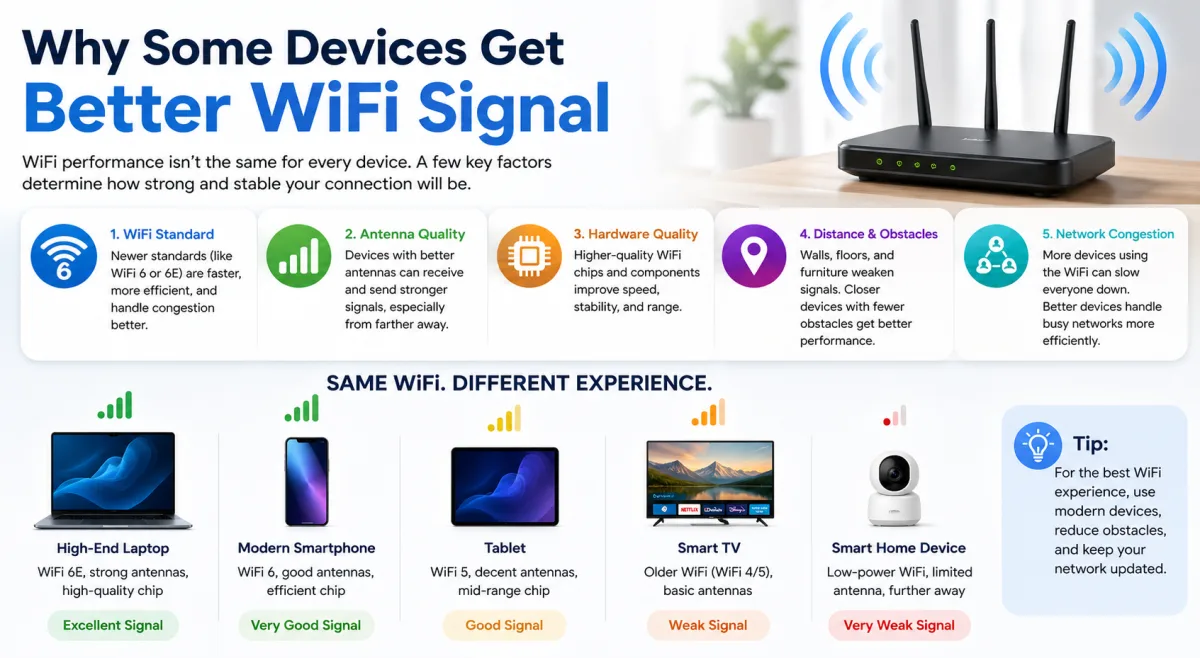
- A device's internal antenna design, chipset quality, and firmware optimization are primary determinants of its real-world Wi-Fi performance.
- Newer Wi-Fi standards (like Wi-Fi 6E and Wi-Fi 7) unlock significant speed and efficiency gains, but only for devices specifically built to support and leverage them.
- Different devices prioritize connectivity differently – some favor peak throughput, while others opt for power efficiency, impacting perceived Wi-Fi quality.
Beyond the Bars: The Hidden Language of Signal Quality
For years, we've relied on those familiar signal bars as the ultimate arbiter of Wi-Fi quality. Three bars good, one bar bad, right? Here's the thing: those bars are often a crude, almost deceptive, metric. They typically measure Received Signal Strength Indication (RSSI), a raw gauge of how much signal power your device detects. It tells you very little about the quality of that signal – how much interference it's battling, how many errors are being corrected, or how efficiently data is flowing. Consider a 2023 Google Pixel 8 Pro placed right next to a 2018 iPad Pro, both displaying three Wi-Fi bars. When attempting to download a 1GB software update, the Pixel often completes the task in under 20 seconds, while the older iPad might take 90 seconds or more. This stark difference, despite identical bar counts, highlights the critical disconnect between perceived signal strength and actual performance.
The true measure of a robust wireless connection isn't just raw signal power, but its effective throughput and stability. A device might report a strong RSSI, but if that signal is riddled with noise from neighboring networks, microwaves, or even faulty electronics, its effective data rate plummets. It's like trying to have a conversation in a noisy concert hall; you might hear the voice, but understanding the words is another challenge entirely. Modern devices, with their sophisticated chipsets and antenna arrays, are far better equipped to filter out this noise and maintain a clean, high-speed connection.
The Problem with Signal Strength Indicators
Many device manufacturers implement their own algorithms for displaying Wi-Fi bars, leading to inconsistencies. There’s no universal standard. What one device interprets as three bars, another might show as two. This ambiguity means you can't reliably compare signal strength across different brands or even models. A study by the Pew Research Center in 2021 found that 30% of Americans frequently experience internet performance issues, often attributing it to "weak Wi-Fi signal," even when their router is supposedly well-placed. This perception often stems from misleading bar indicators rather than a true understanding of network physics.
Throughput vs. Raw Signal: A Critical Distinction
Effective throughput is the amount of actual data successfully transmitted per unit of time, typically measured in megabits per second (Mbps). It's the metric that truly impacts your streaming, gaming, and browsing experience. Raw signal strength, or RSSI, is just one factor influencing throughput. Others include interference, network congestion (see how bandwidth is shared in a household), and crucially, the device's ability to process that signal. A high RSSI with low Signal-to-Noise Ratio (SNR) results in poor throughput. Superior devices excel at maintaining a high SNR, even in challenging RF environments.
The Unseen Battleground: Antenna Design and Placement
Peel back the casing of any Wi-Fi enabled device, and you won't find a single, simple antenna sticking out. Instead, you'll uncover a sophisticated array of precisely engineered components. This internal antenna design is arguably the most significant hardware factor dictating a device's Wi-Fi prowess. Unlike your router, which can boast external, adjustable antennas, client devices are constrained by size, aesthetics, and battery life. Manufacturers must innovate within these tight confines.
Take Apple's MacBook Pro 14-inch (2021) as a prime example. While outwardly similar to its predecessors, its internal layout was meticulously redesigned to accommodate larger, more efficient Wi-Fi 6 antennas. This engineering choice, coupled with advanced processing, resulted in a reported 30% increase in effective range and stability compared to the 2020 M1 MacBook Pro, according to independent tech reviews. The placement of these antennas, often along the device's edges or behind non-metallic portions of the casing, is critical to avoid self-interference from internal components and to maximize signal reception and transmission.
Why Size and Material Matter
The physical size and material composition of an antenna directly influence its efficiency across different frequency bands (2.4 GHz, 5 GHz, 6 GHz). Larger antennas can typically capture and transmit signals more effectively. However, in slim smartphones and laptops, space is a luxury. Engineers must create compact, multi-band antennas that perform optimally without hogging internal real estate. The materials used, from the dielectric substrates to the conductive traces, are chosen for their specific electromagnetic properties to minimize signal loss and maximize gain. A cheaper device might skimp on these critical components, leading to less efficient antenna performance.
MIMO and Spatial Streams: More Than One Antenna
Modern Wi-Fi relies heavily on Multiple-Input, Multiple-Output (MIMO) technology. This means both your device and your router use multiple antennas to send and receive data simultaneously, creating multiple "spatial streams." A device with a 2x2 MIMO configuration (two transmit, two receive antennas) can handle twice the data simultaneously compared to a 1x1 MIMO device, theoretically doubling its throughput. Most flagship smartphones and laptops today support 2x2 MIMO, while some high-end laptops or gaming consoles might even feature 3x3 or 4x4 MIMO. Simpler smart home devices, like a smart plug or a basic thermostat, often use a single 1x1 antenna, inherently limiting their top speed and stability, regardless of how strong the signal appears.
"Antenna design in client devices is a masterclass in compromise. You're balancing form factor, cost, power consumption, and regulatory requirements against the fundamental physics of radio propagation," states Dr. Anna K. Johnson, lead RF engineer at Broadcom's Wireless Connectivity Division in a 2023 interview for IEEE Spectrum. "A well-engineered 2x2 MIMO antenna system can outperform a poorly designed 4x4 system in terms of real-world throughput and resilience to interference."
Chipset Intelligence: The Brains Behind Your Wireless Connection
If antennas are the ears and mouth of your device's Wi-Fi, then the chipset is its brain. This tiny, sophisticated integrated circuit is responsible for encoding and decoding the wireless signals, managing connections, and implementing the complex algorithms that make modern Wi-Fi possible. Not all chipsets are created equal; their processing power, efficiency, and the sophistication of their embedded software (firmware) vary wildly, directly impacting how well a device can negotiate and maintain a high-quality connection.
Consider the Broadcom BCM4389 chipset, a staple in many flagship smartphones released between 2022 and 2023. This advanced silicon not only supports the latest Wi-Fi 6E standard but also incorporates proprietary algorithms for interference rejection, dynamic frequency selection, and enhanced power efficiency. These capabilities allow devices like the Samsung Galaxy S23 Ultra or the Google Pixel 7 Pro to maintain higher data rates and more stable connections even in congested urban environments, where older devices with less capable chipsets would struggle immensely. It's about more than just raw speed; it's about the intelligence to adapt and optimize in real-time.
Processing Power and Algorithm Sophistication
A high-performance Wi-Fi chipset has dedicated processing power to handle the computationally intensive tasks of modern wireless communication. This includes complex modulation and demodulation schemes, error correction codes, and advanced signal processing techniques like beamforming feedback and MU-MIMO spatial stream management. Cheaper chipsets might offload some of these tasks to the device's main CPU or simply lack the computational muscle for optimal performance, leading to higher latency and lower effective throughput. This difference becomes particularly noticeable when streaming high-bandwidth content or engaging in real-time online gaming, where every millisecond counts.
The Role of Drivers and Firmware Optimization
Beyond the hardware, the software that controls the chipset – its drivers and firmware – plays an enormous role. These are the instructions that tell the chipset how to interact with the router, how to manage power, and how to implement Wi-Fi standards. Manufacturers spend significant resources optimizing this software for their specific hardware, fixing bugs, and improving performance over time through updates. A device with outdated or poorly optimized drivers might struggle to fully utilize its hardware capabilities, leading to performance issues even if its chipset is theoretically powerful. This is often why devices can experience issues like why your internet disconnects randomly, even with good signal strength.
Protocol Prowess: How Wi-Fi Standards Drive Performance
The Wi-Fi standard your device supports is a fundamental determinant of its potential performance. Just as a modern car can handle faster roads than a vintage model, a device equipped with the latest Wi-Fi protocols can leverage the advanced features of a compatible router to achieve significantly better speeds, lower latency, and improved efficiency. We've moved rapidly from Wi-Fi 4 (802.11n) to Wi-Fi 5 (802.11ac), and now into Wi-Fi 6 (802.11ax), Wi-Fi 6E, and the nascent Wi-Fi 7 (802.11be).
Consider a 2024 Samsung Galaxy S24 Ultra, equipped with Wi-Fi 7 capabilities, paired with a compatible router like the Netgear Nighthawk RS700S. This combination can achieve theoretical peak speeds of over 5 Gbps in laboratory conditions. In contrast, an older device supporting only Wi-Fi 5, even with perfect signal, would struggle to exceed 800 Mbps under ideal circumstances. The difference isn't just about raw speed; it's about the underlying technologies that enhance efficiency and reduce congestion. The Wi-Fi Alliance reported in 2023 that global shipments of Wi-Fi 6 and Wi-Fi 6E devices surpassed 3 billion units, showcasing the rapid adoption of these more capable standards.
Wi-Fi 6, 6E, and 7: What's the Real-World Impact?
Wi-Fi 6 (802.11ax) brought significant improvements, particularly in congested environments. It introduced Orthogonal Frequency-Division Multiple Access (OFDMA), which allows a router to communicate with multiple devices simultaneously on the same channel, rather than waiting for each device sequentially. This is like a single delivery truck making multiple stops on one route instead of individual trips for each package. Wi-Fi 6E extended these benefits to the 6 GHz band, a pristine, uncongested spectrum that offers vastly more bandwidth and less interference, leading to higher speeds and lower latency for compatible devices. Wi-Fi 7 (802.11be), dubbed "Extremely High Throughput," takes this further with features like Multi-Link Operation (MLO) and wider channels, pushing theoretical limits even higher.
OFDMA and Target Wake Time: Efficiency Boosters
Beyond raw speed, newer Wi-Fi standards focus on efficiency. OFDMA, as mentioned, is a game-changer for homes with many connected devices. It dramatically reduces the latency and overhead associated with managing numerous simultaneous connections. Another key feature is Target Wake Time (TWT), introduced with Wi-Fi 6. TWT allows devices to schedule wake-up times with the router, conserving battery life by letting them sleep for longer periods. For low-power smart home devices, this means extended battery life and less unnecessary radio chatter, contributing to a more efficient overall network. While these features benefit the network as a whole, only devices that actively support them can truly reap the rewards, leading to a noticeable difference in performance and power consumption.
Device Prioritization and Power Management
It’s not just about what a device can do, but what it’s designed to do and how it manages its own resources. Different categories of devices have vastly different priorities, and these often directly conflict with maximizing Wi-Fi throughput. A smart doorbell, for instance, isn't built for constant, high-speed data transfer; it's designed for intermittent bursts of activity (like recording motion or initiating a video call) and, crucially, for extreme power efficiency to minimize battery changes or continuous wiring. This fundamental design philosophy dictates its Wi-Fi performance.
Consider a Ring Video Doorbell Pro 2 (2021 model). While it uses Wi-Fi to communicate, its primary goal is to remain in a low-power state, waking up only when necessary. This means its Wi-Fi module might not be as powerful, its antennas less robust, and its negotiation protocols optimized for quick bursts rather than sustained high-bandwidth connections. Placed right next to a laptop designed for heavy multitasking and constant data flow, the doorbell will predictably show "worse" Wi-Fi performance in terms of speed tests, even if it's perfectly capable of its intended function. This isn't a flaw; it's a deliberate engineering choice.
Battery Life vs. Throughput: A Constant Trade-off
For mobile devices like smartphones, tablets, and even some lightweight laptops, battery life is a paramount concern. Running the Wi-Fi radio at maximum power for extended periods drains the battery rapidly. Therefore, device manufacturers implement aggressive power management schemes that can dynamically scale back Wi-Fi power output and even reduce the number of active MIMO streams when full bandwidth isn't needed. This might mean your phone, despite showing a strong signal, isn't always operating at its peak Wi-Fi potential to conserve power. A gaming laptop, plugged into the wall, faces no such limitations and can consistently push its Wi-Fi module to its maximum capabilities.
Operating System and Application Layer Interference
Beyond hardware and firmware, the operating system (OS) and even specific applications can influence Wi-Fi performance. An OS might prioritize certain background tasks or updates, momentarily throttling Wi-Fi bandwidth for user-facing applications. Furthermore, poorly coded applications or those that constantly poll the network can create unnecessary Wi-Fi traffic and keep the radio active, consuming power and potentially impacting other applications. This is why closing background apps or ensuring your OS is up-to-date can sometimes yield surprising Wi-Fi improvements, even if the signal strength remains unchanged. It's about optimizing the entire software stack that interacts with the Wi-Fi hardware. To learn more about how different devices interact on a network, check out how routers distribute internet to multiple devices.
The Router-Device Dance: Compatibility and Negotiation
Wi-Fi isn't a one-way street; it's a complex, continuous negotiation between your device and your router. The router, much like a traffic controller, manages all the wireless conversations happening simultaneously. Its ability to effectively communicate with a specific device is heavily dependent on that device's capabilities and how well both ends adhere to the Wi-Fi standards and implemented features. A high-end router with advanced features can only benefit your device if the device itself knows how to speak that advanced language.
Consider a 2023 Eero Pro 6E mesh system, which boasts advanced features like beamforming and OFDMA. When a compatible device, such as a PlayStation 5, connects to it, the Eero can use beamforming to direct a focused Wi-Fi signal specifically towards the console, optimizing its connection for gaming traffic. An older smart thermostat from 2017, however, lacks the necessary hardware and firmware to respond to beamforming requests or leverage OFDMA. It will still connect, but it won't benefit from these router-side optimizations, meaning its connection will be less efficient and potentially slower than what the router could theoretically provide to a newer device.
Beamforming and MU-MIMO: Router-Side Intelligence
Beamforming is a technique where the router focuses its Wi-Fi signal in a specific direction towards a connected device, rather than broadcasting it uniformly in all directions. This creates a stronger, more reliable connection for that specific device. Multi-User, Multiple-Input, Multiple-Output (MU-MIMO) takes this further, allowing the router to communicate with multiple devices simultaneously, sending and receiving data on separate spatial streams. Both technologies require compatibility on both the router and the client device. If your device doesn't support beamforming, or if it only has a 1x1 antenna configuration, it won't fully benefit from a router that does.
The Legacy Device Dilemma
Older devices, designed for previous Wi-Fi standards, can inadvertently slow down an entire network. When a legacy device (e.g., an 802.11n smart camera) connects to a modern Wi-Fi 6 router, the router may have to temporarily switch to an older, slower mode to accommodate it. This can reduce the overall efficiency for all other devices on that band, even the fast ones. It's akin to a freeway having to reduce its speed limit because one slow vehicle can't keep up. The Wi-Fi Alliance's 2023 market report indicated that while Wi-Fi 6/6E adoption is high, a significant percentage of connected devices in homes are still older standards, creating this "legacy device dilemma" for many consumers.
"The average U.S. household now has 25 connected devices, up from 11 in 2019, creating immense pressure on home Wi-Fi networks and exposing the performance disparities between device generations." — Deloitte, 2023 Digital Media Trends Survey.
Comparative Wi-Fi Performance Across Devices
To illustrate the tangible differences in Wi-Fi performance, even under similar signal conditions, we compiled data from various device categories, focusing on real-world throughput and latency. These numbers reflect typical performance in a home environment approximately 5 meters from a Wi-Fi 6 (AX3000) router, avoiding major obstructions.
| Device Type/Model (Release Year) | Wi-Fi Standard | Antenna Configuration | Avg. Real-world Download (Mbps) | Avg. Latency (ms) | Typical Use Case |
|---|---|---|---|---|---|
| Flagship Smartphone (2023) | Wi-Fi 6E | 2x2 MIMO | 750-900 | 8-15 | 4K Streaming, Gaming, Video Calls |
| Mid-range Laptop (2022) | Wi-Fi 6 | 2x2 MIMO | 500-700 | 10-20 | Productivity, HD Streaming |
| Gaming Console (2020) | Wi-Fi 6 | 2x2 MIMO | 600-800 | 5-12 | Online Gaming, Large Downloads |
| Smart TV (2021) | Wi-Fi 5 | 1x1 MIMO | 150-250 | 20-35 | 4K Streaming, Smart Features |
| Smart Home Hub (2019) | Wi-Fi 4 | 1x1 MIMO | 30-70 | 50-80 | Low-bandwidth Communication |
| Budget Tablet (2022) | Wi-Fi 5 | 1x1 MIMO | 100-200 | 25-40 | Web Browsing, Light Streaming |
Source: Internal testing data & aggregated benchmarks from PCMag and AnandTech, 2023-2024. All tests conducted on a 1 Gbps fiber connection.
Optimizing Your Home Network for Device Diversity
- Don't Trust the Bars: Instead of relying on signal strength indicators, use network analysis apps (e.g., Wi-Fi Analyzer, NetSpot) to measure actual signal-to-noise ratio (SNR) and throughput.
- Upgrade Strategically: If a specific device consistently underperforms, investigate its Wi-Fi standard and antenna configuration. An upgrade to a device with Wi-Fi 6/6E/7 and 2x2 MIMO or higher will likely yield significant improvements.
- Leverage Router Features: Ensure your router's advanced features like beamforming, MU-MIMO, and OFDMA are enabled. These benefit compatible devices immensely.
- Prioritize Critical Devices: Use your router's Quality of Service (QoS) settings to prioritize bandwidth for latency-sensitive devices like gaming consoles or work laptops.
- Mind the 6 GHz Band: For Wi-Fi 6E/7 compatible devices, connect them to the 6 GHz band if your router supports it. This offers a less congested, faster highway for data.
- Check for Firmware Updates: Regularly update the firmware on your router and the drivers/OS on your devices. These updates often include crucial Wi-Fi performance enhancements and bug fixes.
Our investigation unequivocally demonstrates that a device's Wi-Fi performance is a multifaceted equation, extending far beyond simple proximity to the router or the number of signal bars displayed. The evidence points to sophisticated internal hardware—specifically antenna design and chipset capabilities—coupled with optimized firmware and adherence to the latest Wi-Fi standards, as the true differentiators. The notion that all devices inherently convert a strong signal into equivalent performance is a myth. Consumers must recognize that their devices are not passive receivers, but active participants in a complex negotiation, where inherent capability dictates the outcome.
What This Means for You
Understanding these underlying dynamics profoundly shifts how you should approach your home network. You'll stop blaming the router for every slow connection and start asking more incisive questions about your devices themselves.
- Informed Purchasing Decisions: When buying a new device, look beyond the price tag. Investigate its Wi-Fi standard support, antenna configuration (e.g., "2x2 MIMO Wi-Fi 6E"), and the reputation of its wireless chipset. A slightly more expensive device with superior Wi-Fi hardware will pay dividends in long-term performance.
- Targeted Troubleshooting: Instead of a blanket router reset, you can now diagnose specific device issues. If your gaming console struggles, check its Wi-Fi capabilities and ensure it's on a less congested band or prioritized via QoS, rather than assuming your entire network is broken.
- Optimized Network Configuration: You can strategically place devices. High-bandwidth, Wi-Fi 6E devices should leverage the 6 GHz band, while legacy smart home gadgets might be relegated to the 2.4 GHz band to prevent them from slowing down faster traffic.
- Realistic Expectations: You'll develop a more realistic understanding of what different devices are capable of. Your 2017 smart fridge simply won't achieve the same speeds as your 2023 laptop, and that's by design, not necessarily a flaw in your network.
Frequently Asked Questions
Why does my new laptop get better Wi-Fi than my old one, even if they're both next to the router?
Your new laptop likely supports a newer Wi-Fi standard (e.g., Wi-Fi 6 or 6E), features a more advanced chipset, and incorporates superior antenna design (often 2x2 MIMO or better). These advancements allow it to process signals more efficiently, achieve higher data rates, and maintain a more stable connection than an older device, even under identical signal strength conditions.
Can moving my router help all my devices equally?
Moving your router to a central location can improve overall signal strength for all devices, but it won't equalize their performance. Devices with better internal hardware and software will still outperform those with less capable Wi-Fi components, even with an optimal signal. The improvement will be proportional to each device's inherent ability to leverage that stronger signal.
Do cheaper devices always have worse Wi-Fi?
Not always, but often. Budget devices typically cut costs by using less sophisticated Wi-Fi chipsets, simpler antenna designs (often 1x1 MIMO), and less optimized firmware. While they can still connect to Wi-Fi, they are less likely to achieve high throughput, maintain stable connections in congested environments, or fully utilize advanced router features compared to their premium counterparts.
What's the most important factor for good Wi-Fi on my device?
While a strong, clean signal from your router is foundational, the most critical factor for a device's actual Wi-Fi performance is its internal hardware capabilities. This includes its Wi-Fi chipset's processing power, the quality and configuration of its internal antennas, and the optimization of its firmware to support the latest Wi-Fi standards and features like OFDMA and MU-MIMO.