In November 2022, a major financial institution narrowly avoided a catastrophic data breach, not because of a fancy new firewall, but due to a subtle anomaly flagged by a routine system log analysis. An obscure server, usually dormant during off-peak hours, suddenly pinged an external IP address thousands of times. It wasn't an active attack yet; it was reconnaissance, a digital footprint left by an intruder meticulously mapping the network for vulnerabilities. That early warning, buried deep within a mountain of raw data, allowed security teams to isolate the threat and reinforce defenses before a single byte of sensitive customer information was compromised. This incident, like countless others, underscores a profound truth: system logs aren't merely passive records of what’s happened. They’re active agents, constantly feeding into algorithms that make real-time decisions about performance, security, and even your device's longevity. They aren't just tracking device activity; they're driving it.
- System logs predict potential hardware failures and software conflicts, not just record them.
- They’re the primary evidence in cybersecurity investigations, often detecting threats before they fully materialize.
- Your device's ongoing performance and battery life are continually optimized through real-time log data analysis.
- Understanding how logs work empowers users to make more informed choices about their digital privacy and security.
Beyond the Black Box: What System Logs Really Are
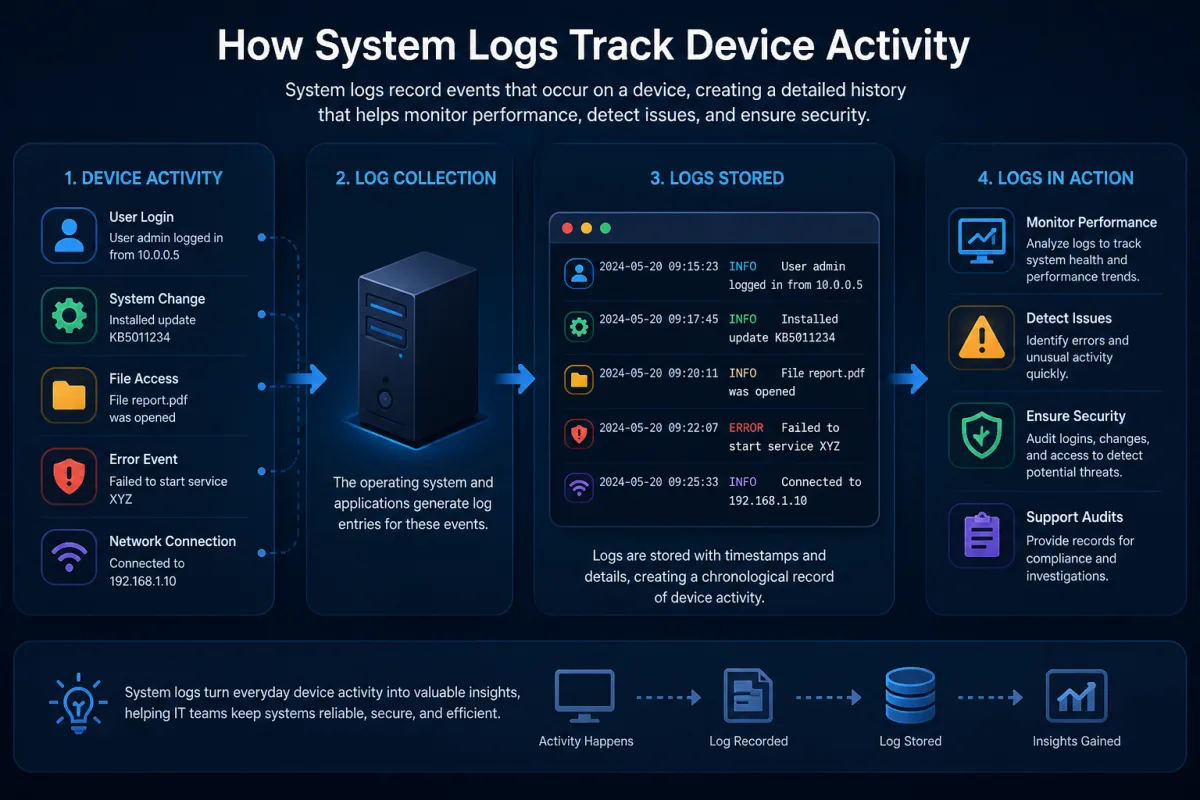
Every digital interaction, every process launch, every network connection – your devices are constantly whispering secrets about their inner workings. These whispers are system logs. At their core, logs are timestamped records of events that occur within a computer system. From a simple user login on a Windows machine, meticulously recorded in the Event Viewer, to complex kernel messages generated by a Linux server's syslog daemon, these digital breadcrumbs create an exhaustive narrative of a device's life. Think of them as the device's flight recorder, capturing critical operational data, but unlike a plane's black box, they're not just for post-mortem analysis. They're alive, constantly being written to, read from, and acted upon by the very systems that create them.
It’s not just operating systems. Applications, network devices, databases, and even your home router produce their own streams of log data. Each entry typically includes a timestamp, the event source (e.g., "Kernel-Power" or "Apache Web Server"), an event ID, and a descriptive message. This granular detail provides an unparalleled window into system behavior, offering diagnostic insights that no other data source can match. Without these verbose records, troubleshooting a crashing application or diagnosing a network outage would be akin to solving a mystery without any clues. Here's the thing. While seemingly mundane, this continuous stream of data forms the foundational layer for nearly all modern IT operations, security monitoring, and even user experience optimization.
The Silent Sentinels: Proactive Diagnostics and Predictive Maintenance
Conventional wisdom often pegs system logs as reactive tools – something you check *after* a problem occurs. But wait. The most profound utility of system logs lies in their predictive power. Modern systems, particularly large-scale enterprises and cloud providers, don't wait for a hard drive to fail; they anticipate it. They do this by analyzing patterns within logs. For example, a sudden increase in "bad sector" warnings in a server's disk logs, even if the disk is still operational, signals impending failure. This isn't just theory; it's standard practice.
Detecting Anomalies Before They Crash
Google, for instance, pioneered the use of log analytics to predict hard drive failures in its massive data centers. By correlating specific error messages and performance metrics from system logs, they found they could predict approximately 60% of disk failures up to three months in advance, allowing for proactive replacement and significantly reducing data loss and downtime. This capability transformed their operational strategy, moving from reactive component swaps to scheduled maintenance. Similarly, in industrial control systems, logs from machinery can indicate subtle deviations in temperature, pressure, or vibration that, when correlated, predict mechanical breakdown long before catastrophic failure. It's a testament to the power of data: the device itself tells you it's sick before it collapses.
From Warning Signs to System Health
This proactive approach extends beyond hardware. Application logs often reveal subtle memory leaks, database connection errors, or API timeout warnings that suggest performance bottlenecks or impending service degradation. Microsoft Azure’s monitoring services, for example, ingest billions of log entries daily from customer applications and infrastructure. Their AI-driven analytics can identify recurring error patterns or unusual spikes in resource consumption that indicate an application is about to become unstable, triggering automated alerts or even self-healing actions. This isn't just about fixing things faster; it's about keeping them from breaking in the first place, largely thanks to the diligent, continuous recording of system logs.
Digital Forensics: Unmasking the Unseen Threat
When a cyberattack hits, system logs transition from quiet sentinels to indispensable detectives. They're the primary record of compromise, the digital breadcrumbs that allow investigators to reconstruct events, identify vulnerabilities, and attribute attacks. Without them, understanding how a breach occurred is nearly impossible. Consider the infamous WannaCry ransomware attack in 2017. Security analysts meticulously pieced together the infection chain by examining Windows event logs across thousands of affected machines, tracing the propagation of the worm and identifying the initial entry points, which often involved unpatched EternalBlue vulnerabilities. Every login attempt, every file access, every network connection – it all leaves a trace.
“System logs are the crown jewels of any cybersecurity investigation,” states Dr. Casey Ellis, CTO and Founder of Bugcrowd, in a 2023 interview. “In over 90% of the major breaches we’ve analyzed, granular log data provided the unequivocal proof of initial access, lateral movement, and data exfiltration. Without detailed logs, you’re flying blind against sophisticated adversaries.”
Modern Security Information and Event Management (SIEM) systems like Splunk and IBM QRadar ingest logs from across an entire organization's infrastructure. They correlate events, identify suspicious patterns, and flag potential threats in real time. For example, multiple failed login attempts on a server, followed by a successful login from an unusual geographic location, might trigger an alert for a brute-force attack. These systems are constantly sifting through petabytes of data, looking for the tell-tale signs of malicious activity. This isn't theoretical; it's the front line of cyber defense, where system logs provide the intelligence needed to combat an ever-evolving threat landscape. It's also how organizations identify why some domains are blacklisted after being used in phishing campaigns.
Optimizing Experience: How Logs Fine-Tune Your Device
Beyond security and stability, system logs play a crucial, often unseen, role in optimizing your everyday device experience. Ever wonder how your smartphone manages to squeeze out hours of battery life, or how applications seem to load faster over time? A significant part of that magic happens behind the scenes, driven by continuous analysis of system log data. These logs provide insights into resource consumption, application usage patterns, and hardware performance metrics, allowing operating systems and applications to intelligently adapt.
Resource Management and Performance Boosts
Apple’s iOS, for example, constantly monitors application activity through system logs. It learns which apps you use frequently, when you use them, and which ones drain battery in the background. Based on this log data, the OS intelligently adjusts background refresh rates, prioritizes network access, and even unloads less-used apps from memory to conserve resources and improve overall responsiveness. This isn't a static setting; it's a dynamic, machine learning-driven optimization process fueled by your device's own internal record-keeping. Similarly, gaming consoles use logs to understand game performance under different conditions, allowing developers to release patches that specifically target observed bottlenecks.
Personalization Through Passive Observation
It's not just about raw performance. Logs contribute to a more personalized experience. Imagine a video streaming service like Netflix. Their systems constantly log playback metrics, buffering times, and user interactions. This data isn't just about what you watched; it's about how your device performed during that viewing. If certain codecs consistently cause issues on your specific hardware, the system might subtly adjust the streaming profile. This passive, log-driven observation allows services to adapt to individual device capabilities and network conditions, ensuring a smoother, more enjoyable experience without explicit user configuration. That's the power of system logs, silently working to make your digital life better.
The Privacy Paradox: What Your Logs Reveal About You
Here's where it gets interesting. While system logs are undeniably powerful tools for security and optimization, they also present a significant privacy paradox. Because they record nearly every interaction, they can inadvertently capture highly sensitive personal information. Every website visited, every application launched, every network connection made – it all leaves a digital trace. For instance, diagnostic logs sent to software vendors might include details about your device's configuration, crash reports with memory dumps, and even metadata about files you've accessed. This data, while anonymized or aggregated, can sometimes be de-anonymized or, in its raw form, reveal habits, locations, and preferences.
This tension between utility and privacy is a central challenge for developers and users alike. Regulations like the General Data Protection Regulation (GDPR) in Europe and the California Consumer Privacy Act (CCPA) directly address how log data, if it contains Personally Identifiable Information (PII), must be handled. Companies are obligated to declare what data they collect, why they collect it, and how long they retain it. For users, understanding what their device is logging and to whom that data is being transmitted becomes critical. It's a constant balancing act: the more granular the logs, the more insight they offer for troubleshooting and security; but also, the greater the potential for privacy infringement. User consent and transparent data policies are no longer optional but essential for maintaining trust in a deeply logged world.
Architecting Visibility: Common Logging Frameworks and Tools
Managing the sheer volume of system log data generated by modern IT environments is a monumental task. A single enterprise can generate terabytes of log data daily. Without robust frameworks and tools, this invaluable data would remain an unsearchable, inaccessible mess. This is where dedicated logging solutions come into play, transforming raw log files into actionable intelligence. The classic example is syslog, a standard protocol used by Linux and Unix-like systems to send event messages to a central server. It's the grandfather of centralized logging, allowing administrators to consolidate logs from hundreds or thousands of devices into one location for easier review.
The Ecosystem of Log Management
Beyond basic `syslog`, the industry has developed sophisticated platforms to aggregate, parse, store, and analyze log data at scale. The ELK Stack (Elasticsearch, Logstash, Kibana) is a popular open-source solution, where Logstash collects logs, Elasticsearch indexes and stores them, and Kibana provides a powerful visualization dashboard. Commercial solutions like Splunk and Sumo Logic offer even more advanced capabilities, including machine learning-driven anomaly detection and compliance reporting. These tools don't just store logs; they make them searchable, correlatable, and understandable, enabling rapid incident response and proactive monitoring. For cloud environments, services like AWS CloudWatch and Azure Monitor provide integrated logging and monitoring for cloud resources, offering seamless visibility into distributed applications and infrastructure.
From Raw Data to Actionable Intelligence
Consider Netflix, a company synonymous with massive scale. They leverage an incredibly sophisticated internal logging and monitoring infrastructure to ensure their streaming service remains seamless for millions of users worldwide. Every stream, every server request, every database query generates log data. Their systems ingest this data, analyze it for performance bottlenecks, security threats, and user experience issues, and even trigger automated remediation actions. This constant flow from raw log data to actionable intelligence is what keeps their complex distributed system running efficiently. It's how how virtual machines run different OS on one device are monitored and managed across vast server farms, ensuring stability and performance.
The Future is Logged: AI, Machine Learning, and Hyper-Automation
The role of system logs is evolving dramatically with the advent of artificial intelligence (AI) and machine learning (ML). Manually sifting through terabytes of log data is impossible for humans. This is where AI excels, transforming log analysis from a reactive, human-intensive task into a proactive, automated one. ML algorithms can identify subtle, complex patterns in log data that human analysts would miss, detecting zero-day attacks, predicting system failures with greater accuracy, and even automating responses to common issues. IBM Watson for Cyber Security, for example, processes millions of security events daily from various log sources, learning from new threats and advising human analysts on potential risks.
This shift towards AI-powered log analysis is leading to hyper-automation in IT operations and security. Instead of just alerting an administrator about a suspicious event, an AI system might automatically isolate a compromised server, block a malicious IP address, or even roll back a problematic software update based on log-driven insights. This reduces human intervention, speeds up incident response, and dramatically improves the resilience of digital systems. What gives? We're moving from systems that merely record history to systems that actively learn from it and shape their own future. The future of IT operations isn't just about collecting more data; it's about intelligently acting on it, and system logs remain the fundamental data source fueling this revolution.
| Incident Type | Traditional Log Analysis (Avg. Hours) | AI-Powered Log Analysis (Avg. Hours) | Source | Year |
|---|---|---|---|---|
| Malware Infection | 12.5 | 2.1 | Cisco Security Report | 2021 |
| Data Exfiltration | 18.0 | 3.5 | Ponemon Institute / IBM | 2023 |
| Unauthorized Access | 9.8 | 1.8 | Verizon DBIR | 2022 |
| DDoS Attack Mitigation | 6.2 | 0.7 | Akamai Security Report | 2020 |
| Application Outage | 7.1 | 1.5 | Gartner Research | 2022 |
“The average cost of a data breach in 2023 reached an all-time high of $4.45 million, a figure significantly influenced by the time it takes to identify and contain the breach – a process where robust log analysis is absolutely critical.” — Ponemon Institute / IBM Cost of a Data Breach Report, 2023
How to Improve Your Device's Security and Performance with Log Insights
Understanding the critical role of system logs isn't just for IT professionals; it offers practical benefits for every device user. Here's how you can proactively use this knowledge to enhance your digital life:
- Enable Comprehensive Logging: Ensure verbose logging is enabled on critical systems and applications where appropriate. While it consumes more storage, it provides the detailed forensic data necessary for deep analysis, especially in security incidents.
- Regularly Review Event Logs: On Windows, regularly check the Event Viewer (especially the "Security" and "System" logs). For macOS, use Console.app. Look for recurring error messages, unexpected restarts, or unusual login attempts.
- Implement Centralized Log Management: For businesses or advanced users, consider a basic SIEM solution or an ELK stack. Consolidating logs from multiple devices allows for easier correlation of events and faster threat detection.
- Configure Alerts for Anomalies: Set up automated alerts for specific log events, such as failed administrator logins, sudden spikes in network traffic, or critical application errors. Many modern systems and tools offer this functionality.
- Understand Privacy Settings: Be aware of what diagnostic and usage data your operating system and applications are configured to send to vendors. Adjust these settings to balance privacy with helpful crash reporting.
- Encrypt Log Data: Ensure that log files, especially those containing sensitive information, are stored securely and encrypted both at rest and in transit to prevent unauthorized access.
- Back Up and Retain Logs Appropriately: Establish a clear log retention policy. While logs can take up space, retaining them for a sufficient period (e.g., 90 days to a year) is crucial for compliance and post-incident investigation.
The evidence is clear: system logs are far more than passive records. They are the beating heart of modern digital systems, providing the critical data needed for proactive threat detection, predictive maintenance, and continuous performance optimization. The staggering reductions in incident response times achieved through AI-powered log analysis, as demonstrated by industry reports, underscore their essential role. Any organization or individual serious about security and efficiency simply cannot afford to overlook the active, dynamic power of their system logs.
What This Means For You
For the average user, this deep dive into system logs means your devices are smarter and more resilient than you might realize, constantly self-optimizing and defending. Your smartphone isn't just running apps; it's logging their behavior to extend battery life. Your computer isn't just crashing randomly; it's likely been sending warning signals to its OS for hours, signals that could prevent future failures. For businesses, the implications are even more profound. Robust log management isn't an optional add-on; it's a fundamental pillar of cybersecurity, operational efficiency, and regulatory compliance. Ignoring your logs means flying blind in an increasingly complex digital landscape, exposing you to unforeseen vulnerabilities and costly downtime. Embracing log intelligence means building systems that are not only reactive but truly proactive, learning and adapting to challenges before they even fully emerge. It's the difference between waiting for a problem to hit and seeing it coming, giving you the power to act.
Frequently Asked Questions
Are system logs permanent on my device?
No, system logs are generally not permanent. Operating systems typically implement rotation policies, meaning older logs are automatically overwritten or archived after a certain period or when they reach a specific file size limit. For example, Windows Event Viewer often has a maximum size limit for log files before new events begin to overwrite the oldest ones.
Can I view my own device's system logs?
Yes, you absolutely can. On Windows, you can access logs via the "Event Viewer" application. macOS users can open "Console.app" to view system and application logs, while Linux users can typically find logs in the `/var/log` directory or use commands like `journalctl` or `dmesg` to inspect kernel messages.
Do system logs affect my device's performance?
Minimally, yes. Writing log entries consumes a small amount of CPU, memory, and disk I/O. However, for most modern devices and typical logging levels, this impact is negligible and far outweighed by the benefits of having diagnostic and security information. Only extremely verbose logging on resource-constrained systems or malfunctioning logging processes might noticeably impact performance.
How long are system logs typically kept by companies?
Log retention policies vary widely by industry, regulatory requirements (like GDPR or HIPAA), and company policy. Many organizations retain security-relevant logs for 90 days to a year for forensic purposes, while compliance-driven industries might extend this to several years. Personal device logs, as mentioned, are often rotated much faster by the operating system itself.