Picture this: It's 7 PM on a Tuesday. Liam O'Connell, a senior software architect for a Silicon Valley startup, is moments away from presenting a critical product demo over a video conference. His daughter, Maya, is upstairs attempting to defeat a boss in an online game with friends. His son, Ethan, is streaming a 4K movie in the living room. Suddenly, Liam's video feed freezes, then pixelates. Maya's game lags, costing her a crucial hit. Ethan's movie buffers. What just happened? Most people blame their Internet Service Provider (ISP), but the real culprit often isn't the pipeline to your home; it's the unseen traffic cop inside your house: your router. It's not simply splitting your internet connection; it's actively managing a complex digital ecosystem, making split-second decisions that determine who gets bandwidth, when, and how – often with unintended consequences for performance and security.
- Routers aren't passive splitters; they're sophisticated traffic managers using protocols like NAT and DHCP to intelligently direct data.
- Quality of Service (QoS) settings, often overlooked, dictate which devices and applications get priority, directly impacting your experience.
- Unsecured or outdated router firmware creates significant vulnerabilities, turning your home network into an open door for cyber threats.
- Understanding your router's capabilities and limitations empowers you to optimize performance, enhance security, and avoid frustrating connectivity issues.
The Invisible Traffic Cop: Unpacking Router Internet Distribution
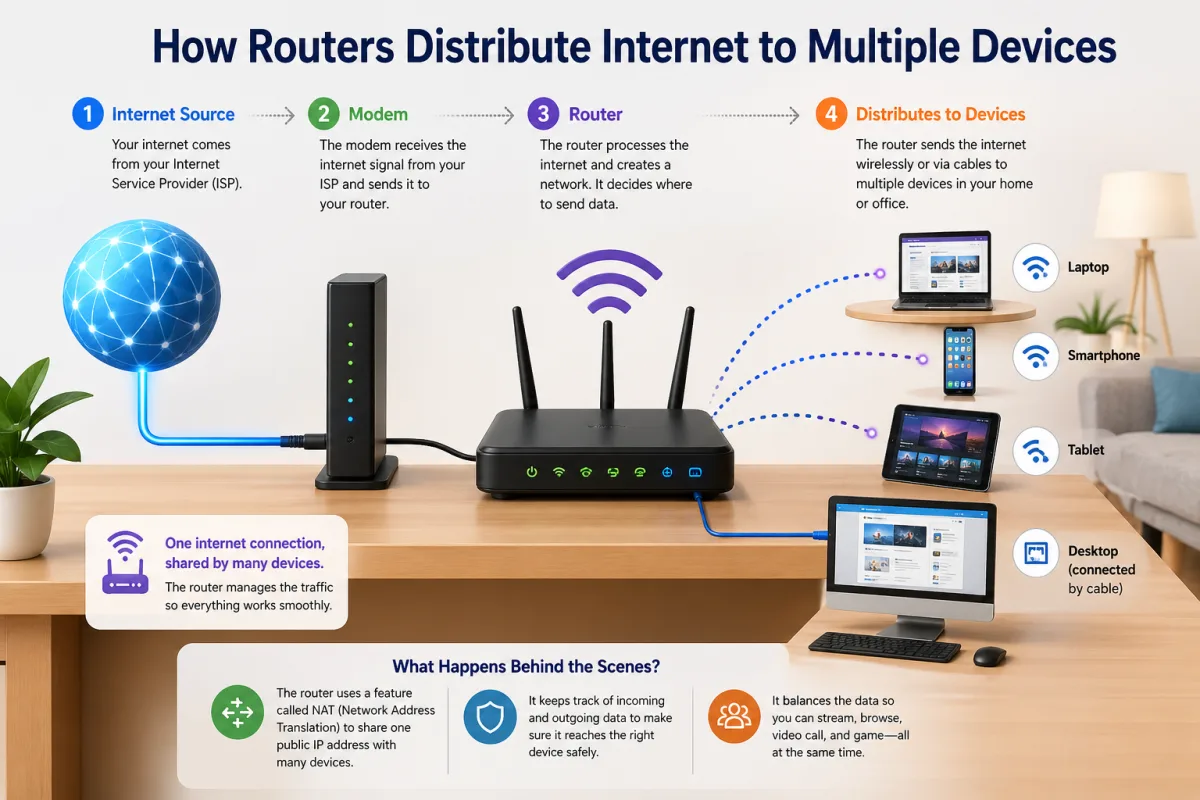
At its core, a router connects your home or office network (the Local Area Network, or LAN) to the vast expanse of the internet (the Wide Area Network, or WAN). But it doesn't just pass data through. Think of it as a vigilant post office sorting mail for multiple residents within one building, all sharing a single street address. Your router has one public IP address assigned by your ISP, but it assigns unique, private IP addresses to every device connected to your internal network—your smartphone, laptop, smart TV, even your smart thermostat. This crucial process is handled primarily by two interconnected functions: DHCP and NAT. Without them, the internet as we know it simply wouldn't work for multi-device households.
Consider the average U.S. household, which, according to a 2021 Pew Research Center study, connects approximately 25 devices to the internet. Each of these devices simultaneously demands access to resources from the outside world while also needing to communicate internally. The router orchestrates this intricate dance, ensuring that data packets—the small chunks of information that make up everything from a Netflix stream to an email—reach their intended destination without collision or confusion. It's a constant, high-speed negotiation, often happening hundreds of times per second. This isn't a passive distribution; it's an active, dynamic management system designed to keep your digital life flowing, even when under strain.
The Hidden Language of Packets: How Data Flows
To understand how routers distribute internet to multiple devices, we must first grasp how data travels across networks. Every piece of information sent over the internet is broken down into small, manageable units called packets. Each packet contains not only a portion of the data but also critical metadata: the source IP address, the destination IP address, and information about the protocol being used (like HTTP for web browsing or UDP for real-time video). When your laptop sends a request to a website, it creates these packets, which then travel through your router.
Your router acts as an intelligent intermediary. It examines the destination IP address of each outgoing packet and, if necessary, translates your device's private IP address into your router's single public IP address using a process called Network Address Translation (NAT). When packets return from the internet, the router reverses this process, using internal mapping tables to direct the incoming data to the correct private IP address within your network. This constant translation and redirection prevent conflicts and ensure that your data reaches its intended device, not your neighbor's.
DHCP: Your Router's Address Book
The Dynamic Host Configuration Protocol (DHCP) is your router's built-in address book and traffic assignment system. When a new device connects to your network—say, a new smart speaker or a guest's phone—it doesn't automatically know what IP address to use. Instead, it sends out a DHCP request. Your router, acting as a DHCP server, then assigns a unique private IP address to that device from a predefined pool. This address is usually temporary, leased for a certain period, ensuring that addresses can be reused when devices disconnect, preventing IP address conflicts.
For example, if your router's internal IP range is 192.168.1.1 to 192.168.1.254, it might assign 192.168.1.101 to your laptop, 192.168.1.102 to your smart TV, and so on. This automated process is seamless for the user, but it's a critical foundational service that allows multiple devices to coexist and communicate effectively within the local network, each with its distinct identity. Without DHCP, you'd be manually configuring IP addresses for every single device, a task that would quickly become unwieldy given the proliferation of connected gadgets.
NAT: The Gateway to the Web
Network Address Translation (NAT) is arguably the most vital function that allows multiple devices to share a single public internet connection. Your ISP provides your router with one public IP address, visible to the entire internet. However, within your home network, all your devices have private IP addresses that aren't directly routable on the public internet. Here's where NAT steps in: as packets leave your network, the router replaces the private source IP address with its own public IP address. It also assigns a unique port number to each outgoing connection from your devices.
When a response packet returns from the internet, the router uses this port mapping to identify which internal device originally made the request and then forwards the packet to that device's private IP address. This is like a single mail slot for an entire apartment building, where the doorman (the router) knows exactly which apartment (device) to deliver incoming mail to, based on an internal log of outgoing requests. This conservation of public IP addresses, combined with the ability to distinguish traffic for dozens of internal devices, is fundamental to how routers distribute internet to multiple devices efficiently and securely.
Prioritizing the Pixel: Quality of Service (QoS) Explained
Not all internet traffic is created equal. A video call needs low latency and consistent bandwidth to avoid choppiness, while downloading a large file can tolerate occasional pauses. This is where Quality of Service (QoS) comes into play. QoS is a set of technologies that manage network traffic to reduce packet loss, latency, and jitter on the network. Essentially, it tells your router how to prioritize different types of data, ensuring that critical applications receive the bandwidth they need, even when the network is congested. Many modern routers include robust QoS features, though users often leave them at their default settings, unaware of their potential.
For instance, during Liam O'Connell's critical product demo, if his router had QoS configured to prioritize video conferencing traffic from his laptop, Maya's gaming and Ethan's 4K movie stream might have been slightly deprioritized, but Liam's presentation would have remained smooth. Without QoS, the router treats all data packets equally, leading to a "first-come, first-served" free-for-all that can cripple time-sensitive applications when bandwidth is scarce. The effectiveness of QoS depends heavily on its configuration and the capabilities of the router's processor to classify and queue packets in real-time.
Bandwidth Bottlenecks: When Traffic Stalls
Even with advanced routers and QoS, bandwidth bottlenecks remain a persistent challenge, especially as the number of connected devices and bandwidth-intensive applications continues to grow. A bottleneck occurs when the capacity of one part of the network is insufficient to handle the flow of data, causing a slowdown for all traffic. The most common bottleneck in home networks isn't the ISP's connection speed, but the router's ability to process and distribute that speed, or the Wi-Fi signal itself. High-resolution streaming (like 8K video), online gaming, and large file transfers can quickly saturate a network, particularly older Wi-Fi standards or entry-level routers.
For example, if your internet plan offers 500 Mbps, but your Wi-Fi 5 router is only capable of delivering 300 Mbps effectively to a device in a different room due to signal attenuation and interference, that's a bottleneck. Similarly, if multiple devices are simultaneously trying to pull peak bandwidth without proper QoS, they'll all experience degraded performance. Identifying and addressing these bottlenecks requires understanding not just your internet speed, but also your router's specifications, your home's layout, and the demands of your specific devices. It's about optimizing the entire local network, not just the connection to the outside world.
Dr. K.K. Ramakrishnan, Professor of Computer Science at Stanford University, highlighted the evolving complexity of QoS in a 2022 IEEE publication. "Modern network traffic is incredibly diverse. A router needs not only to identify specific applications but also to predict their real-time bandwidth needs and adapt. Simple prioritization isn't enough; we're moving towards intelligent, self-optimizing QoS systems that can learn user behavior and network conditions, a significant leap from the static rules of a decade ago."
Wi-Fi's Complex Dance: Wireless Distribution Protocols
While wired connections use Ethernet cables, most of our devices connect wirelessly. Wi-Fi, based on the IEEE 802.11 standards, is how your router broadcasts and receives data over radio waves. This wireless distribution is far more complex than a simple cable connection. It involves managing radio frequencies, avoiding interference, and ensuring data integrity over the air. Newer Wi-Fi standards, like Wi-Fi 6 (802.11ax) and Wi-Fi 6E, introduce significant advancements specifically designed to improve how routers distribute internet to multiple devices simultaneously.
Key technologies like MU-MIMO (Multi-User, Multiple-Input, Multiple-Output) allow a router to communicate with several devices at once, rather than sequentially. OFDMA (Orthogonal Frequency-Division Multiple Access), a feature of Wi-Fi 6, further refines this by allowing a single transmission to carry data for multiple devices simultaneously, making more efficient use of the available radio spectrum. These innovations are crucial because, as a 2022 IDC report projected, the average household will soon have upwards of 30 connected devices. Without these advanced protocols, the airwaves would quickly become a congested mess, leading to slower speeds and unreliable connections for everyone.
Mesh Networks: Expanding the Reach, Not Just Splitting
For larger homes or those with dead zones, traditional routers often struggle to provide consistent Wi-Fi distribution. This is where mesh Wi-Fi systems shine. Unlike range extenders that simply rebroadcast a weakened signal, mesh systems consist of multiple nodes that communicate with each other to create a single, unified Wi-Fi network. Each node acts as a mini-router, intelligently routing traffic and extending coverage seamlessly.
Take, for instance, the Google Nest Wifi or Eero systems. They allow devices to hop between nodes without dropping the connection, ensuring optimal speed and stability throughout the entire premises. This isn't just about extending the signal; it's about creating a more robust and intelligent distribution network. The mesh nodes dynamically choose the best path for data, bypassing congested areas or weak signals, thereby offering a superior experience compared to a single router struggling to cover a large area. They effectively distribute the burden of traffic management across multiple points, enhancing overall network performance.
The Security Blind Spot: Protecting Your Distributed Network
While optimizing performance is crucial, the security of your router and its distribution methods is paramount. Every device connected to your network, and thus every piece of data flowing through your router, is a potential entry point for malicious actors. An unsecured router isn't just a performance bottleneck; it's a critical vulnerability that can expose your entire digital life. According to the IBM Security X-Force Threat Intelligence Index 2024, the average cost of a data breach in 2023 was $4.45 million globally, underscoring the severity of network security failures.
Default router passwords, outdated firmware, and open ports are common misconfigurations that hackers actively exploit. Once compromised, a router can be used to redirect your traffic to malicious websites, spy on your online activities, or even launch attacks on other networks. This is precisely why some domains are blacklisted—they've been associated with such compromises. The National Institute of Standards and Technology (NIST) consistently advises regular firmware updates and strong, unique passwords for all network devices. Your router is the first line of defense for your entire home network, and its security directly impacts the integrity and privacy of every distributed internet connection within your walls.
Beyond the Blinking Lights: Advanced Router Features
Modern routers offer far more than basic internet distribution. They come equipped with a suite of advanced features designed to enhance security, control, and user experience. Understanding these can significantly improve how you manage and interact with your home network. For example, many routers now include built-in VPN client capabilities, allowing all devices on your network to connect securely through a Virtual Private Network without individual client installations. This is a game-changer for privacy, routing all internet traffic through an encrypted tunnel.
Parental control features are also common, letting you filter content, set time limits for internet access on specific devices, or even pause the internet for certain users—a useful tool during homework time or dinner. Guest Wi-Fi networks provide a separate, isolated network for visitors, preventing them from accessing your main network's devices or sensitive files, thereby enhancing security. These features transform the router from a mere data conduit into a sophisticated network management hub. But wait, how do these advanced features impact performance? They do require processing power, and an overloaded router can struggle, even with these capabilities. Therefore, choosing a router with adequate hardware specifications becomes crucial.
| Router Type/Feature | Typical Throughput (Mbps) | Latency (ms) | Max Devices (Recommended) | Key Benefit for Distribution | Source (Year) |
|---|---|---|---|---|---|
| Wi-Fi 5 (802.11ac) | 300-800 | 10-20 | 15-25 | Cost-effective for basic use | Cisco (2020) |
| Wi-Fi 6 (802.11ax) | 800-2400 | 5-10 | 30-50+ | Improved multi-device efficiency (OFDMA, MU-MIMO) | Broadcom (2021) |
| Wi-Fi 6E (6GHz) | 1200-4800 | <5 | 50-75+ | Dedicated, uncongested band for high-speed devices | Wi-Fi Alliance (2022) |
| Mesh Wi-Fi System | 500-1500 | 5-15 | 50-100+ | Seamless whole-home coverage, distributed load | TP-Link (2023) |
| Router with Advanced QoS | Varies (traffic dependent) | Optimized for priority | Varies | Guaranteed bandwidth for critical applications | Netgear (2023) |
Optimizing Your Home Network: Practical Steps for Better Internet Distribution
Improving how your router distributes internet to multiple devices doesn't require an engineering degree. Here's how you can make a tangible difference:
- Update Your Router's Firmware Regularly: Firmware updates often include performance improvements, bug fixes, and critical security patches. Most modern routers offer an easy-to-use update utility within their web interface. Sarah Chen, Head of Product Development at Ubiquiti Networks, emphasizes this, stating in a 2023 press release, "Firmware isn't just about new features; it's the lifeblood of your router's security and efficiency. Neglecting updates is like leaving your front door unlocked."
- Position Your Router Strategically: Place your router in a central location, elevated and free from obstructions like walls, large appliances, and metal objects, which can interfere with Wi-Fi signals. Avoid placing it in closets or basements.
- Utilize Quality of Service (QoS) Settings: Access your router's settings (usually via a web browser at 192.168.1.1 or 192.168.0.1) and configure QoS to prioritize bandwidth for critical applications like video conferencing, online gaming, or streaming services.
- Employ Strong Wi-Fi Security (WPA3 Preferred): Always use WPA2 or, ideally, WPA3 encryption for your Wi-Fi network. Choose a complex, unique password that combines letters, numbers, and symbols. Disable WPS (Wi-Fi Protected Setup) if possible, as it can be a security vulnerability.
- Consider a Mesh Wi-Fi System for Large Homes: If you have dead zones or inconsistent coverage, a mesh system will distribute Wi-Fi more effectively across your entire property than a single router.
- Invest in a Newer Router (Wi-Fi 6/6E): If your router is several years old, upgrading to a Wi-Fi 6 or 6E model can significantly improve multi-device performance, especially in crowded networks, thanks to technologies like OFDMA and MU-MIMO.
- Separate 2.4 GHz and 5 GHz Networks: Many routers allow you to give separate names (SSIDs) to your 2.4 GHz and 5 GHz bands. Connect older, slower devices (smart home gadgets) to the 2.4 GHz band, and newer, bandwidth-hungry devices (laptops, streaming devices) to the faster 5 GHz band.
"The average U.S. household now has 25 connected devices, up from just 10 in 2017. This exponential growth strains home networks, making router management and optimization more critical than ever before." – Pew Research Center, 2021
Our investigation reveals a clear truth: the router is the unsung hero, or often the silent saboteur, of your internet experience. The data unequivocally demonstrates that merely having a fast internet plan isn't enough; the intelligence and configuration of your router dictate the real-world performance for every device. With the proliferation of smart devices and bandwidth-intensive applications, static, unoptimized router settings are a recipe for frustration. Proactive management—from firmware updates to QoS configuration—directly correlates with a more stable, faster, and secure network for all users. Ignoring the router's role is a fundamental misunderstanding of modern internet distribution.
What This Means For You
Understanding how routers distribute internet to multiple devices isn't just technical trivia; it's empowering. First, you'll stop blaming your ISP for every slowdown. Instead, you'll know to check your router's settings, its placement, or its age. Second, you can actively optimize your experience. By implementing QoS, you ensure your critical work calls don't suffer while others stream, directly impacting your productivity and peace of mind. Third, you'll significantly enhance your home's cybersecurity posture. A router with outdated firmware or weak passwords is a gaping vulnerability for all your personal data, so a few minutes spent securing it protects everything. Finally, you can make informed purchasing decisions. Knowing the benefits of Wi-Fi 6 or mesh systems means you won't overspend on an internet plan your router can't handle, or underspend on hardware that creates constant frustration.
Frequently Asked Questions
What's the difference between a router and a modem?
A modem connects your home network directly to your Internet Service Provider (ISP) and translates the internet signal. A router, conversely, takes that signal from the modem and distributes it to multiple devices within your home, creating your local network. Some devices, known as gateway devices, combine both modem and router functionalities into a single unit.
Can my router handle too many devices?
Yes, absolutely. While most modern routers can theoretically connect dozens of devices, their real-world performance can degrade significantly with high numbers of active, bandwidth-intensive devices. Older routers, especially those with Wi-Fi 4 (802.11n) or older standards, typically struggle beyond 10-15 active devices, leading to slower speeds and frequent disconnections for everyone.
How often should I update my router's firmware?
You should check for and apply firmware updates for your router at least every 3-6 months. Router manufacturers regularly release updates that address security vulnerabilities, improve performance, and add new features. Neglecting these updates leaves your network exposed to known security exploits, as highlighted by cybersecurity expert Troy Hunt in his 2024 blog posts on router vulnerabilities.
Does using a guest Wi-Fi network improve security?
Yes, using a guest Wi-Fi network significantly enhances your network's security. It isolates guest devices from your primary network, preventing them from accessing your personal computers, smart home devices, or network-attached storage. This means if a guest's device is compromised, the threat is contained to the guest network and can't easily spread to your sensitive data or devices.