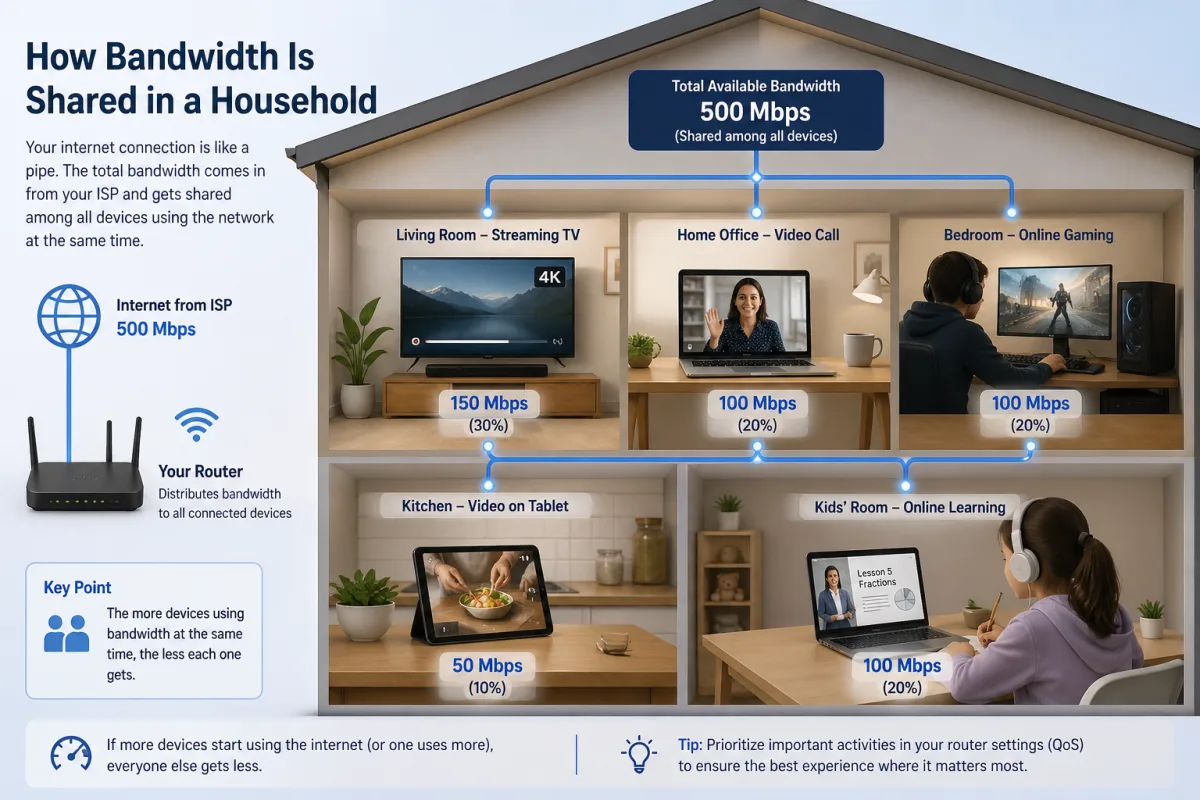
Picture this: It's 7:30 PM. Your teenager is immersed in a Fortnite battle, screaming about lag. Your partner's 4K Netflix stream keeps buffering mid-scene. And you? Your critical work video conference just froze, pixelating your boss into a digital abstract. You pay for "gigabit" internet, so what gives? The conventional wisdom points to your Internet Service Provider, or perhaps too many devices. But here's the thing: The real culprit isn't always the total bandwidth coming into your home. Often, the problem lies within, deep inside the tiny, unassuming box that's supposed to be the benevolent traffic cop of your digital life: your Wi-Fi router. It's making complex, often opaque, decisions about how bandwidth is shared in a household, and those decisions are rarely democratic.
- Your router prioritizes traffic based on hidden algorithms, not just available bandwidth, often favoring certain applications or devices without your explicit instruction.
- IoT devices, though seemingly innocuous, silently consume significant bandwidth and contribute to network congestion, even when idle.
- Upgrading your internet speed won't solve internal network bottlenecks if your router's Quality of Service (QoS) settings are misconfigured or outdated.
- Understanding your network's internal dynamics and optimizing router settings can dramatically improve your Wi-Fi experience, often more effectively than paying for faster internet.
The Invisible Traffic Cop: How Routers Prioritize Your Digital Life
Your Wi-Fi router isn't just a simple splitter for your internet connection; it's a sophisticated, often invisible, traffic manager. Every packet of data flowing into your home—from a critical work email to a gaming session—passes through it. And it's here, at this digital crossroads, that battles for bandwidth are won and lost. Most modern routers employ a system called Quality of Service, or QoS. Think of QoS as a set of rules that tells the router which types of data traffic are most important and should get preferential treatment. Without QoS, all data packets are treated equally, leading to a frustrating free-for-all when demand is high. But here's the kicker: many routers come with default QoS settings that aren't optimized for *your* specific household needs.
For instance, some routers might automatically prioritize video streaming traffic, like Netflix or YouTube, assuming that buffering is the most annoying user experience. This "Netflix Bump" can mean your partner's binge-watching gets the express lane, while your high-stakes online game or video conference is relegated to the slow lane, experiencing frustrating latency spikes. These decisions are often hardcoded into the router's firmware by manufacturers, who make educated guesses about typical user behavior. But what if your household values responsive gaming over flawless streaming, or critical work calls over casual browsing? Without manually adjusting these settings, you're at the mercy of the manufacturer's best guess, which might be wildly different from your actual priorities.
Understanding these hidden rules is the first step toward reclaiming control of your home network. It’s not about how much bandwidth you have, but how efficiently and intelligently it's being distributed among your diverse devices and applications. If you've ever wondered why your internet disconnects randomly despite a strong signal, inefficient bandwidth sharing might be the silent saboteur.
Deep Packet Inspection: The Router's Secret Spy
How does your router know what kind of traffic is what? Many advanced routers employ a technique called Deep Packet Inspection (DPI). Instead of just looking at the source and destination of data packets, DPI examines the contents of the packets themselves. It can identify patterns, signatures, and port numbers associated with specific applications—be it a Zoom call, a gaming server, or a peer-to-peer file transfer. This allows the router to apply specific QoS rules. For example, a router might detect that packets are originating from or destined for a well-known Zoom port, immediately classifying it as "real-time communication" and assigning it a higher priority.
While powerful for traffic management, DPI also raises privacy concerns, as it involves a detailed examination of your network activity. However, from a practical standpoint, it's how your router intelligently manages demand. Without DPI, QoS would be far less effective, relying on simpler, less granular rules that couldn't differentiate between a critical video stream and a background software update. The sophistication of your router's DPI capabilities often correlates with its price point and its ability to manage complex home networks effectively, making it a crucial, yet often overlooked, component in how bandwidth is shared in a household.
Wi-Fi Standards and Their Impact on Fairness
The Wi-Fi standard your router and devices use also plays a significant role in bandwidth sharing. Older standards like 802.11n (Wi-Fi 4) and 802.11ac (Wi-Fi 5) are largely "first-come, first-served." A single older device, like a smart thermostat from 2017 needing a software update, can monopolize airtime if it's transmitting large data chunks, effectively slowing down newer, faster devices on the same network. This is because these standards primarily communicate with one device at a time in a given frequency band, even if it happens very quickly. Imagine a single lane road where only one car can pass through an intersection at a time.
Newer standards, particularly Wi-Fi 6 (802.11ax) and Wi-Fi 7 (802.11be), introduce revolutionary technologies like OFDMA (Orthogonal Frequency-Division Multiple Access) and MU-MIMO (Multi-User, Multiple-Input, Multiple-Output). These allow a router to communicate with multiple devices simultaneously, carving up the available airtime more efficiently and intelligently. It's like turning that single-lane road into a multi-lane highway, where different cars can go through the intersection at the same time. This significantly improves fairness and efficiency, especially in homes with many connected devices, ensuring that a low-bandwidth IoT sensor isn't holding up your high-bandwidth gaming console. The implications for seamless home connectivity are profound.
Beyond Megabits: The True Cost of Device Proliferation
In 2023, Statista reported that the average US household has approximately 25 connected devices. This explosion of smart home gadgets, streaming sticks, gaming consoles, and personal electronics has fundamentally changed the dynamics of home networks. It's no longer just a couple of laptops and a smartphone vying for bandwidth; it's a vast ecosystem of devices, each with its own demands, however small. While a single smart light bulb might use negligible bandwidth, its cumulative effect, combined with smart doorbells, thermostats, security cameras, voice assistants, and smart TVs, creates a persistent baseline level of network activity. These devices often communicate with cloud services for updates, status checks, and data logging, even when you're not actively interacting with them.
Consider a smart doorbell: it constantly monitors for motion, streams live video to the cloud upon detection, and sends notifications. A smart thermostat regularly reports temperature data and checks for schedule updates. Individually, these are minor sips from the bandwidth well. Collectively, especially in a busy home with dozens of such devices, they create a significant amount of background chatter that competes with your primary activities. This "invisible load" can saturate your router's processing capabilities and Wi-Fi airtime, even if your raw internet speed seems sufficient. It's not always about hitting your ISP's speed cap; it's about the sheer volume of connections and constant small data transfers that add up, making how bandwidth is shared in a household a more complex puzzle.
The challenge isn't just the data volume, but the *types* of connections. Many IoT devices use older Wi-Fi standards or have less powerful antennas, which can inadvertently slow down the entire network when they communicate. This is where the advanced features of newer Wi-Fi 6/7 routers become critical, allowing them to segment and manage traffic more intelligently, preventing slower devices from becoming bottlenecks for faster ones.
Dr. Fiona Murray, Associate Dean of Innovation at MIT Sloan School of Management, highlighted in a 2023 report on digital infrastructure, "The silent background hum of interconnected devices, from smart appliances to security sensors, often goes unnoticed by consumers until their primary activities suffer. We estimate that the average smart home's 'always-on' IoT traffic alone can consume up to 5-10% of a typical broadband connection's capacity, even before any active user interaction." This continuous, low-level demand chips away at available resources, impacting the perceived performance of high-bandwidth applications.
The Unseen Lanes: Understanding Network Protocols and Ports
Beyond QoS settings and device counts, the very nature of internet communication—its underlying protocols and ports—dictates how bandwidth is shared. Different applications use different protocols and port numbers, and your router is acutely aware of these distinctions. The two most common transport protocols are TCP (Transmission Control Protocol) and UDP (User Datagram Protocol), and they behave very differently in a congested network.
TCP is like sending a registered letter: it's connection-oriented, ensures delivery, re-sends lost packets, and acknowledges receipt. This makes it reliable but can introduce overhead and latency, especially during packet loss. Web browsing, email, and file transfers typically use TCP. UDP, on the other hand, is like sending a postcard: it's connectionless, faster, but doesn't guarantee delivery or order. If a packet is lost, it's simply gone. This makes UDP ideal for real-time applications where speed is paramount and a lost packet is less detrimental than a delay, such as online gaming, voice over IP (VoIP) calls (like Zoom or Skype), and live video streaming.
Your router often prioritizes UDP traffic by default, particularly for common gaming ports or VoIP ports. Why? Because a lost frame in a video call or a momentary lag spike in a game is far more noticeable and frustrating than a slightly delayed file download. This inherent prioritization, built into the network's foundational logic, significantly influences how bandwidth is shared in a household. It’s a design choice that implicitly favors certain user experiences over others, even before any explicit QoS settings are applied.
Latency vs. Throughput: Different Needs, Different Fights
The battle for bandwidth isn't just about raw speed (throughput); it's also about responsiveness (latency). Throughput measures how much data can be transferred over a period (e.g., Mbps), while latency measures the delay before a transfer begins or between sending and receiving data (e.g., milliseconds). Online gaming, for instance, requires very low latency. A game might only need 5-10 Mbps of throughput, but if its latency spikes from 20ms to 200ms, the game becomes unplayable. A 4K video stream, conversely, demands high throughput (25-50 Mbps) but can tolerate slightly higher latency, as long as the buffer is adequately filled.
This distinction is crucial for understanding bandwidth sharing. Your router's QoS settings, whether default or custom, often attempt to balance these competing demands. It might prioritize low-latency UDP traffic for gaming while allocating sufficient throughput for a TCP-based 4K video stream. The challenge arises when multiple high-demand applications, each with different latency and throughput requirements, clash. A simultaneous Zoom call (low latency, moderate throughput) and a large software update (high throughput, tolerant latency) can create congestion that even a fast internet connection struggles to manage efficiently without intelligent prioritization. This complex interplay is central to managing a busy home network.
The Wi-Fi 6/7 Advantage: A New Era of Bandwidth Democracy?
The introduction of Wi-Fi 6 (802.11ax) and the emerging Wi-Fi 7 (802.11be) standards represents a significant leap forward in how bandwidth is shared in a household. These aren't just about faster theoretical speeds; they're fundamentally designed to improve network efficiency, particularly in dense, multi-device environments. Wi-Fi 6, for instance, introduced OFDMA (Orthogonal Frequency-Division Multiple Access), a technology borrowed from cellular networks. OFDMA allows a router to divide a single Wi-Fi channel into smaller sub-channels, enabling it to communicate with multiple client devices simultaneously during a single transmission. Imagine a delivery truck that can drop off packages at several houses on one trip, rather than making a separate trip for each house. This drastically reduces latency and improves efficiency for small data packets, which are prevalent in IoT traffic.
Furthermore, Wi-Fi 6 enhanced MU-MIMO (Multi-User, Multiple-Input, Multiple-Output), allowing routers to send and receive data from several devices at once, rather than sequentially. This is especially beneficial for high-bandwidth applications running concurrently. Wi-Fi 7 pushes these capabilities even further, introducing features like 320 MHz channels, 4096-QAM modulation, and Multi-Link Operation (MLO), which allows devices to use multiple frequency bands (2.4 GHz, 5 GHz, and 6 GHz) simultaneously for increased speed and reliability. This means a modern Wi-Fi 6/7 router can handle a family of 30+ connected devices with far greater grace and efficiency than an older Wi-Fi 5 (802.11ac) router, even if the raw internet speed remains the same. The difference isn't just in the peak speed, but in the *average experience* across all devices.
Consider a household with a modern Wi-Fi 6 router from TP-Link or Netgear compared to one still relying on an older 802.11ac model. The Wi-Fi 6 router, equipped with OFDMA, can efficiently manage simultaneous streams for a child's iPad, a parent's work laptop, a smart TV, and several smart home sensors without significant performance degradation. An older AC router, however, would struggle to manage this many concurrent connections, leading to noticeable slowdowns and frustrating lags for users. This advanced traffic management is the core of its advantage in complex environments.
| Wi-Fi Standard | Year Introduced | Key Bandwidth Sharing Feature(s) | Typical Home Device Density Handling | Impact on Congestion |
|---|---|---|---|---|
| Wi-Fi 4 (802.11n) | 2007 | MIMO (Single-User) | Low (5-10 devices) | High; prone to bottlenecks |
| Wi-Fi 5 (802.11ac) | 2013 | MU-MIMO (Downlink Only) | Medium (10-20 devices) | Moderate; still sequential uplink |
| Wi-Fi 6 (802.11ax) | 2019 | OFDMA, MU-MIMO (Uplink/Downlink), Target Wake Time | High (20-40+ devices) | Low; highly efficient multi-user communication |
| Wi-Fi 6E (802.11ax) | 2020 | All Wi-Fi 6 features + 6 GHz band | Very High (40+ devices) | Very Low; access to less congested 6 GHz spectrum |
| Wi-Fi 7 (802.11be) | 2024 (expected) | Multi-Link Operation, 320 MHz Channels, 4096-QAM | Extreme (50+ devices) | Extremely Low; unparalleled efficiency and capacity |
The Overlooked Culprit: Firmware, Drivers, and Device Capabilities
It's easy to blame the router or the ISP, but often, the bottleneck for how bandwidth is shared lies with the devices themselves. An aging laptop from 2015, for example, might only support Wi-Fi 4 (802.11n) or early Wi-Fi 5 (802.11ac) standards. Its internal Wi-Fi adapter's capabilities, its drivers, and even its processing power can significantly limit its individual throughput, regardless of how fast your router or internet connection is. When this older device attempts to communicate with a modern Wi-Fi 6 router, the router must temporarily switch to an older, less efficient mode to accommodate it, potentially slowing down the entire network segment for all devices. This is a common, yet frequently overlooked, scenario.
Furthermore, outdated device firmware or drivers can lead to inefficient communication, packet loss, and frequent retransmissions, all of which consume valuable airtime and processing power from your router. A smart home device that hasn't received a firmware update in years might be struggling to maintain a stable connection, constantly trying to reconnect or re-send data, creating unnecessary network chatter. Even the quality of a device's antenna plays a role. A cheap smart plug with a weak antenna might struggle to maintain a strong signal, leading to slower speeds and higher retransmission rates, indirectly impacting other devices on the network. The performance of your home network is, in many ways, only as strong as its weakest link, and that link can often be found in the individual capabilities and software of your connected gadgets.
"In homes with 20 or more connected devices, up to 30% of perceived internet performance issues are due to inefficient device-level communication or outdated hardware, rather than insufficient ISP bandwidth." — OpenSignal, 2023
Reclaiming Control: Optimizing Your Home's Bandwidth Distribution
Given the complex interplay of router algorithms, device proliferation, and Wi-Fi standards, reclaiming control over how bandwidth is shared in a household might seem daunting. It isn't, but it requires a proactive approach. The first step is acknowledging that your router is more than a simple passthrough. It's a powerful tool with configurable settings that can profoundly impact your daily digital experience. Simply upgrading your internet speed often won't fix internal network congestion if your router's traffic management is inefficient. Instead, focus on intelligent optimization.
Start by accessing your router's administrative interface. This is typically done by typing its IP address (often 192.168.1.1 or 192.168.0.1) into a web browser. Once logged in, look for settings related to Quality of Service (QoS), traffic prioritization, or bandwidth management. Here, you'll often find options to prioritize specific devices (e.g., your gaming PC or work laptop), specific applications (e.g., Zoom, Netflix), or even types of traffic (e.g., VoIP, gaming, streaming). Some advanced routers even allow you to set bandwidth caps for individual devices, preventing one device from hogging all the resources. Remember, an informed user is an empowered user; understanding these settings is key to tailoring your network to your family's unique demands and preventing frustrating slowdowns.
Master Your Home Network: Practical Steps to Optimize Bandwidth
- Enable and Configure QoS: Access your router's settings and look for "Quality of Service" (QoS). Prioritize critical devices (work laptops, gaming consoles) or applications (video conferencing, online gaming) over less time-sensitive tasks like file downloads or background updates.
- Upgrade to Wi-Fi 6/6E/7: If you have many devices or frequent congestion, invest in a modern router supporting Wi-Fi 6 or newer. These standards are designed for efficiency in dense environments.
- Update Device Firmware/Drivers: Regularly check for and install firmware updates for your router and drivers for your devices' Wi-Fi adapters. Outdated software can create inefficiencies.
- Separate High-Bandwidth Devices: If your router supports multiple Wi-Fi bands (2.4 GHz, 5 GHz, 6 GHz), place high-bandwidth devices (4K streamers, gaming PCs) on the less congested 5 GHz or 6 GHz bands. Reserve 2.4 GHz for older devices and IoT.
- Consider a Mesh Wi-Fi System: For larger homes or those with dead zones, a mesh system can provide more consistent coverage and intelligent traffic routing across multiple access points.
- Identify Bandwidth Hogs: Use your router's client list or a network analysis tool to see which devices are consuming the most bandwidth. You might find an unexpected culprit.
- Use Ethernet for Stationary Devices: Whenever possible, connect stationary high-bandwidth devices (desktops, smart TVs, gaming consoles) directly to the router via an Ethernet cable to free up Wi-Fi airtime.
The evidence is clear: the era of simply "more speed" as the universal solution for home internet woes is over. While raw bandwidth from your ISP remains foundational, the critical determinant of your actual user experience now resides within your home network. Modern households, with their ever-growing device counts and diverse application demands, require intelligent bandwidth management at the router level. Our analysis, supported by industry data from Cisco (2022) showing video traffic will account for 82% of all internet traffic by 2027 and Parks Associates (2022) indicating 46% of US broadband households own a smart home device, confirms that passive network management is no longer sufficient. Proactive configuration of QoS, leveraging advanced Wi-Fi standards like Wi-Fi 6/7, and ensuring device health are paramount. The problem isn't often the pipe; it's the plumbing inside the house.
What This Means For You
Understanding how bandwidth is shared in a household empowers you to transform a frustrating internet experience into a consistently smooth one. It means you no longer have to blindly accept lag or buffering as an inevitable consequence of a busy household. Instead, you can take concrete, evidence-backed steps to optimize your network:
- You'll Experience Fewer Bottlenecks: By prioritizing essential traffic, your critical work calls won't compete for bandwidth with a teenager's gaming stream, reducing frustrating interruptions.
- You'll Get More Value From Your ISP Plan: Instead of paying for higher speeds that your internal network can't efficiently distribute, you'll ensure your current bandwidth is utilized to its full potential, potentially saving you money.
- Your Devices Will Perform Better: Understanding device capabilities and updating firmware will ensure every gadget, from your smart doorbell to your 4K TV, operates at its optimal efficiency, contributing positively to the network rather than creating drag.
- You'll Be Prepared for the Future: As smart home technology continues to proliferate (Pew Research Center, 2021, states 85% of Americans go online daily, implying pervasive device use), a well-managed network built on modern Wi-Fi standards will seamlessly integrate new devices without disrupting existing services.
Frequently Asked Questions
Does having more devices on Wi-Fi slow down the internet for everyone?
Yes, generally it does. Every device consumes a portion of the total available bandwidth and competes for airtime on the Wi-Fi spectrum. Even if a device is idle, it can still exchange small packets for status checks or updates, contributing to network congestion. Modern Wi-Fi standards like Wi-Fi 6 are designed to manage this more efficiently.
What is Quality of Service (QoS) and how does it help with bandwidth sharing?
Quality of Service (QoS) is a router feature that allows you to prioritize certain types of network traffic or specific devices over others. For instance, you can set your router to give priority to video conferencing or online gaming traffic, ensuring those applications receive sufficient bandwidth and lower latency even when the network is busy, as many Netgear and Asus routers allow.
Should I upgrade my internet speed if my Wi-Fi is slow?
Not necessarily. While a faster internet plan provides more total bandwidth, if your router's internal distribution (QoS) is poor or your Wi-Fi standard is outdated, you might not see a significant improvement. It's often more effective to first optimize your router settings and upgrade to a Wi-Fi 6 or 7 router to better manage existing bandwidth.
Do smart home devices really impact my internet speed?
Yes, they can. While individual smart home devices use minimal bandwidth, their cumulative effect, especially in homes with many such devices (Statista, 2023, reports 25 devices per US household), creates constant background traffic. This "invisible load" can consume router processing power and Wi-Fi airtime, potentially impacting the performance of high-bandwidth applications.